 NewsletterNovember 2010Newsletter Editor: In This Issue:
Tip of the Day  Meeting information
Future Meetings: (subject to change)
Do not forget to bring your used ink cartridges. Minutes of the October 20th meetingBy Susan Prescott The Macintosh User Appreciation Group of Island County (MAGIC) met at 4 p.m. at the Deer Lagoon Grange Hall on Bayview Road on Wednesday, October 20, 2010. Approximately 28 people attended. The meeting began with a Q&A session coordinated by President Robert Elphick. Business meeting: the meeting was called to order about 5 p.m. by President Elphick. A collection hat was passed around for meeting dues at the suggested amount of $2 per person. Treasurer's Report: Treasurer Sue Keblusek reported the bank balance is $4,055.44, and all bills are paid. Fall classes: Education chair Tom Baxter reported the Essential Training and Beyond Basics class series are now complete and went well. Several satisfied attendees were present at the meeting. The next series will be scheduled in March or April 2011. The classes may extend to seven or eight weeks. The intermediate class was not as full, perhaps because it was held so far south. Tom reported that Lynda.com offers academic institutions a package of severals courses. He will explore the possibility of a Macintosh User Group (mug) like MAGIC might qualify so students can select from a several courses. 4-HD Club for youth: Robert says the new club 4-HD, with the Island County 4-H Club through Washington State University (WSU) Extension Service, is up and running with about six young people are signed up. Adjournment: The business meeting adjourned at 5:15 p.m. and Robert demonstrated how to use an iPad and iPod. Several members had iPads at the meeting. The program ended at 6 p.m. Note: Following a query about how to transfer LP records to digital files, Robert said he has a machine that transfers audio tape cassettes to digital. MAGIC Moments

by RYE, a self appointed wizard of the very best kind! Video and Documentary training with 4-HMAGIC and 4-H at the WSU Extension in Coupeville have formed a new club for youngsters (and the young at heart) to learn how to make movies and documentaries using iMovie and Final Cut Express and other Mac technologies. The club is called 4-HD Video Club. Five young people have already met and signed up and formal sessions began in October. In November and December we will be running classes on most Wednesdays at the Race Road fire Station. Let me know if you would like to attend. NEEDED: Macs. Have you got an unused Mac that the 4-HD club could use to make videos. We will provide a tax deduction certificate for the value of the Mac to the donor (We have 501(c)(3) status). We are especially interested in Intel macs, but all possibilites considered. Also backup hard drives. iLife upgradeMAGIC has obtained a copy of iLife '11 and installed it onto one of the group's computers for testing. It will be installed on the second computer in November. We obtained a 'family' version so that we could put the software on multiple computers. The original iPhoto that was part of iLife '11 had some problems updating the library from older versions but the upgrade to iPhoto '11 version 9.1 seems to have solved these problems. Make sure that you get this version with iLife '11 or get the upgrade before using it. See article below. Fall ClassesThe fall classes for Mac beginners has been successfully completed. Our thanks to Tom Baxter and his 'helpers' for making this another successful and a profitable enterprise. No more schools are planned for this year, but we will be running more in 2011. Please contact Tom with your suggestions for schools at For Sale and Wanted PageDo not forget to have a look at our Swap page from time to time where Apple items are listed for sale and also there is a list of wanted items. There are some good deals to be had. SOFTWARE UPDATES
Note: This Software Update section of the newsletter lists the most relevant Apple updates. Apple releases iPhoto '11 update for data loss issuesby Heather Kelly, Macworld.com Apple released an update for iPhoto '11, version 9.0.1, that addresses a data loss problem some users have experienced when upgrading from an older version of iPhoto to iPhoto '11. When you first open iPhoto '11, the application requires that you upgrade your existing iPhoto library to make it compatible with the new software. Some users have reported losing anywhere from a handful of images to entire libraries during this upgrade process. There have also been complaints of lost metadata and events. There are many similar problems posted in the Apple forums, but Apple says the issue is actually "extremely rare." The full iPhoto 9.0.1 update description reads, "This update addresses issues that, in extremely rare cases, could result in data loss when upgrading a library from an earlier version of iPhoto." Along with the update, Apple has posted a support document that acknowledges the data loss problem, and gives specific recommendations for avoiding it. In addition to installing 9.0.1, the support document recommends that that all iPhoto users backup their library before attempting the move to iPhoto '11. If iPhoto '11 unexpectedly quits, Apple warns against force quitting the application during subsequent attempts at upgrading. During the upgrade process, the program may appear to be inactive for extended periods of time. This delay is especially common with large libraries, but eventually a progress bar should appear. The upgrade is 35.4MB and can be downloaded through Software Update, or manually downloaded from the Apple site here. The full support document on the data loss issue is at This web page. Wizard's note: Version 9.1 is now out - get that one. Apple releases Safari updatesby Dan Moren, Macworld.com 
Apple on Thursday released a pair of firmware updates for the most recent version of its Mac Pro desktop machine, which include fixes for a few bugs. The Mac Pro EFI Firmware Update 1.5 is recommended for all users of the Mac Pro (Mid 2010); it includes two bug fixes, one that resolves an issue preventing the firmware password prompt from being displayed, and the other that smooths out incidents where the Boot Picker doesn't show up if the machine is on a Ethernet network without DHCP. The update is a 1.96MB file that requires Mac OS X 10.6.4. In addition, Apple also released the 22.5MB Firmware Restoration CD 1.9, which allows users to restore the firmware on the mid 2010 Mac Pro. Apple releases Safari updates
On Tuesday Apple issued minor updates to its Safari Web browser with "improvements to compatibility and security": Safari 5.0.2 for Leopard and Snow Leopard (OS X 10.5.8 or later) or Windows (XP, Vista, and 7) and Safari 4.1.2 for Tiger (OS X 10.4.11). Safari 5.0.2 address three areas: It fixes an issue that could prevent users from submitting Web forms; it fixes an issue that could cause Web content to display incorrectly when viewing a Google Image result with Flash 10.1 installed; and it establishes an encrypted, authenticated connection to the Safari Extensions Gallery. The Safari 4.1.2 update only addresses the Web form submission issue. You can download the updates via OS X's Software Update mechanism, and Apple has a page explaining the security content of the updates on its site now. And as usual, the Safari update require you to restart your computer when you're done installing it. Java for Mac OS X 10.5 Update 8
Java for Mac OS X 10.5 Update 8 delivers improved compatibility, security, and reliability by updating J2SE 5.0 to 1.5.0_26, and updating Java SE 6 to 1.6.0_22 for 64-bit capable Intel-based Macs. J2SE 1.4.2 is no longer being updated to fix bugs or security issues and remains disabled by default in this update. Please quit any web browsers and Java applications before installing this update. See this web page for more details about this update. See this web page for information about the security content of this update. Apple updates HP printer drivers for Snow Leopardby Philip Michaels, Macworld.com 
Snow Leopard users with hardware from Hewlett-Packard should beat a path to OS X's Software Update feature. On Thursday, Apple released HP Printer Drivers v.2.5.2 for Mac OS X v10.6. There's not a lot to this update, which promises anyone running Mac OS X 10.6.1 or later the latest HP printing and scanning software for Snow Leopard. Apple does provide a list of supported HP printer models at its support Website, though. Apple last released an update for HP printer drivers in June. Click here for complete article. Magic Trackpad and Multi-Touch Trackpad Update 1.0from apple.com About Magic Trackpad and Multi-Touch Trackpad Update 1.0 This update adds support to Mac OS X for the Magic Trackpad and is required for its use. It also enables inertial scrolling and the three-finger drag gesture in recent MacBook and MacBook Pro notebooks. Mac OS X 10.6.4 is required before installing this update. For more information about this update, please visit this website For additional information about the Magic Trackpad and Multi-Touch Trackpad please visit this website. Adobe warns of Shockwave bugby Robert McMillan, IDG News Service Adobe warned Thursday (10/22/2010) of a critical bug in its Shockwave Player that affects both Windows and Macintosh PCs. The bug, which was publicly disclosed Thursday, "could cause a crash and potentially allow an attacker to take control of the affected system," Adobe said in a message on its website. In its security advisory, Adobe said it considers the issue "critical," and is working on a patch for the flaw. The company isn't saying when that patch will ship, however. So far, there aren't any reports of attacks that leverage the bug, but this type of public disclosure of a serious bug is often a harbinger of future attacks. Adobe's Reader software has been a regular target for Web-based attacks over the past year, and while the Shockwave Player is used by about half as many people as Reader, it's probably good enough for many hackers. "Hundreds of millions of computers with Internet connectivity have Shockwave installed, so, this will obviously be an attractive target for attackers," security vendor Symantec said Thursday in an e-mailed statement. If attacks do become a problem, users can disable Shockwave in their Web browsers until a patch becomes available. The bug was found by Shahin Ramezany, a security researcher who said he released details of the problem to celebrate the fact that he now has 1,000 followers on Twitter. He had earlier promised to release an Adobe 0day when he crossed that threshold. Click here for complete article. News, Info and StoriesApple dumps Flash from Mac OS Xby Gregg Keizer, Computerworld Editor's Note: This story is excerpted from Computerworld. Apple will stop bundling Adobe's Flash with Mac OS X, the company confirmed Friday. The new MacBook Air, which debuted earlier in the week, is the first Flash-less system from Apple. Other systems will follow suit as the company clears out inventory of Mac desktops and notebooks that include Flash. Mac users will still be able to install Flash themselves, and Apple has done nothing to block Flash from running. "We're happy to continue to support Flash on the Mac, and the best way for users to always have the most up to date and secure version is to download it directly from Adobe," Apple spokesman Bill Evans said in reply to questions on Friday. The move also puts an end to Apple supplying Flash security updates to Mac OS X users as part of the operating system's patch process. Instead, users will have to know about, locate, download and install those fixes themselves. That's not smart, said Andrew Storms, director of security operations at nCircle Security. "What Apple is doing is separating themselves from the security community," said Storms, who didn't cotton to Apple's decision. "Users, who are likely running an outdated version, typically don't even know when Adobe issues patches." "I just don't see the upside of this. Apple's not helping out," Storms said. In the absence of Apple patching Flash, Adobe said Mac users were on their own for now. "Adobe recommends that users download the most up to date version of Adobe Flash Player from Adobe.com," a spokeswoman said. She urged Mac users to regularly monitor Adobe's security blog , which posts news of impending and available Flash updates, or subscribe to its RSS feed to stay atop fixes. Adobe plans to produce an auto-update notification feature in a future release of Flash Player for the Mac, but declined to set a release date. The feature would be similar to what's now offered to Windows users. People running Mozilla's Firefox or Google's Chrome will have an edge during the interim. Firefox, for example, includes a plug-in checker that detects out-of-date add-ons, including Flash Player, and provides a link to Adobe's download site. Chrome, meanwhile, automatically upgrades Flash Player in the background. While Evans made no mention of Apple's anti-Flash stance, Storms saw the decision as another example of the rocky relationship between Apple and Adobe over the technology. "Apple's trying to separate themselves even further from Flash," Storms said. "Microsoft doesn't update Flash either, but they seem more interested in working with vendors than Apple. Adobe is a good example." Microsoft and Adobe collaborate on security, Storms argued, pointing to the latter's July announcement to join the Microsoft Active Protections Program (MAPP), which gives select security companies early warning on upcoming patches. Adobe has also adopted a version of Microsoft's Software Development Lifecycle (SDL), a program designed to bake security awareness into products, and picked Microsoft developers' brains to create the "sandbox" technology, slated to show up in Reader next month. Storms, who in the past has criticized Apple for patching Flash months after the same fixes were available for Windows, wondered why the company singled out Adobe's software. "If they're going to say they're doing it so that users have the most up-to-date versions, then they should stop issuing patches for every other third-party application in Mac OS X," Storms said. Apple and Adobe have been at loggerheads over Flash ever since the former refused to allow the popular technology on its iPhone. The dispute has been heated this year, as the two companies traded blows over Flash content on Apple's iOS mobile operating system, with CEO Steve Jobs trashing Flash in an April public missive and the co-chairs of Adobe's board of directors accusing Apple of undermining the Web in mid-May. Click here for complete article. TopTen.plist #10: Stealth Announcements from Wednesday's Keynote (10/21/10)by Ben Bonaccio, Small Dog With the past several Apple Keynotes focusing entirely on mobile iOS oriented devices, it would be easy to accuse Apple of neglecting its Mac lineup. If there was any doubt in your mind, yesterday's announcements hopefully re-affirmed that the company is still keeping the Mac on the front burner. The amazing new MacBook Air stands to revolutionize Apple's entire notebook line, and Mac OS X Lion fuses the greatest successes of previous iterations of OS X and iOS. Though these two announcements alone would technically be enough to quell the insatiable demand for new Apple products through the holidays, Apple also announced an all-new version of its popular iLife software suite. However in all the update chaos that ensued post keynote, Mr. Jobs and Co. slyly released/hinted at ten additional items that flew under the radars of many. Here is a collection of some of the more subtle announcements from yesterday's media event. 10. The Air Flies Higher than 2GB: 9. Apple Releases a 1st Party HDMI Cable: 8. MacBook Air SuperDrive gets Souped-up: 7. iLife and iWork Break-up: 6. News Flash! No Flash!: 5. Snow Leopard on a Stick: 4. MacBook Pro Speed Bump: 3. iWeb and iDVD are the Black Sheep of iLife '11: 2. SD Card Reader a 13-in Exclusive: 1. Lion Isn't 10.7: Click here for complete article. Apple temporarily fixes FaceTime security vulnerabilityby Dan Moren, Macworld.com In the wake of privacy concerns, Apple has moved to fix its recently released FaceTime application for the Mac to block access to a potential security hole. 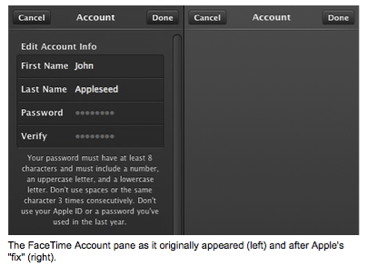
The flaw resided in the fact that anybody with access to the computer on which FaceTime was installed could change the password to the related Apple ID without knowing the current password. When launched, FaceTime automatically logs you into the associated account; from there, going to the app's Preferences pane, clicking on your account, and then clicking View Account would allow you to enter a new password and confirm it without ever having to enter the current password. While the FaceTime application itself has not been updated, Apple has blocked access to that account information—currently, clicking on the View Account link will take you to an empty page before bouncing you back to the previous page. Of course, this is hardly a permanent fix for the security hole, since presumably people will eventually want to access their account details from inside the app, but it should at least block any nefarious pranksters or snoopers in your home or your office for the time being. Click here for complete article. Security firms differ on severity of new Mac malware threatby Dan Moren, Macworld.com 
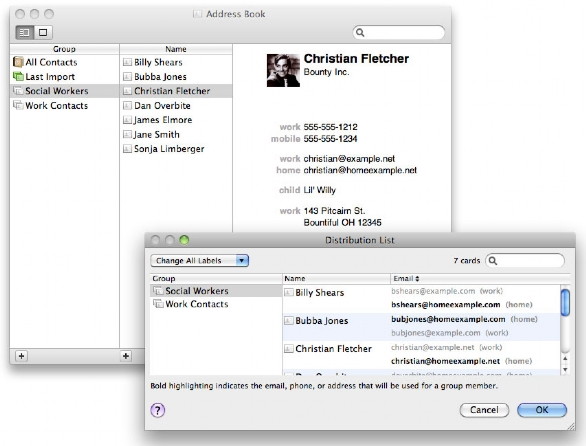
While a new piece of Mac malware is on the prowl, the threat it poses may be overblown, according to one security firm. Boonana is a Mac version of the Koobface worm, which itself is a maliciously crafted Java applet that infects users via messages on social networking services like Facebook, MySpace, and Twitter, as well as other sites. The messages often contain the subject line "Is this you in this video?" along with the infected link. While SecureMac contends that Boonana is a "Critical" risk, security firm Intego—which says it has been monitoring the malware for some time - deems it only a low-risk threat, due to the fact that the implementation of the malware program is itself flawed and many of the remote servers it seems to rely on are inactive. In addition, Mac users will be presented with a Java security alert the first time the applet attempts to run, at which point they can deny it access, preventing the Trojan horse from installing. (Also, clicking the Show Details button on the alert will display an untrusted digital certificate signed by PhotoAlbum.) While the order of the day is always to be careful about what links you click on, concerned Mac users can take further steps such as disabling Java in Safari's Preferences -> Security or using products such as Intego's VirusBarrier and SecureMac's MacScan that will help protect users or remove an infection. Click here for complete article. Five Fantastic Address Book tipsby Christopher Breen, Macworld.comTime-saving tips for a well used (but often ignored) application When you think of Apple's most intriguing applications, it's unlikely Address Book springs to mind. It offers anything but the sexiness of an iLife or iWork application. However, thanks to its close ties to Apple's Mail and iCal as well as your iOS devices, it's actually one of the applications you use the most. Make the time you spend with it more productive with these tips and tricks. 1. Prune addresses for your iPhone or iPad I've found it helpful to sync only those contacts that have both an e-mail address and phone number to my iPhone. To do that, open Address Book, choose File -> New Smart Group, and in the sheet that appears, create two conditions: Email Is Set and Phone Is Set. From the pop-up menu at the top of the sheet choose All so the rule says Contains Cards Which Match All Of The Following Conditions. Click OK to dismiss the sheet and create the group. You now have a smart group that contains just those contacts that have both an e-mail address and phone number. But you're not done yet, because you can't sync smart groups to iOS devices. Select all the contacts in the smart group. From the File menu choose New Group From Selection. This creates a standard (meaning, not smart) group from those contacts. In iTunes choose this new group you've created when you sync contacts to your iOS device. 2. Clean up your contacts 3. Use the right e-mail address at the right time Create a group that includes your work friends and call it something like Social Workers. Select that group and choose Edit -> Edit Distribution List. In the resulting Distribution List window you'll see the selected group and the name of each member in the group. The column header next to the list of members names should read Email (if it doesn't, click on the header and choose Email). Locate the private address for each member and click on it, so that it becomes bold. This makes it the default address to use when you send messages to this group. Click OK when you're done. Now choose the group that you normally use to contact these people for work matters (this may be All Contacts). Locate these same pals and click on their work e-mail addresses so that they too are in bold. This is now the default address for work correspondence.
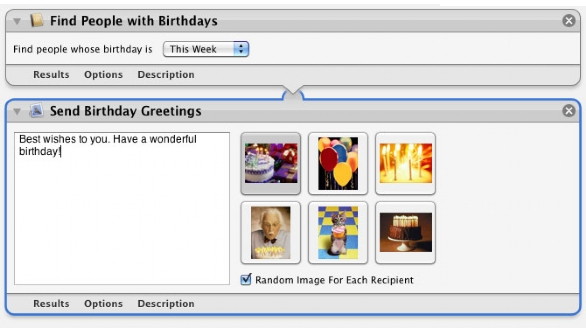
4. Backup and share contacts You can also easily copy single contacts, multiple contacts, and single and multiple groups of contacts. To do so, select them in Address Book and drag them to the Desktop. The item(s) will turn into vCard files, which are generally compatible with all of today's contact management applications. (I say "generally" because some applications don't support vCards that contain multiple contacts.) 5. Automatically send birthday greetings Launch Automator (found in /Applications/Utilities) and in the template sheet that appears select iCal Alarm and click the Choose button. Create a workflow that contains these actions: (under the Contacts heading) Find People With Birthdays and (under the Mail heading) Send Birthday Greetings. In the Find People With Birthdays action choose an appropriate time period—This Week, for example. In the Send Birthday Greetings action enter a birthday message—Best wishes to you. Have a wonderful birthday!, for example. If you like, enable the Random Image For Each Recipient option. Save and name your workflow. When you do, iCal opens, creates an Automator calendar (if one doesn't already exist), and creates your birthday greetings event. You can now move that event to an appropriate day and time—Monday at 9:00 AM, for example—as well as make it a repeating event. For instance, if your workflow looks for birthdays in the upcoming week, have the event repeat once a week.
When the event is triggered, a new message is created in Apple's Mail for each recipient, complete with a subject heading that reads Greetings from Yourname, a Dear Nameofrecipient greeting, the message you entered in the Send Birthday Greetings action, and the image selected in that same action. These messages are created as drafts. All you need to do is send them. Click here for complete article. Awesome Free Mac Add-onsby Mikhael Cohen, smalldog.com Apple computers come with enough software to last a decade of fun use. However, sometimes there are just things you need to do that OS X doesn't support out of the box. Here's a list of my favorite free Mac apps!
System add-ons: NTFS-3G (SUPER-USEFUL, allows full use of Windows & Linux-formatted drives) Perian (Used to play most video formats) Flip4Mac (Used to play a single archaic video format [.wmv files]) Secrets (Preference Pane allowing pretty thorough customization. Be careful, you can screw up your system mighty quick! However, it lets you set things like Time Machine intervals and the minimize animation “Suck”) iStat Dashboard Widget (Gives hardware information such as temperature, battery health and RAM usage). iStat Menus is even more awesome, integrating this info into your menu bar, and costs $16. Well worth it. Growl (Alerts you of events, such as new messages, new mail, etc) DoubleCommand (Lets you change key mapping. My right option key is an enter key. Also, allows you to flip the Windows and Alt keys when using a keyboard with the Windows key layout.) Cuckoo (Gives me my handy little Timex-watch alarm hourly) Xmarks for Safari (Allows bookmarks to be synched to a central location) Notify (Puts gmail widget in menubar, announces new messages) Sizzling Keys (Allows control of iTunes from any application via keyboard commands) Programs: Tweetie (Favorite Twitter client) Google Chrome (Favorite Browser) With AdBlock & Xmarks Addons Firefox (Second-favorite Browser) With AdBlock & Xmarks Addons Skype (Allows video chat and audio conference calls between Skype users) Adium (Fantastic chat client, fully customizable) Alarm (Plays iTunes music at a specified time of day) LibreOffice (NeoOffice for the Mac-native interface.) A full office suite, open-source! Previously OpenOffice. VirtualBox (A virtual machine software by Sun Microsystems, allows Windows to run at the same time as Mac OSX. Unfortunately it’s a bit slower than Parallels 6, and a bit more limited, in both features and support. But hey, it’s free and open-source!) Mactracker (An almost full archive of Apple hardware. Pull up the system specs of your Performa 6220CD from 1995!) coconutBattery (Gives you all the data on your laptop’s battery) PandoraBoy (Allows playback of Pandora internet radio from an application instead of a webpage) VLC (Fairly universal media reader for Mac) Editor’s Note Here’s a fun add-on for anyone who grew up in the NES/8-bit generation. It’s so cool I couldn’t help but throw it in! Mega Man Effect (Mimics the level start screen/sounds from the classic Mega Man II whenever you launch an application! Good for a quick laugh.) Click here for complete article. Master the Application Switcherby Matt Klein, smalldog.com I find myself using the Application Switcher function of Mac OS X dozens of times each hour during the work day. If you haven't tried it yet, you can view it by holding down the Command key while repeatedly pressing the Tab key. 
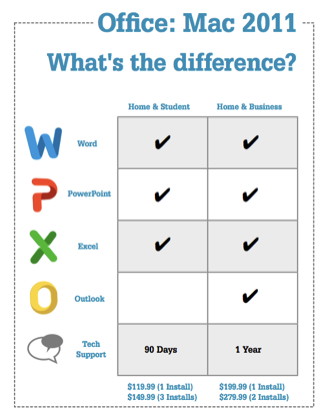
There's more to the Application Switcher than just switching applications. You can quit open applications by selecting the program in the Switcher and pressing the Q key. If that application is frozen, Application Switcher will instead force quit it (most of the time at least), saving you a trip to the Apple menu. You can also drag a file to a running application in the Application Switcher. Say you have an Excel spreadsheet that you want to open in Numbers instead of Excel. Because Excel files open in Excel by default, simply double-clicking on the file will launch Excel. With Numbers running, begin dragging the document and then press Command-Tab. Drag the file to the Numbers icon and the file will open up in that program instead of Excel. You can use the keystroke Command-~ to go backwards in the application switcher. The Command-~ convention works elsewhere on the Mac, like cycling through open windows in most programs. If you have a bunch of Safari windows open and don't want to cycle through them all, you can use Command-~ to cycle backwards. Of course, you can mouse over the desired application to select it in the Application Switcher. This is one of the more basic tips out there, and is known quite widely. I trust that you will find yourself more efficient and satisfied if you work this one into your daily routine. Click here for complete article. Microsoft Office for Mac 2011 Out Now!by Ben Bonaccio, smalldog.com
Currently, we have all versions of Office for Mac 2011 in stock, and are running some great launchpromotions. Right now, select versions of Office for Mac 2011 are eligible for savings from $5-$15 off and free shipping! Click here to learn more. Click here for complete article. iPhoto '11 New Features Overviewby Ed Shepard, smalldog.com 
iPhoto '11 was released 10/20/2010 at Apple's Back to Mac press conference as part of the new iLife '11. Some of the standout new features include: New Full-Screen Modes iOS-like full-screen mode for editing and viewing photos Use every inch of your display to browse and edit your photos. This is much more advanced than the full-screen editing available in previous versions of iPhoto. More screen real estate means a bigger workspace for perfecting each shot or creating nifty iPhoto projects. Facebook Enhancements - Share your photos and view comments without ever leaving iPhoto. iPhoto and Facebook are now even better friends. iPhoto even shows you all of your Facebook photo albums, including the ones you published using another application. You'll always know which photos you shared (or didn't share) on Facebook, because iPhoto keeps track of that for you. Emailing Photos - iPhoto now includes eight Apple-designed themes that you customize with your own images and words. Rearrange photos with a simple drag and drop, adjust the image mask, or change the size and style of your text. Plus, iPhoto optimizes your message so it's never too big to send. iPhoto also works with popular email services like MobileMe, Gmail, Yahoo! Mail, Windows Live Hotmail, and AOL. And since iPhoto keeps track of all your email messages with photos, you're free to open a sent message, make changes, and share it with someone new, anytime you want. New Slideshows - New animated themes — like Holiday Mobile, Places, and Reflections — give your photos movement and help you avoid typical, photo-by-photo, fade-in, fade-out slideshows. Each shot is centered and framed perfectly, thanks to face detection. And the animated themes include their own soundtracks, so your photos and music play together flawlessly. Big Leap in Books - iPhoto '11 makes it even easier to create professional-quality books using your own photos. Building your book starts with a new dynamic Theme browser. Pick a theme, and an even smarter Autoflow instantly goes to work, placing your images for you. Higher-rated images are featured more prominently. Photos taken on the same day appear together. And all the while, face detection ensures that photos of people are cropped and framed properly. Change the background color, font, layout, and more. Add eye-popping full-bleed, two-page spreads. Letterpress Cards - For the first time, traditional printing techniques join modern digital photography on a large scale. With iPhoto '11, you can create custom letterpress cards personalized with your photos and text. Each iPhoto letterpress card is made from premium paper and produced using a centuries-old printing method. Then it's digitally processed with your photos and text. iPhoto letterpress cards are available in 15 beautifully crafted themes complete with matching envelope. There's just something about the elegant look and feel of a letterpress card. As John Gruber from Daring Fireball tweeted: "Can you imagine any other computer company offering letterpress as a mass-market printing technology?" iLife is a $49 upgrade for existing Mac users, and comes free with every new Mac. Click here for complete article. Fixing problemsby Ron Sharp If you have an application function that's not working, something you used to be able to do but for some reason it's no longer cooperating, then here are a few tips. Check your application preferences. Some applications, particularly when updated, may return to a default setting. 
Check for Apple software updates. There may be an update that fixes the very thing that's affecting you. Check the "Help" for the application you're working in. The Help menu in the top menu bar changes for each application. If you don't find what you are looking for try other related applications help such as the Finder Help.  
Check online discussion boards 
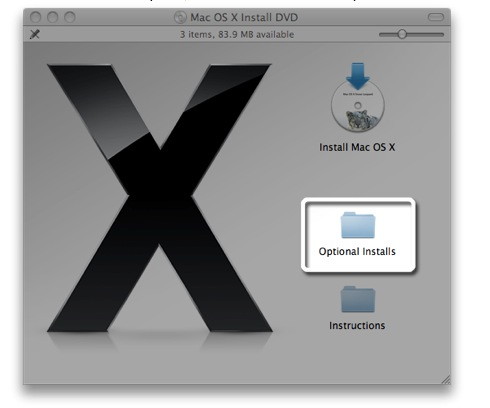
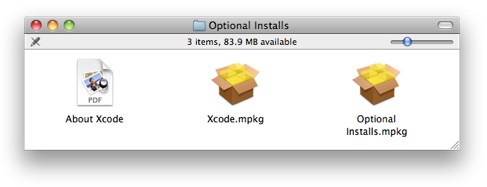
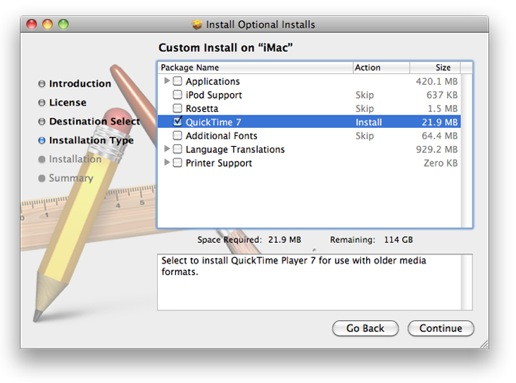
You can also check a couple places on the MAGIC website. Check Tips and Tricks, and the Newsletter Article Index. Here are a couple specific situations you may encounter: Passwords. If you have a problem with a password protected item not being accessed properly, try Keychain Access First Aid from the Keychain app. in the Utility folder. It's the option just below the Preferences option. You can verify and repair your Keychain just like verifying and repairing permissions with Disk Utility. A situation I recently encountered after updating to Snow Leopard was my Mail program asking for my account password every time I checked mail. Repairing the Keychain corrected the problem. Another situation with Snow Leopard is movies no longer open in iPhoto '08 when you click on them. The Help files have information on this issue and QuickTime version 7 is needed. The help article for this is listed below. The other option is to import your videos to iTunes 10 which lists a Movie library in the left column and plays videos with no additional procedures. You can also simply drag your videos to your desktop or other folder, then open them with QuickTime. iPhoto '08: Viewing videos in iPhoto '08 on Mac OS X v10.6 Snow Leopard may need QuickTime 7from OS-X help menu Symptoms If you have upgraded to Mac OS X v10.6 Snow Leopard and you use iPhoto '08,* playing videos from within iPhoto by double-clicking them may not cause them to play. You will need to install QuickTime 7 (an optional install from the Snow Leopard Install Disc) in order to continue viewing videos in your iPhoto library. *Note: Watching videos in iPhoto '09 (version 8.0.4 or later) can be done without any additional installs of QuickTime. Resolution To install QuickTime 7 from your Snow Leopard Install Disc:
Compatibility with HTML5from Bill Frederick The World Wide Web is progressing towards a major upgrade of the HTML (HyperText Markup Language), version number 5. Some parts of this new system have already been released and some developers are testing out and even using some of its features. Most browsers are being upgraded to be able to handle the new code, but some are doing better than others. In order to see how compatible your browser is to the new standards, go to this web page. Note that the full version of HTML 5 will not be released until sometime in 2011. By The Way
by Ron Sharp Just today I did the Magic Trackpad and Multi-Touch Trackpad Update 1.0 and it's great. I use the trackpad on my MacBook and the "inertia scrolling" is a small thing but it amuses me with the scrolling feel. It feels like your computer is working really fast because it's scrolling fast, ...just works nicer on long documents. The odd thing is I just got that update this morning and I frequently check updates so I would not have missed it. But when I went to Apple's Support Downloads page this Magic Trackpad update has a post date of July 27th, 2010. Very odd! I even checked my computer system logs with the Console app. just to be sure it was the same update. My Console screenshot below ...11/05/10 7:55 AM MagicTrackpad MultitouchUpdate 1.0 -install.package.writeReceipt: SUCCESS. 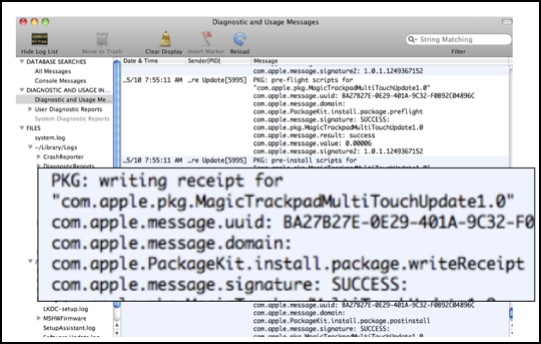
Image below is Apple Download page with post date. 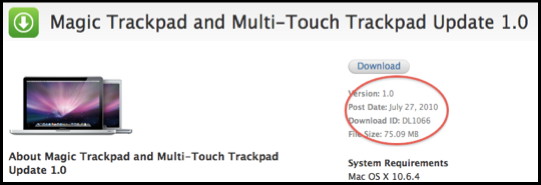
MAGIC, the Macintosh Appreciation Group of Island County, serves people who use Macintosh computers, software and peripherals. Our goal is to share information and get answers to questions to make us more productive with our use of technology. Our monthly meetings give us a chance to discuss computer problems and share ideas with other Mac users, feature speakers on specific topics, and to keep apprised of Apple news. |