
NewsletterFebruary 2011Newsletter Editor: In This Issue:
 Meeting information
Future Meetings: (subject to change)
Do not forget to bring your used ink cartridges. Minutes of the January MeetingBy Susan Prescott, MAGIC Secretary The Macintosh User Appreciation Group of Island County (MAGIC) met at 4 p.m. at the Deer Lagoon Grange Hall on Bayview Road on Wednesday, January 19, 2011. Approximately 25 people attended. The meeting began with a Q&A session coordinated by President Robert Elphick. Business meeting: the meeting was called to order about 5 p.m. by President Elphick. A collection hat was passed around for meeting dues at the suggested amount of $2 per person. Treasurer's report: Treasurer Sue Keblusek reported the current bank balance is $4,270.46. A Keynote presentation illustrated the distribution of income and expenses for 2010. The financial report will not be posted on the website but is available to anyone who is interested. Elphick was applauded for generating approximately $1,170 in donations for his services helping others make their computer problems go away. He reminded everyone that MAGIC is a 501(c)3 nonprofit organization, so any donations are tax deductible. Board elections: Ron Norman has agreed to serve as Vice President of Programs and Cynthia Shelton to serve as Director-at-Large. Tom Baxter moved to accept the two candidates and Harrison Goodall seconded the motion. The two candidates were elected with no opposition. Jerry Holm has completed his term and was commended for his service as a Director-at-Large. 
4-HD: Elphick reported the club is working with Jim Patton of the Port of Coupeville; the Island County Tourism coordinator, Sherry Wyatt; and the Whidbey Examiner publisher, Kasia Piersga, to generate Quick Reader Four (QR4) codes for tourism. A pilot project is focusing on the Coupeville Wharf. An example was shown of the code image for Coupeville Wharf. A person with a handheld device such as an iPhone, iPod or iPad and an approriate QR reader could hold it up to the image and a description of the site would appear on a web browser. The project will generate signs with the code image and the relevant websites. The project is similar to the Port Townsend "Way Finding" project. Donations are being solicited for the project. Elphick proposed MAGIC donate $300. Cynthia Shelton moved we accept and Ron Norman seconded. The proposal was approved by all. HTML class: Through the 4-HD club Robert Elphick will teach a six week HTML class beginning Friday, February 25. The classes will be 3 to 5 p.m. at the Race Road Firehall, a donation of $25 for 4-H is requested. Information and registration is available on the MAGIC website. Education report: Tom Baxter announced two items to giveaway. A member claimed the manual for Aperture 2 and the copy of Final CutPro 5 was accepted for the 4-HD club. He described his negotiations with Lynda.com to grant MAGIC the means to offer classes as an accredited institution would. If the directors of Lynda.com approve this new concept, students could register for the course of their choice, each would have a password, work at home on their own schedule, send assignments to Baxter to monitor, and earn credit for the course. This would create flexibility for both the instructor and students in terms of place and time. Occasionally students may gather at Baxter's home. The cost is about 33¢ per day, or $20 to $25 per month. Programs: The new program director, Ron Norman, asked members to contact him about for future program suggestions and offered some interesting ideas. At each meeting, he will offer a feature he's calling Tech Crunch, a "techie" thing such as iTwin. In March, Norman will demonstrate how to optimize photos. He also has explored holding MAGIC meetings at the Useless Bay Country Club. He's arranged for nonUseless Bay club members to have dinner after MAGIC meetings, if they choose. The change of meeting place will be confirmed at a later time. Membership: Vice President for Membership Ed Severinghaus announce current membership at 284. One member held up her latest "toy" MagicWand, a hand held scanner, costing about $100. It works on both Macs and PCs but the Optical Character Recognition (OCR) feature only works with PCs. Whidbey Telecom will present at the February 15 meeting. The business meeting adjourned about 5:30 p.m. Robert Elphick presented the new features of iLife 11; including iPhoto, iMovie and Garageband. He reported iWeb was not updated. The meeting ended at 6 p.m. MAGIC Moments

by RYE, a self appointed wizard of the very best kind! 4-HD Video ClubThe MAGIC sponsored 4-HD Video Club has begun work on the QR code project. The Pilot is focusing on the Coupeville wharf, particularly the layout, history, and natural history of the Wharf and Penn Cove. Part of this project will require some HTML programming training - this will start at the end of February (MAGIC members are welcome - see the description and applications form.) The Club members are producing a story board for a Documentary about the QR project.Have you filled out your Mac Cheat Sheet?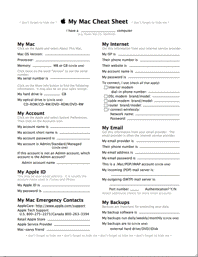
All members are encourages to print out a copy of the "Mac Cheat Sheet", fill it out and keep it in a safe place. It contains most of the information that you will need when things go wrong. It contains many of the questions the wizard will ask right after "You DID back up, right?" Click on the image on the right to get a copy in another window Building Website ClassesMAGIC and 4-H are putting on classes on HTML, CSS, and JavaScript programming - this will start on 25 February (MAGIC members are welcome - see the description and applications form.) Speech RecognitionDo any members use speech recognition software? We are interested in knowing what your experiences have been and how you would rate the software that you are using. Please contact me at For Sale and Wanted PageDo not forget to have a look at our Swap page from time to time where Apple items are listed for sale and also there is a list of wanted items. There are some good deals to be had. SOFTWARE UPDATES
Note: This Software Update section of the newsletter lists the most relevant Apple updates. Apple releases iTunes 10.1.2by Lex Friedman, Macworld.com 
Apple on Thursday (Jan 27) released iTunes 10.1.2, a stability and performance update for everyone's favorite media-playing / iOS-device-syncing / app-shopping tool. The company's characteristically terse release notes say only that "iTunes 10.1.2 provides a number of important stability and performance improvements." However, the update's "Read Before You Install iTunes" document—which you only see if you download the new version from Apple's iTunes site, and not when you download via Software Update—specifically mentions that 10.1.2 also adds support for syncing "with iPhone 4 (CDMA model)." The company's CDMA iPhone will debut on Verizon on February 10. The update requires Mac OS X 10.5 Leopard or later. Apple updates Lexmark printer drivers for OS Xby Dan Moren, Macworld.com 
Got a Lexmark printer of any of a number of models? You'll want to run Software Update and grab the latest version of Lexmark printer drivers for Mac OS X. Released on Wednesday, Lexmark Printers v2.4 for Mac OS X Snow Leopard includes the most recent drivers for Lexmark-branded printers; you can see the full list of supported models—of which there are frankly too many to count—at the link above. Non-Lexmark printer owners will have to console themselves by sighing wistfully. Or, heck, if you're a completionist, feel free to go and download them anyway. The 139MB download requires Mac OS X 10.6 or later and is available both from Software Update and at Apple's support downloads site. Apple updates iMovie '11, Brother driversby Jonathan Seff, Macworld.com 
Apple on Thursday (Jan 20) released two updates that Snow Leopard users might be interested in, one for iMovie '11 and the other for Brother printers and scanners. iMovie 9.0.2 "improves overall stability and fixes an issue that could cause audio playback to be out of sync," according to the brief release notes. It requires OS X 10.6.3 or later. Brother 2.5 Printer Drivers for Mac OS X v10.6 installs the latest Brother printer and scanner drivers. If you don't have the previous drivers, Apple lists the full download at 123.84MB, but my Software Update download was much smaller. It requires OS X 10.6.0 or later. As usual, check Software Update or visit Apple's support downloads page to get the latest and greatest updates. News, Info and StoriesInitial Verizon iPhone 4 Reviewsby Ben Bonaccio, smalldog.com 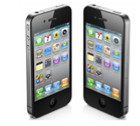
The long awaited Verizon iPhone 4 is available for pre-order for existing Verizon Wireless customers. As the handsets will soon see public availability, embargoes on initial reviews have been removed. Macrumors has compiled a series of early reviews, and though feedback seems generally positive, the phone does have a few weaknesses compared its AT&T counterpart. All Things Digital and Engadget both reported that while the phone gets remarkably better reception and drops calls less frequently, data speeds are generally weaker. In fact, it was reported that AT&T's network permitted download speeds up to 46% faster than Verizon in areas of good reception. Though it's been known since the phone's announcement, nearly all reviewers commented on the phone's lack of true multi-tasking. Due to a limitation of CDMA wireless technology, the Verizon iPhone 4 cannot make or receive a call and access data simultaneously. In their review, Macworld reported: "if you're using the Internet and your phone rings, your Internet connection immediately drops." The trade off mentioned in every review, is the phone's improved reception. Potentially due in part to a combination of the rumored reworking of the phone's antenna and Verizon's network, all reviewers commented that the device did not drop calls. TechCrunch's reviewer claimed to be able to place a call in an area of his building which had previously been impossible with AT&T. The Verizon iPhone 4 has been subject to an increasingly large amount of hype building towards its public launch. However, as with any product, it has pros and cons. There are several trade offs to consider, especially if you're switching from AT&T. While better reliability may seem enticing, early adopters will have to weigh it against slower data and the inability to multi-task while on a phone call. Verizon has posted full plan pricing and details for the iPhone 4 here. MAGIC Editor note: another good article on the Verizon iPhone by David Pogue, New York Times Personal Tech. Click here for complete article. iPhone 4 breaks all Verizon sales records in two hoursby David Chartier, Macworld.com, posted 4 February How badly did Verizon Wireless customers want the iPhone 4—a phone that's been on the market for seven months and is likely to get replaced in just a few more? Apparently, they wanted it more than any other phone in Verizon's history. Verizon Wireless on Friday announced that the iPhone 4 broke all previous first-day device sales records in company history, and it only took two hours to do it. "This was an exciting day," said Dan Mead, president and CEO for Verizon Wireless, in a press release. Keep in mind, Verizon Wireless and Apple opened preorders at 3 a.m. ET Thursday morning, and even then, only to existing Verizon Wireless customers. While the iPhone 4 broke Verizon Wireless's sales records just two hours later, preorders lasted until Thursday afternoon, when both Verizon and Apple had to stop accepting them. The only way to get a Verizon iPhone 4 now is to wait for when they become publicly available. You can try to order one online for delivery or in-store reservation at 3:01 a.m. ET on February 9, or try your luck with walking up to stores on February 10, when doors open at 7 a.m. local time. Judging by Verizon Wireless's battered and bruised sales records, though, it seems like demand is pretty healthy, which means lines are likely to be long. If you're determined to get a Verizon iPhone 4 as soon as possible, it may be wise to collect a comfortable lawn chair and your best line-waiting shoes. Click here for complete article. Running iLife '09 or Version 9?by Daniel Warren, smalldog.com 
Since the introduction of iLife '11, I have spoken to a few customers who were confused about which version of iLife they are running. The version of iLife has typically been defined by the year associated with the install. For instance, you may be running iLife '09 and refer to the version of iPhoto that comes with it as "iPhoto '09." In most cases, this is all you need to determine what version you may be running to allow a technician to narrow down what problems you may be having and how to resolve them. The trouble with version vs. year is that there is a small discrepancy from Apple's standpoint. The version is referring to how many renditions of the application existed before it; the year is obviously referring to the year of release. These numbers may match if Apple released a new iLife suite every year, but they do not always need to release a new update every year. (For instance, they did not release iLife in 2010.) Normally, it would not matter what version you had, and most people would not know that there is even a separate version number associated with their iLife applications. The only time you might notice the difference is when attempting to update. Most recently, I have noticed an influx of calls from people attempting to update iPhoto from iLife '09. If you are looking on Apple's website they have updates for several versions of iPhoto including iPhoto version 9. On a quick glance, one might think that the update for iPhoto version 9 is for the iPhoto application that came with iLife '09—this is incorrect. iLife '09 came with iPhoto version 8. It is actually iLife '11 that comes with iPhoto version 9. As you can see, this can be very confusing, and subsequently you should always check for updates through the built in Software Update application that comes with all versions of OS X. This will ensure that you always keep your software up-to-date and that you are updating to the correct version. Please refer to the following for a complete list of the applications and version numbers that are included with each distribution of iLife:
However, Opera 11 hit a real high note in JavaScript performance. In the SunSpider JavaScript benchmark, its 416.5 milliseconds nipped at the heels of Chrome's 372.4 and Safari's 388.5, and humbled Firefox's poky 1,256.8 milliseconds. More importantly, Opera 11's score is a huge improvement from version 10's 6,144.6-millisecond performance on the same test. Like Safari and Chrome, Opera 11 scored a perfect 100 on the Acid3 rendering test, and like all three fellow browsers, it nabbed a perfect score from CSS3.info's check of CSS3 selector support. In HTML5test.com's benchmark of compliance with the emerging HTML5 standard, Opera scored a total of 184 out of 300, compared to Chrome's 244, Safari's 215, and Firefox's 143. Unlike version 10, Opera 11 handled HTML5 video well, and reliably located me on a map in HTML5 geolocation tests. But some HTML5 features, including one drag and drop test, still didn't seem to work. Benchmarks aside, Opera 11 felt much faster and more responsive than its rivals. Thanks to its new Vega graphics library, tabs pop open, snap closed, and zip back and forth, and pages scroll in any direction with lightning speed. Unfortunately, Opera 11 still won't play nice with Netflix's Watch Instantly (which may well be Netflix's fault). Maybe in version 12…
Interface innovations Stack too many tabs together, and the visual previews obscure your current Web page. There's no way to automatically open a list of bookmarks as a single stack, and while you can easily unstack a tab by control-clicking it, there's no simple means of compiling multiple tabs into a stack. You'll have to tediously drag and drop them one by one. I was a much bigger fan of the clever button that can track and reopen all the tabs you've closed in a given session. A big, clear button in the address bar at the top of the Opera window lists a page's security status. With a few clicks, you can automatically scan the page for malware or phishing, and even report suspicious pages to a pair of online security databases—a nifty trick that Safari, Firefox, and Chrome can't currently match.
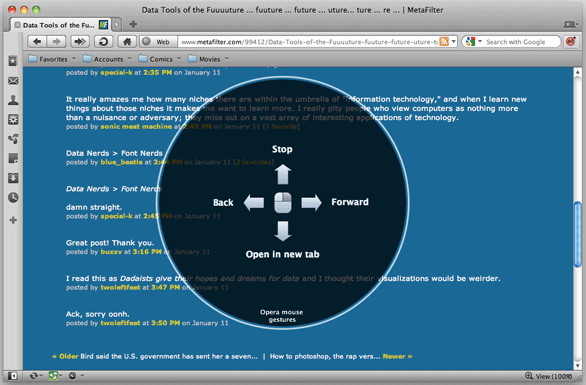
Opera 11 also offers its own mouse gestures for navigation. Hold down the right button while swiping in one of four directions to go back, forward, stop, or open a link in a new tab. The feature's tough to pull off on a multitouch trackpad, but Opera's thoughtfully added support for the standard Mac OS multitouch gestures in this version as well. Though it retains version 10's esoteric, toy-like Widgets, Opera 11 adds far more useful Extensions to the mix. These add-ons can block ads, translate pages, and pipe PDF files straight into Google's PDF viewer, among other abilities. The handful I tested all worked well, and were easily disabled or uninstalled. Opera also incorporates Unite, a free online service that lets you easily share files and photos, trade notes, listen to your personal music, or serve a site over the Web. Like the Widgets, it's another example of Opera's everything-but-the-kitchen-sink approach. However smartly they're integrated, I'm still not convinced that any browser truly needs all these bells and whistles.
Macworld's buying advice Click here for complete article. Taxsoftware.com makes forms, filing available for Macby Joel Mathis, Macworld.com 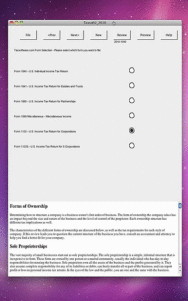
Taxsoftware.com's suite of digital tax forms is now available in a single offering on the Mac App Store. The software was announced on Monday by the Maryland-based company, following last week's launch of of a similar app for the iPad. The desktop program includes the standard 1040 IRS form for individual filers, as well as the 2010 versions of Form 1065 for business partnerships, Form 1120 for corporations, Form 1120S for S corporations, and Form 1041 for estates and trusts. The company says its software helps users fill out those often-complicated forms in about 30 minutes. The returns can be filed with the IRS directly from the app; there is an e-filing fee of $4 for the 1040 form and $15 for the business returns. Paid tax preparers must furnish their IRS registration numbers to use the app, and must also have a Taxsoftware.com E-services account. Taxsoftware.com's desktop app costs $10, and is compatible with computers running OS X 10.6 or later. Click here for complete article. Apple1 sells for $200,000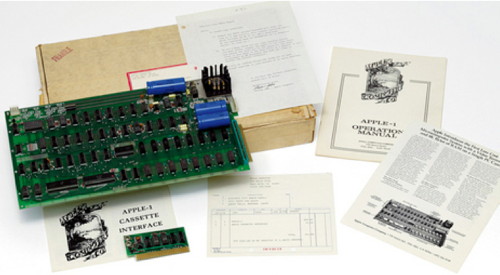
Somebody paid a little more than $200,000 at a recent Christies auction for an original Apple 1. That's a now-rare 1976 model that at the time it was built, as the Associated Press says, "was the only personal computer to come with a fully assembled motherboard, making it ready to use straight from the box — provided the user supplied a keyboard, power supply, and display." Have you got one? Can I borrow it?? Websites for funby our web checker Safari Extensions Gallery has extensions to enhance shopping, searching, security and more, including Print Plus to help you select what you want to print from a web page. Internet fraudby our fraud department 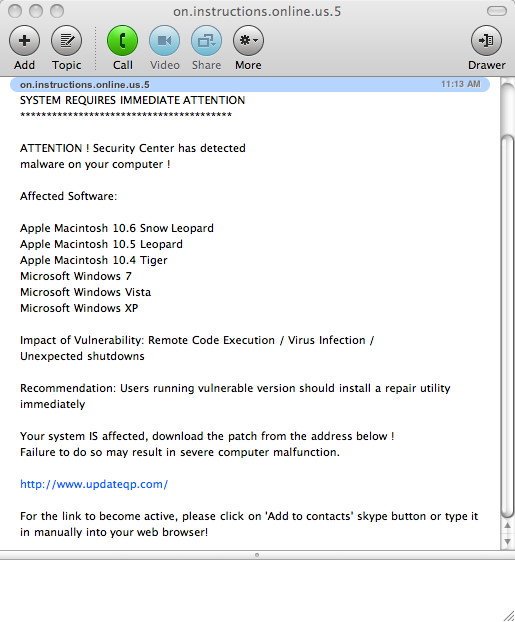
Here is an example of fraud. This window came up not long after a new user of Skype had registered the product and starting it up. It appears to be a message but it is trying to get the user to go to a website were 'nasties' are waiting to be downloaded. The giveaway is that it detected Windows errors on a Mac! 
Here is another example of fraud. This window came up during a credit card purchase. It is trying to get the user to provide information to an illegitimate source. The giveaway in this one is that it is asking for data that has already been supplied as part of the transaction. If in doubt, do NOT click! Be Careful! Using Apple Hardware Testby our hardware dude Apple Hardware Test (AHT) contains a suite of diagnostics that will test the hardware of your computer. It's is a great way to rule out a hardware issue when troubleshooting your computer.
Products Affected: To start up your computer in Apple Hardware Test:
By The Way
Magic Member Help & Hintsby Ron Sharp Penny Discovers Changed iPad Button Functions Hey Robert! I've noticed that some of my APPs weren't working--the ones with sound. Today I downloaded a free piano app and it didn't play either. I began wondering if I needed to do some sort of a reset or restore, so I started poking around on the Apple site, which I didn't find too easy to navigate. But I finally got onto a discussion page for iPad and put in "missing Audio" and here's what I found: Have you got what was the rotation lock switch 'on' ? That switch has changed function in 4.2 to be a notification mute switch, with rotation lock now being a software function via the taskbar. (double-click the home button, slide from the left, and its the button far right; press home again to exit the taskbar; repeat to switch off rotation lock.) Voila! That's it. Maybe others in our group don't know this as well, or maybe I'm the only dummy: Mira responds to last months newsletter article with a clever hint for storing passwords. Hint: I keep my passwords on index cards in an old rolodex. Much easier to keep alphabetized and tracked. (I also put a date on them so I know when they were set or reset.) Message from the Wizard: I use an application called CiphSafe. It is free and easy to use. Tom Johnson shares info on camera Geo Tagging. Hi Penny, et al, Thanks for the tips! MAGIC, the Macintosh Appreciation Group of Island County, serves people who use Macintosh computers, software and peripherals. Our goal is to share information and get answers to questions to make us more productive with our use of technology. Our monthly meetings give us a chance to discuss computer problems and share ideas with other Mac users, feature speakers on specific topics, and to keep apprised of Apple news. | ||||||||||||||||||||||||||||||||||||||||||||||||||||||||||||||||||||||||||||||||||||||||||||||||||||||||||||||||||||||||||||||||||


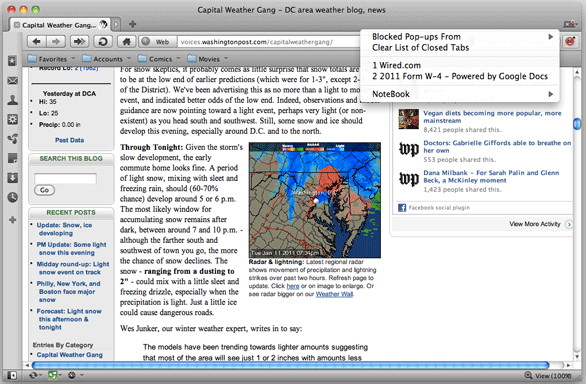
 It takes a minute or so for Apple Hardware Test to start up and inspect your hardware configuration. While this is taking place, an icon appears on the screen. When the process is complete, select your language and click the right arrow. If you aren't using a mouse, you can use the up and down arrows to select a language and then press the Return key.