How Robots Could Save $6+ Billion Worth Of Recyclables A Year
* Indicates author is a member of MAGIC
Meeting information
Date
17 June 2026
Time
4:00 - 5:00 p.m.
Presentation:
• Introduction with Mike Turnbull
• "NUMBERS" with Robert Elphick
Location:
by Zoom online
MAGIC Minutes for April 2026
by Wendy Shimada, MAGIC Secretary
At 4:02 p.m. President Mike Turnbull welcomed everyone and called the meeting to order with 24 attendees present within a few moments, an excellent turnout for a sunny May afternoon. This month's presentation is "Avoiding Spam and Other Evils" with Robert Elphick.
Treasurer Carol Heimgartner gave the monthly report, clarifying that the monthly balance of $4329.79 is completely up-to-date as the monthly Whidbey Telecom website hosting fee has already posted. She also noted that although she has already arranged to have her colleague Jan Vaughan do a standard audit with her, they both have had some other commitments so have not yet begun. Mike assured her that it was not a problem as it is just procedural.
Next month's MAGIC Zoom meeting will be June 17. Robert will present "Numbers" , followed by Q&A.
Robert proceeded with a helpful presentation on various ways to differentiate between spam and real mail, how to get rid of it, and how to change your settings to avoid recurring spam from the same parties. He also went through a couple of apps that are helpful in clearing your computer of unnecessary "stuff" that can slow it down and take up space, as well as recommending a malware/virus protector app.
After the presentation, Robert and Ron answered a few members' questions. The meeting was adjourned at 5:10 p.m.
Missed the meeting? You can still watch the video tutorial on Safari by either visiting the MAGIC website at www.whidbey.com/magicmug or by just clicking on the MAGIC logo at the top of the monthly newsletter; it is a direct link to the MAGIC website, which offers many excellent tips and tricks, along with instructional video sessions from past meetings.
MAGIC Musings
Hello Magic Members,
Using info from last month's Magic Meeting, I ran Onyx on my 6 yr old MacBook M1 chip laptop and Onyx found a defect. With Ron and Robert's help, using Time Machine and a new external drive I was able to delete and reinstall all my data and Tahoe 26. Almost everything now works. Whew.
Our Magic Meeting will be held on June 17th at 4:00 p.m. via Zoom. Robert will be giving a presentation on Apples spreadsheet program "Numbers." We hope to see you at the meeting.
The meeting for July is scheduled for July 15th.
MAGIC President
Note: This Software Update section of the newsletter lists the most relevant Apple updates. Not all updates are listed for all products. Additionally, I'll add other pertinent updates on occasion.
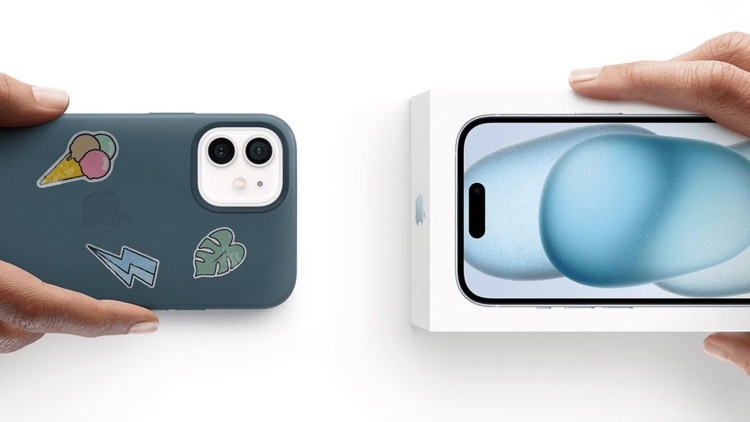
Apple Updates Trade-In Values for iPhone, iPad, Mac, and Apple Watch
by Hartley Charlton, macrumors
Apple today updated its U.S. trade-in estimates, raising values for most current iPhone, iPad, Mac, and Apple Watch models while reducing several Android offers.
The headline iPhone trade-in figure rises from $685 to $695, with every iPhone 16 model gaining value:
iPhone 16 Pro Max: $685 to $695
iPhone 16 Pro: $550 to $560
iPhone 16 Plus: $455 to $465
iPhone 16: $435 to $460
Every current iPad also gains value, with the headline range shifting from $40 to $670 up to $45 to $690:
iPad Pro: $670 to $690
iPad Air: $445 to $460
iPad: $220 to $235
iPad mini: $250 to $265
Mac changes are mixed, with most current models gaining value:
MacBook Pro: $685 to $690
MacBook Air: $485 to $520
Mac mini: $340 to $375
iMac: Unchanged at $355
Despite those increases, the top of Apple's Mac trade-in range slips from $2,090 to $2,045, suggesting a reduction for a higher-end model not shown in Apple's summary table, such as the Mac Pro or Mac Studio. The Apple Watch lineup also gets a mix of revisions:
Apple Watch Ultra 2: $295 to $305
Apple Watch Series 9: $120 to $130
Apple Watch Series 10: Unchanged at $150
Apple Watch Ultra: $215 to $205
Android trade-in offers have largely been cut, with the headline range narrowing from $30 to $370 down to $30 to $360:
Samsung Galaxy S23 Ultra: $230 to $200
Google Pixel 8 Pro: $170 to $165
Samsung Galaxy S23: Unchanged at $125
OnePlus 12: Unchanged at $200
All Apple-listed values are estimates, with final offers determined after the device is received and inspected. Customers can apply trade-in credit toward a new purchase or receive the value as an Apple Gift Card, and Apple will recycle ineligible devices for free.
macOS 26.5.1 is out with an important fix for enterprise users
by marcus Mendes, 9yo5mac
Apple just rolled out macOS 26.5.1, which fixes a bug that had been causing Macs with the M5 Apple silicon to unexpectedly shut down under certain conditions. Here are the details.
macOS 26.5.1 out now
After releasing macOS 26.5 last month, Apple is rolling out its first point update, which includes an important bug fix for enterprise users.
macOS 26.5.1 includes a fix for a bug affecting M5 Macs under certain conditions. From Apple's release notes:
This update addresses an issue for enterprise users where Macs with an M5 chip could unexpectedly shut down when using certain content filtering network extensions.
Interestingly, macOS 26.5 included several bug fixes specific to enterprise users, including issues where some Macs could start up to a black screen after a software update and cases where certain MacBook Air and MacBook Pro models restarted unexpectedly while mounting SMB shares.
While this is the only bug fix mentioned in the release notes, it is possible that the system update might include other performance enhancements and bug fixes, so it might be a good idea to update your Mac as soon as possible, even if you're not an enterprise user.
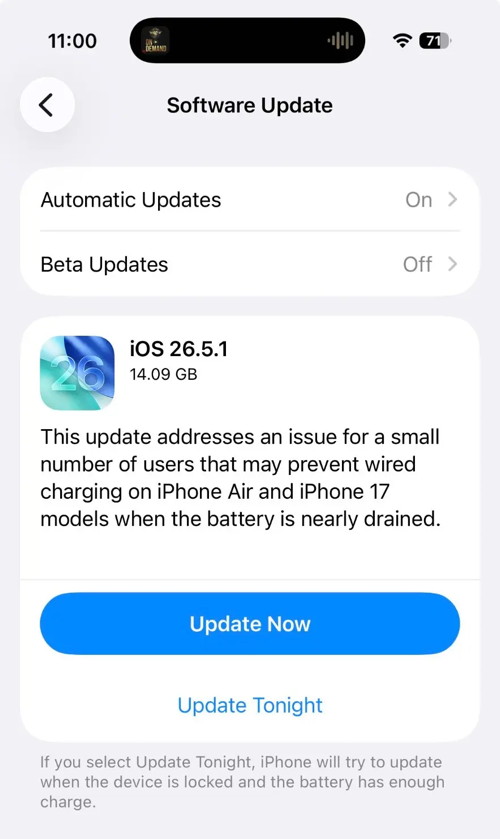
iOS 26.5.1 update fixes charging problem with Phone 17 and iPhone Air
by David Snow, cultofmac
Apple made an update available for its iPhone operating system Monday with iOS 26.5.1. It addresses a wired charging problem some users with iPhone Series 17 or iPhone Air handsets face.
Apple said the problem affects a "small number of users." But for the few users who face it, the problem probably feels pretty big. The same goes for a Mac glitch fixed by macOS 26.5.1, also released Monday.
iOS 26.5.1 update fixes charging problem
The new iOS 26.5.1 update appears to address charging problems that only a small group of iPhone users have experienced since iOS 26.5 came out in May. It involves difficulty with wired charging of iPhone 17 and iPhone Air handsets when they have a very low battery level.
Here's what Apple's release notes say:
This update addresses an issue for a small number of users that may prevent wired charging on iPhone Air and iPhone 17 models when the battery is nearly drained.
So that's not a whole lot to go on. As always, the release could address other bugs. Apple typically doesn't list every element of updates in its scant release notes.
If you're one of the unlucky few the charging problem vexes, here's your solution.
Photo: Apple
And with iOS 27 due to make headlines with new features at WWDC26 next week, iOS 26.6 is in beta testing. iOS 27 won't be out right away — more like September, in fact, as usual with the year's biggest software releases. So in the meantime, updates to iOS 26 will continue.
If you need the iOS 26.5.1 update, just go to Settings > General > Software Update on your iPhone to download and install it.
macOS 26.5.1 fixes M5 Mac problem
Apple also released macOS 26.5.1 on Monday. Like the iOS update, it targets a problem experienced by a thin slice of Mac users.
"This update addresses an issue for enterprise users where Macs with an M5 chip could unexpectedly shut down when using certain content filtering network extensions," Apple's release notes said.
To get the macOS 26.5.1 update, just go to System Settings > Software Updates on your Mac to download and install it.
Gemini app for Mac adding 'Spark' agent and voice control this summer
by Abner Li, 9to5google
At I/O 2026, Google previewed two major features for the Gemini app on macOS that are coming this summer.
Google introduced the native Mac app in April, with a "small team" using Antigravity to aid development.
Gemini Spark is your 24/7 personal AI agent that can take actions on your behalf to help "navigate your digital life." This includes integrating with Gmail, Docs, and other Workspace apps, as well as third-party services. It will be available to Google AI Ultra ($100 per month) subscribers in beta next week in the Gemini app on Android, iOS, and web.
Spark is coming to Gemini for macOS this summer with the ability to perform tasks "involving your local files and automate workflows across your desktop" as we previously reported. This will join the existing capability to use any of your open windows as context for prompts.
A new voice experience will let you ramble, so you "won't have to worry about all the 'ums' or 'what abouts' that happen as you think aloud." When long-pressing the function key on Mac, Gemini will show a new floating pill at the bottom of your screen. Letting go submits the prompt with a thinking animation showing progress.
Using the context from your screen, Gemini can turn your free-flowing speech into precise drafts, instantly reformatting the text to capture your intent, right where your cursor is.
On stage this Tuesday, Google showed selecting files in Finder and then dictating an email that's automatically inserted into a Gmail compose window.
The 15-inch M5 MacBook Air just got its first-ever $200 discount
by Gabriel Vatu, macworld
The 15-inch MacBook Air has the perfect balance of screen size, portability, and power, and now it's got the perfect price too: Amazon is selling the 15-inch M5 MacBook Air M5 for the best discount it's ever had, bringing the price down to just $1,1100. a savings of $200 and the best price we've ever seen. Now that's a deal!
This MacBook Air setup is the perfect pick for remote workers, creatives, and pretty much anyone who needs a seamless multitasking experience. The gorgeous 15.2-inch display and exceptional all-day battery life make it possible to leave the charger behind while working on the go, and that's quite important. This particular model runs on the super-fast M5 chip, and it's equipped with a generous 512GB of storage and 16GB of unified memory right out of the box. If you need more internal storage, the 1TB model is also on sale right now for $150 off, but with Thunderbolt 4 on board, you'll be able to hook up a speedy external drive.
Don't miss out on this $200 discount for one of the best laptops out there.
AirPods with cameras suddenly make a lot more sense after this new reveal
by Ryan Christoffel, 9to5mac
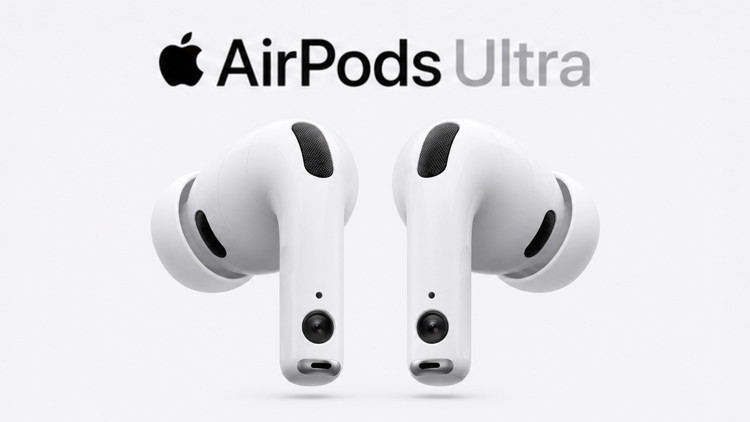
AirPods with cameras are reportedly coming this year, perhaps with 'AirPods Ultra' branding. And after a new reveal, the rumored product makes a lot more sense to me.
New AirPods to add cameras for visual intelligence, but that may not be the whole story
Rumors from multiple sources have long pointed to AirPods gaining IR (infrared) cameras this year.
We previously assumed this new model would be a variant of AirPods Pro 3 at around $299. Similar to how you can choose AirPods 4 without active noise cancellation for $129 or with ANC for $179.
But with indications that Apple plans to expand its 'Ultra' product lineup this fall with the first iPhone Ultra and MacBook Ultra, an 'AirPods Ultra' name now seems more likely.
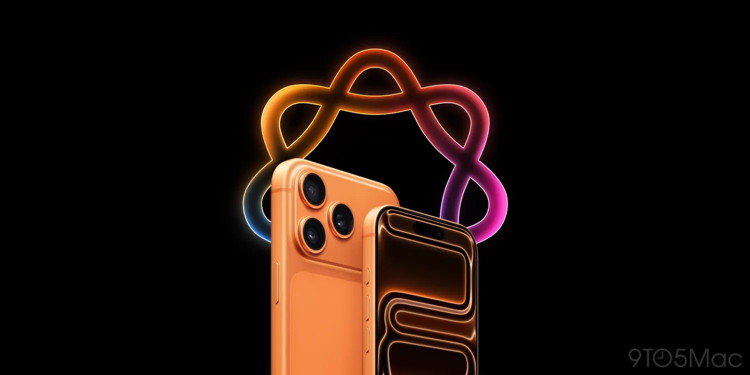
Apple Intelligence 2.0 promises many new features I'm very excited for
by Ryan Christoffel, 9to5mac
Apple Intelligence debuted almost two years ago, and for some iPhone users it's been underwhelming. But rumors about what's coming in iOS 27 sound like a true Apple Intelligence 2.0, with many features I'm already very excited for.
iOS 27 could deliver the true 'Apple Intelligence 2.0' that last year didn't
Last year, I was anticipating a much bigger Apple Intelligence showing at WWDC than we got. Though iOS 26 offered 20+ new AI features, it wasn't the 'Apple Intelligence 2.0' I'd hoped for.
But the true next generation of Apple Intelligence, aided by Google Gemini, will be unveiled soon.
At WWDC, Apple says it will showcase "incredible updates for Apple platforms, including AI advancements."
And based on reporting from Mark Gurman at Bloomberg, I believe iOS 27 will finally deliver the kind of features that make Apple Intelligence truly matter for users.
Personally, I'm most looking forward to these five rumored features:
Siri's major AI overhaul
Photos app editing tools
Custom wallpaper generation
Subtitles for all videos
Building shortcuts with natural language
My top five Apple Intelligence features rumored for iOS 27
Siri will no doubt be the highlight of Apple's WWDC presentation.
That's because rumors indicate the assistant is getting a comprehensive overhaul that includes a standalone Siri app, chatbot-style interface, LLM-based world knowledge, hundreds of agentic-style new app actions, onscreen awareness, personal context intelligence, support for multi-action requests, and a lot more.
Basically, it's a new Siri for the modern era of AI assistants.
But I'm also excited for several other AI features that are rumored.
Photos is reportedly getting three powerful editing tools thanks to the new Gemini-based Apple Foundation Models. 'Extend' is the feature I can't wait for. Per Mark Gurman, it "lets users generate additional image content beyond the original frame. For example, someone could take a close-up photo of a landmark and use the tool to fill in surrounding scenery."
Wallpaper generation being built into iOS 27 is another feature I'm eager for. I tend not to change my iPhone wallpaper very often, but that's mainly because I don't have great options on-hand. If the custom wallpaper feature works well, it could quickly become a go-to for me.
Apple confirmed this week that iOS 27 will let you turn on subtitles for any video you watch—even when captions aren't provided. This will be great for when I'm listening to a podcast, or in an environment where my volume needs to stay off.
Finally, even though Federico Viticci beat them to it, Apple is rumored to use AI in the Shortcuts app to let you build custom shortcuts—including all-new actions—using natural language.
Which new Apple Intelligence features in iOS 27 are you most excited for? Let us know in the comments.
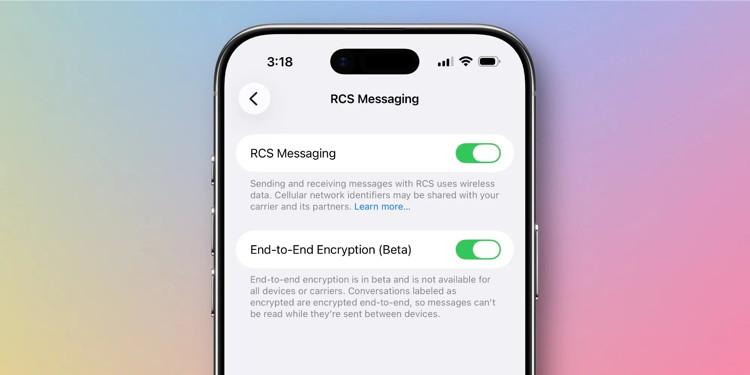
iOS 26.5's Messages app has RCS end-to-end encryption in beta
by Ryan Christoffel, 9to5mac
iOS 26.5 beta 1 is now available for developers, with a new Apple Maps feature, hints of a new in-app subscription option, but no signs of Siri upgrades. iOS 26.5 also gives Messages support for end-to-end encrypted RCS messaging.
RCS messaging again supports E2EE in iOS 26.5 beta 1
During the iOS 26.4 beta cycle, Apple let users test out RCS messaging with end-to-end encryption (E2EE). From the very first beta though, Apple was clear that E2EE for RCS was only being tested in iOS 26.4 but wouldn't actually ship until a future 26.x release.
Now, with iOS 26.5 beta 1, end-to-end encrypted RCS messaging has returned.
And all signs indicate it's likely to stick around in the shipping version this time around.
Inside Settings ⇾ Apps ⇾ Messages ⇾ RCS Messaging, iOS 26.5 users will see a new 'End-to-End Encryption (Beta)' toggle. It has the following description.
End-to-end encryption is in beta and is not available for all devices or carriers. Conversations labeled as encrypted are encrypted end-to-end, so messages can't be read while they're sent between devices.
End-to-end encryption for RCS is enabled by default in iOS 26.5 beta 1.
And this time around, there's no mention in Apple's release notes of it not shipping in the public build.
With iOS 26.4 beta 1, Apple was clear: "This feature is not shipping in this release and will be available to customers in a future software update." But there's no such disclaimer in iOS 26.5's developer notes.
It's always possible Apple might pull it from future betas, but for now at least, it seems like when iOS 26.5 ships, it will probably bring end-to-end encrypted RCS messaging with it.
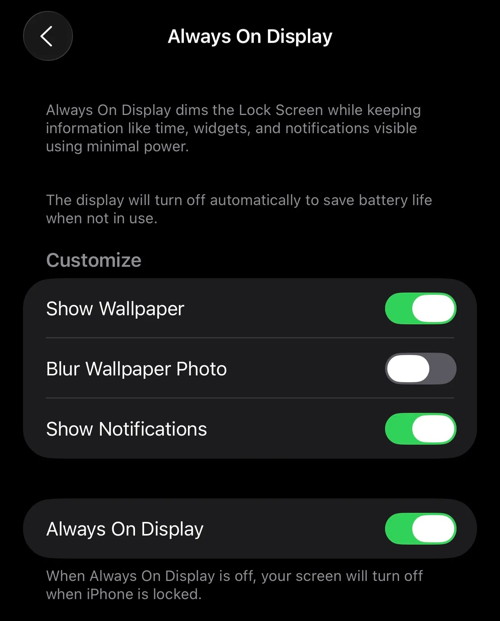
iOS 26 tweaks iPhone Always On Display in a way you might not like
by Zac Hall, 9to5mac
Apple's Always On Display has been fairly consistent since it debuted on iPhone 14 Pro. With iOS 26, Apple quietly changed how it works in a way that may not be obvious.
Always On Display modes
Instead of simply dimming your Lock Screen wallpaper, the system blurs it by default in iOS 26.
The tweak makes the clock and widgets stand out more, but it also defeats the purpose of displaying a photo if that's what you like about the feature.
Luckily, there's also a toggle to bring back the original behavior.
In iOS 18, the Always On Display worked much like it works in iOS 26. A dimmed version of your Lock Screen stays visible when your iPhone is locked, giving you quick access to essentials like the clock, date, notifications, and widgets.
The screen will turn off entirely when face down, covered, in CarPlay, using Continuity Camera, in Low Power Mode, while Sleep Focus is on, or at bedtime.
Customization has always been limited but useful. You can decide whether the wallpaper appears at all and whether notifications are shown.
This means your always on screen can be clean and utility-driven, or retain the personality of your wallpaper and lock screen setup.
iOS 26 makes one big change
With iOS 26, wallpapers are blurred by default when the display is dimmed. The effect likely improves legibility, but it changes the look of the Lock Screen.
For me, I think I'd rather not show any wallpaper than be presented with a blurred version of my Lock Screen image.
Fortunately, Apple added a toggle alongside the behavior change to give you control.
In Settings > Display & Brightness > Always On Display, you can disable blurred wallpapers so your Lock Screen appears in full clarity like before.
Details continue to emerge about Apple's next-generation premium earbuds, widely referred to as "AirPods Ultra" and sometimes described in leaks as fourth-generation AirPods Pro. The next-gen earbuds reportedly will bring a significant jump forward, including adding cameras and health-monitoring features. And they aren't too far away.
Here's what to expect.
AirPods Ultra rather than AirPods Pro 4?
AirPods Pro 3 launched in fall 2025, and rumors of a follow-up began circulating almost immediately. That's surprising — the usual span of time between new models is about three years.
But it seems the leaks aren't about a fourth-generation model. Instead, Apple is apparently working on a very advanced version that many expect to be the first in a new "AirPods Ultra" line.
The high-end earbuds supposedly will be joined by a folding "iPhone Ultra" as well as a "MacBook Ultra" with a touchscreen. The name change indicates a notable leap forward rather than a routine update, as previously happened with Apple Watch Ultra.
Apple's first AI device?
iOS 27 reportedly will upgrade the Siri voice assistant into an AI-powered chatbot. Apple advertising will surely position AirPods Ultra as the best option to access this AI wherever it's needed. To be clear, Siri will run on the user's iPhone or Mac, not the earbuds.
Looking ahead, the AirPods Ultra could even function as a lightweight, screen-free interface for Apple's AI, greatly reducing how often users need to look at their iPhones. Far beyond simply controlling music playback, voice commands to the AI could summon driving directions, send and receive texts, and much more.
Cameras? Really?!?
Early reports that Apple might build cameras into the AirPods Ultra might make people chuckle at the idea of taking pictures with their ears. But the cams reportedly won't be intended for that.
Instead, they will give the Siri AI a way to see the world around the user. They would let wearers easily make use of Apple's own visual intelligence feature. With the current version, users point an iPhone camera at an object in the real world to receive an explanation for it. The AI feature can read and summarize text, identify objects, translate languages on signs and more.
Building low-res cameras into AirPods Ultra could let this happen almost seamlessly.
Beyond that, multiple reports indicate these cameras will function as depth and proximity sensors. That fostered speculation that the earbuds might also support gesture detection, allowing iPhone users to control audio playback by moving their hands in specific patterns. There might be no more need to squeeze the earbuds' stems — assuming Apple can get the tech to work reliably.
More health-monitoring features
AirPods Pro 3 brought the first health-related feature to Apple's earbuds: heart rate monitoring. The upcoming Ultra version is expected to build on that. Unconfirmed reports point to improved heart rate monitoring plus the possible addition of body temperature tracking.
More broadly, rumors indicate the earbuds will deepen Apple's "hearing health" push as well, with features like hearing tests and additional protection from loud environments.
If accurate, these moves would continue Apple's goal of turning everyday accessories into passive health monitoring tools.
Better audio, of course
Audio performance is expected to improve in the AirPods Ultra, potentially through a new H3 wireless chip that enhances both sound quality and connectivity. But that's par for the course for new AirPods — audio quality keeps improving with each new generation.
Plus, leaks coming out of Cupertino mention better active noise cancellation and more adaptive transparency modes, refining features that have become central to the AirPods Pro line.
And no one should be surprised that Apple is supposedly working to improve AirPods battery life, a key area of competition in the premium earbud market.
Start saving your money
For now, the AirPods Ultra earbuds remain firmly in the realm of speculation. But taken together, the leaks suggest Apple is preparing a more ambitious update than usual, one that could blur the line between audio accessory and health device while deepening the earbuds' role in the company's expanding ecosystem.
Of course, the additional features likely will lead to a higher price than the current AirPods Pro, which retail for $249. Estimates generally come in around $299, but AirPods Ultra could cost even more.
As for the launch timing, rumors suggest the earbuds could debut as soon as September alongside the new iPhone 18 Pro and the first folding iPhone. But they could arrive later, of course. With the earliest possible release still months away, it's too early for anyone to be able to give a reliable launch window.
And if Apple really does sell the earbuds as "AirPods Ultra," do not expect them to replace AirPods Pro 3 in the lineup. This is apparently a new third tier of earbuds.
iPhone Crash Detection saved the day after driver's 330ft mountain drop
by Oliver Haslam, appleinsider
The iPhone's Crash Detection feature has been credited with saving another life.
A woman has credited her iPhone with saving her life after it automatically called emergency services when her car left the road and slid 330 feet down a mountainside.
The woman lost control of her vehicle on a winding road in scenic Denbighshire, UK. It then rolled down the hill before bursting into flames moments after she was able to escape.
Emergency services arrived at the scene 20 minutes later, including a mountain rescue team and firefighters. Both had been alerted to the accident by the woman's iPhone and its automatic Crash Detection feature.
"I'm grateful to Apple for what the iPhone did," the woman told the BBC. "I don't think that I would have been able to get help that quickly."
Unfortunately, the rescue was just the beginning of a long road to recovery. The driver spent four months in the hospital and required multiple surgeries as a result of the crash. She was left with life-changing damage to her ankle and her spine.
iPhone to the rescue
Crash Detection is a feature built into all modern iPhones and Apple Watches, and has been saving lives for years. It was first introduced alongside the iPhone 14, Apple Watch Series 8, and Apple Watch Ultra.
The feature uses sensors to detect severe car crashes and then sounds an alarm and displays an on-screen alert for 10 seconds. If the alert is not dismissed, Crash Detection automatically places a call to emergency services.
What makes the feature so vital is its ability to send first responders right to the crash site. Crash Detection shares the device's location and the device owner's Medical ID if one has been set up.
Crash Detection has proven to be particularly important in crashes where the driver has been rendered unconscious. In these instances, Crash Detection has been able to summon emergency services long before they might otherwise be called.
AirPods got new iPhone camera feature in iOS 26, here's how to use it
by Ryan Christoffel, 9to5mac
iOS 26 added a variety of new features for AirPods, including a Camera Remote setting to control your iPhone's Camera app. Here's how to use it.
Camera Remote can be enabled in AirPods settings to control iPhone's Camera app
Have you ever wanted to take a photo or video without needing to have your iPhone within reach?
Apple Watch has long offered a Camera Remote app that lets you control the iPhone's camera remotely. And you can always use the built-in timer in the Camera app.
But with iOS 26, Apple added a third option: Camera Remote for AirPods.
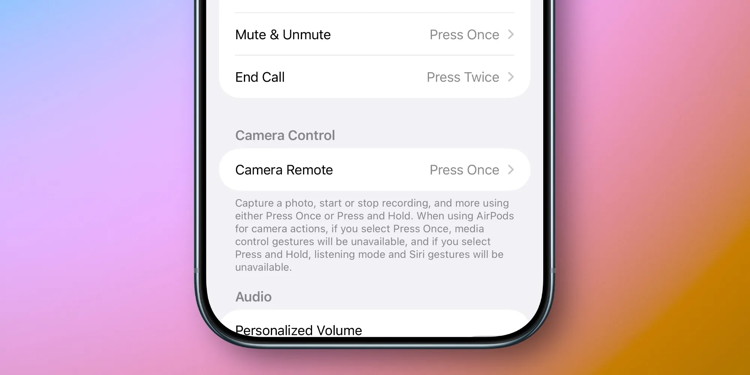
Camera Remote is off by default, but you'll find it inside the Settings app under AirPods settings in a 'Camera Control' section.
Camera remote from AirPod
Tap into the Camera Remote menu and select either 'Press Once' or 'Press and Hold' to enable your preferred gesture.
Once it's set up, any time your iPhone's Camera app is open, you'll be able to snap a photo, start and stop recording, and more by pressing your AirPods stem. Or the Digital Crown on AirPods Max.
From Apple's description in the Settings app:
Capture a photo, start or stop recording, and more using either Press Once or Press and Hold. When using AirPods for camera actions, if you select Press Once, media control gestures will be unavailable, and if you select Press and Hold, listening mode and Siri gestures will be unavailable.
All that's saying is that when the Camera app is active, your AirPods will replace the typical media control and/or Siri gestures with Camera Remote.
There's one requirement worth mentioning: Camera Remote is limited to AirPods Pro 3, AirPods Pro 2, AirPods 4, and AirPods Max 2.
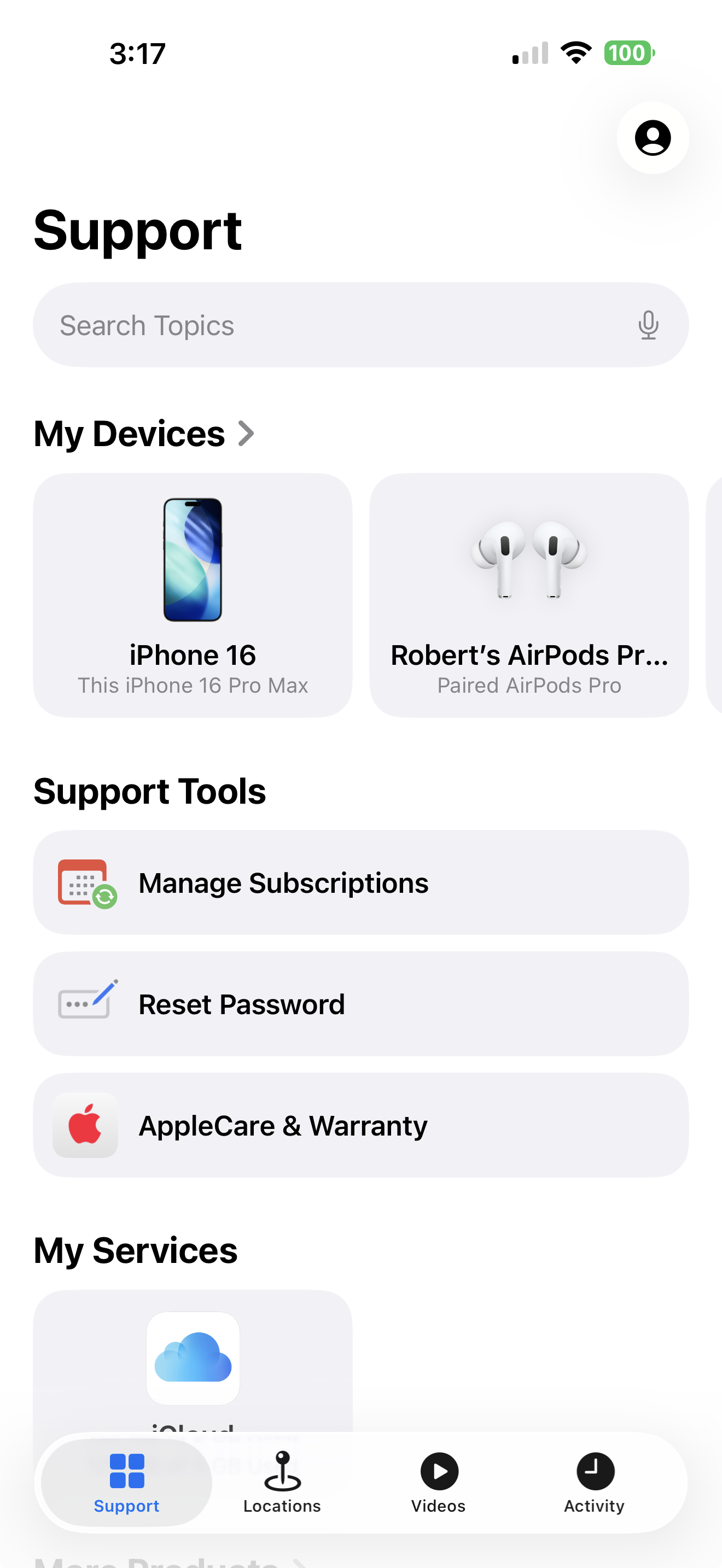
Apple has placed an App on the iPhone (iOS 16) that is designed to help you when you have a question or a problem. It is worth finding it and putting where you can find it easily. Double tap on it to open it.
You can take one of two approaches:
tap on the device you wish to explore and go through the topics
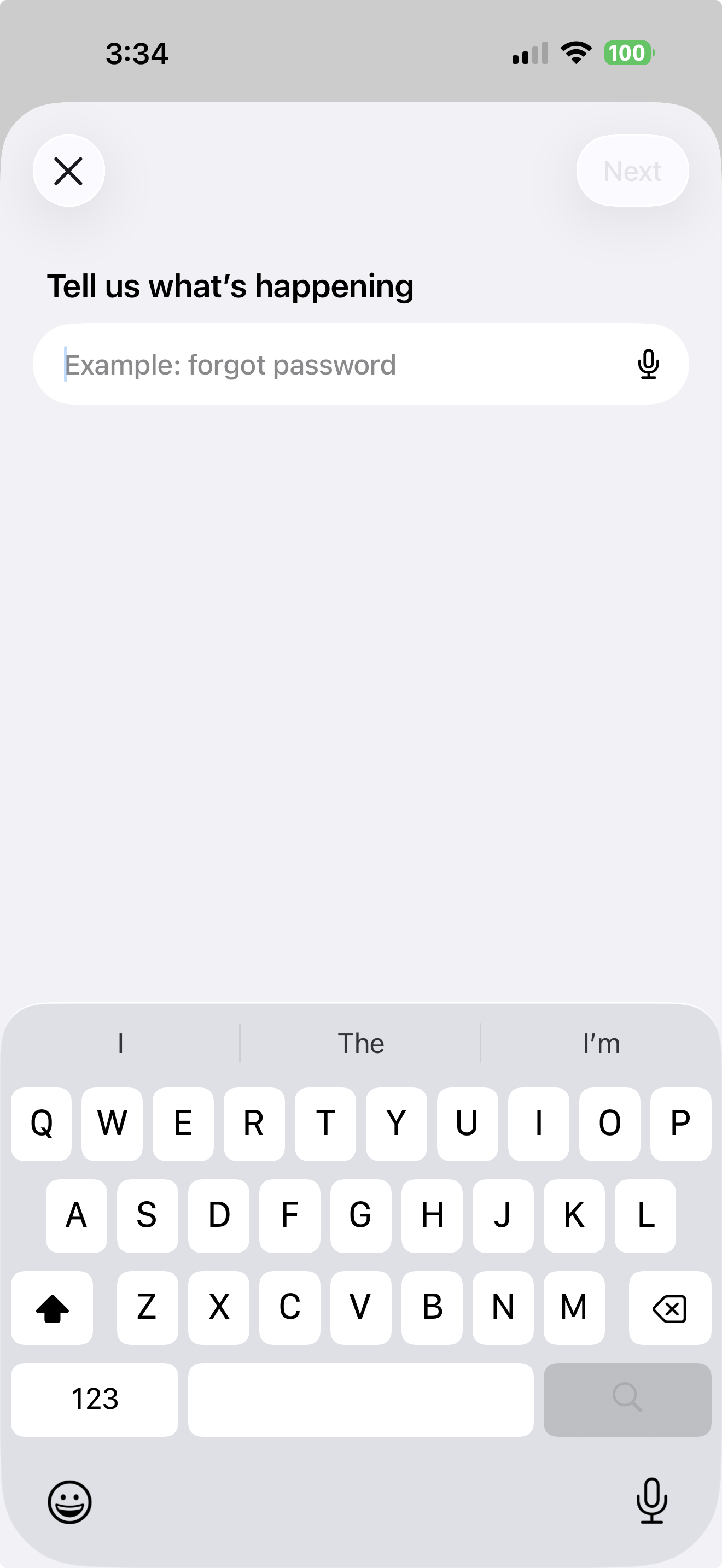
ask a question in the search box at the top e.g.:
'how to create an album'
'how to make a formula in numbers'
'make an appointment with Apple'
Here is what you will get when you start the app:
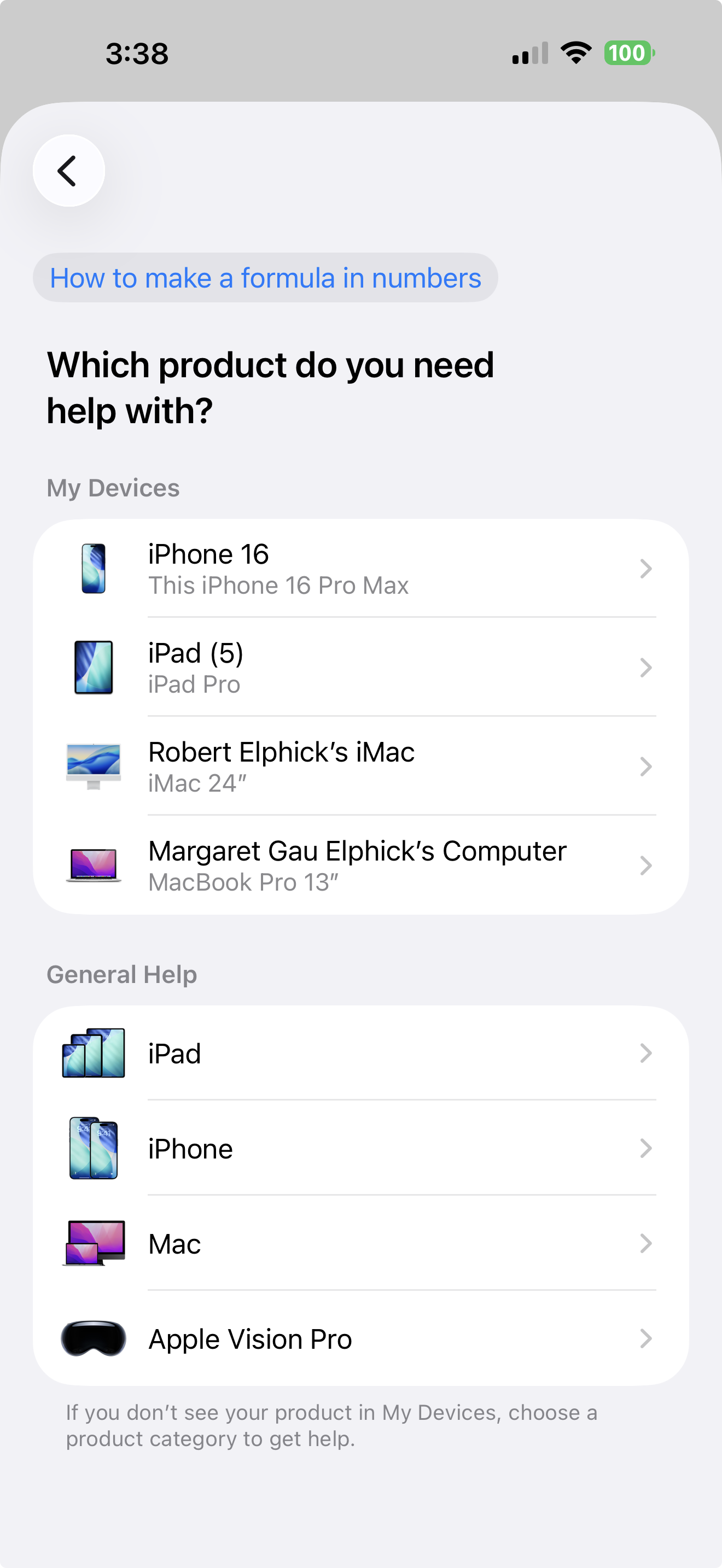
Once you type in a question you will get a request for which device you are enquiring about:
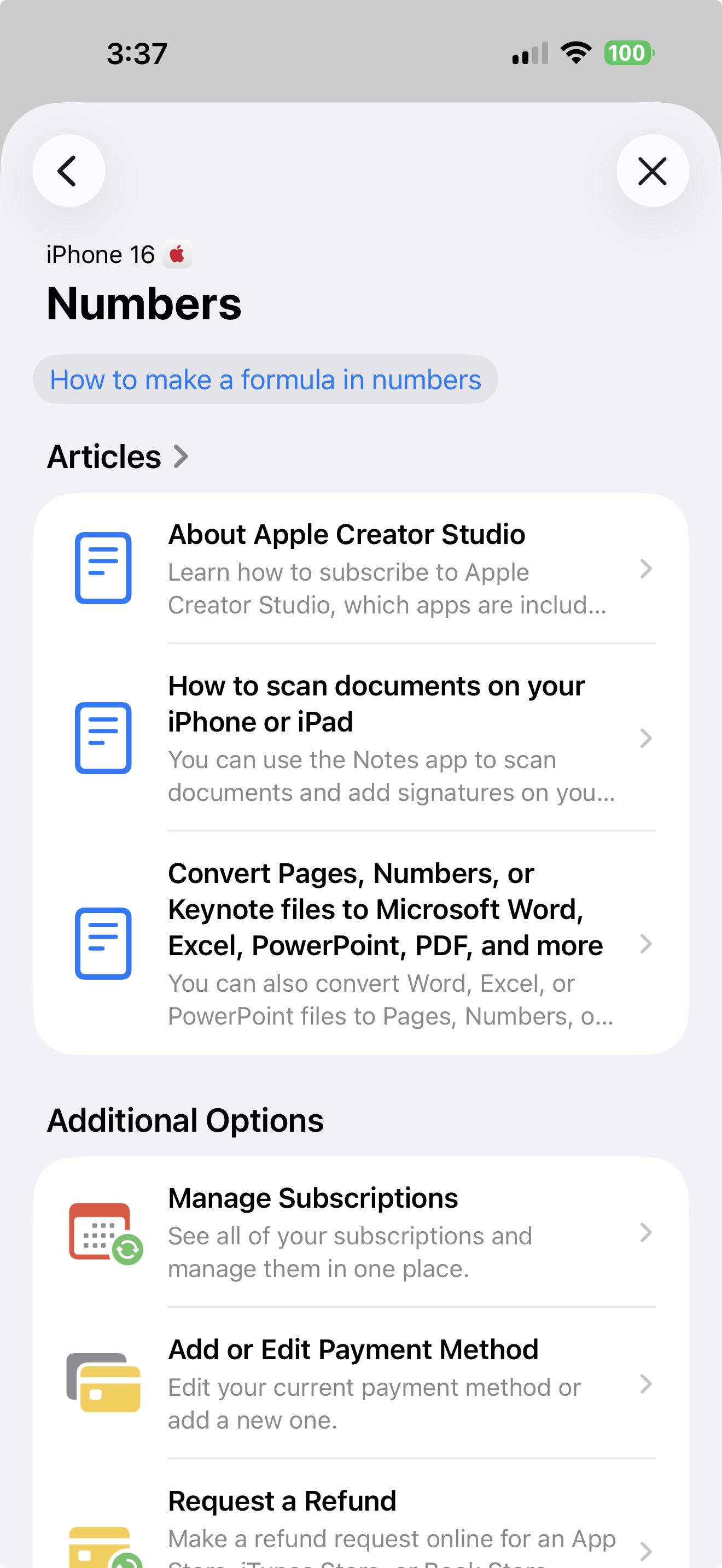
Then you will start to get suggestions like this:
Sometimes the response is not as relevant as you need in which case try to rephrase the question.
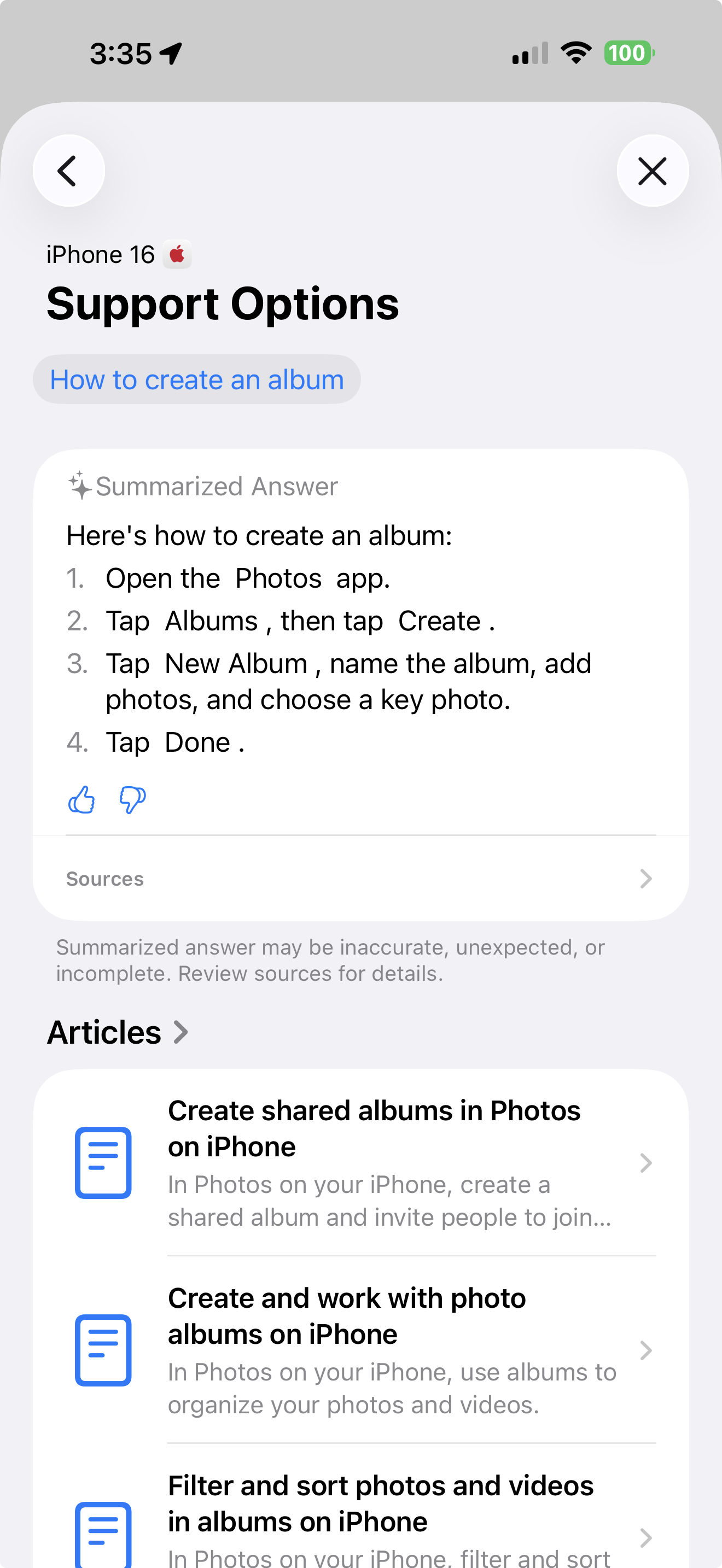
Most of the time you will find a useful set of help, like this:
The Support Application is also available on all devices including your Mac. It is also available online at this Apple site.
Apple TV's hit comedy lineup keeps growing, with big new series coming
by Ryan Christoffel, 9to5mac
Apple TV is a strong destination for comedies, headlined by hits like Ted Lasso and Shrinking. And recent announcements reveal a lot of similarly promising series in the pipeline.
Apple TV's new and upcoming comedies offer compelling lineup
One of Apple TV's strongest genres, alongside sci-fi, has long been comedies.
The first big Apple breakout series was Ted Lasso. And since then, Lasso's co-creator has also birthed the excellent Shrinking and Bad Monkey.
Apple is currently airing two excellent new series with comedic flair:
Maximum Pleasure Guaranteed, the thriller-dark comedy with Tatiana Maslany
Widow's Bay, the horror-comedy mashup starring Matthew Rhys
Margo's Got Money Troubles just aired its finale this week, but it's a comedic drama worth checking out too.
Ted-Lasso coaching trio.
Looking to the summer, upcoming comedy premieres include Ted Lasso's long-awaited return in August, a new season of the beloved British series Trying, and a pickleball film called The Dink. And this fall, a Texas-set comedy called Brothers will star Matthew McConaughey and Woody Harrelson.
We're also expecting the wait for a new season of Shrinking to be mercifully short, thanks to a quick turnaround shooting season 4.
Further out, there are two more high-profile new comedies Apple has in the works.
Apple's future comedy series include starring vehicles for Ben Stiller and Elizabeth Banks
Ben Stiller and Eddy Cue
Deadline reported today that a new Apple TV comedy series called Protective Custody is coming, headlined by star Ben Stiller:
Ben Stiller is set to star in and executive produce Protective Custody, a new comedy series from Mike Judge (Silicon Valley), Steve Hely (Common Side Effects) and Dave King (Parks and Recreation) that Apple is developing with an eye toward a series order.
Marking the first leading comedy series role for Stiller, Protective Custody will follow a disgraced financier accused of massive fraud who is thrown into protective custody, where he must navigate prison politics, salvage his reputation, and confront the consequences of his actions while awaiting trial.
Stiller is a frequent Apple collaborator at this point, most famously for his work on Severance. He's also starring alongside Jessica Chastain in an upcoming limited series,
Elizabeth Banks
Another recent Apple TV announcement is for a half-hour comedy from Elizabeth Banks.
Banks stars and executive produces in the untitled series, which hails from creators Liz Heldens ("Will Trent," "Friday Night Lights") and Matt Ward ("The Big Leap," "Best Medicine"). Here's the plot summary:
Fresh off a messy divorce, Heidi sets out to secure a lively second act for herself and her kids. But when she stumbles into coordinating her father's retirement community sex dates, Heidi is forced into an unlikely alliance with his girlfriend's perpetually single son.
T
The Elizabeth Banks show starts filming this year in Los Angeles, so a 2027 premiere is likely. Protective Custody might arrive next year too, but it's earlier in development so timing is anyone's guess.
Apple Watch and AirPods health features get major new global expansions
by Ryan Chritoffel, 9to5mac
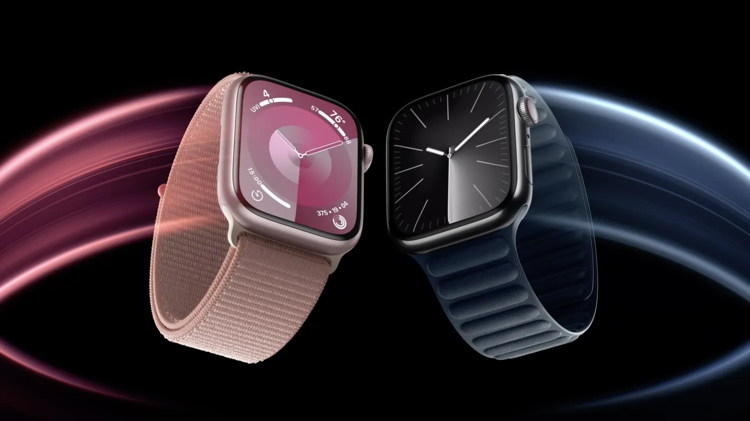
Apple Watch Series 9 vs 8
Apple has announced noteworthy global expansions for some of its latest health features for Apple Watch and AirPods. Here are the details.
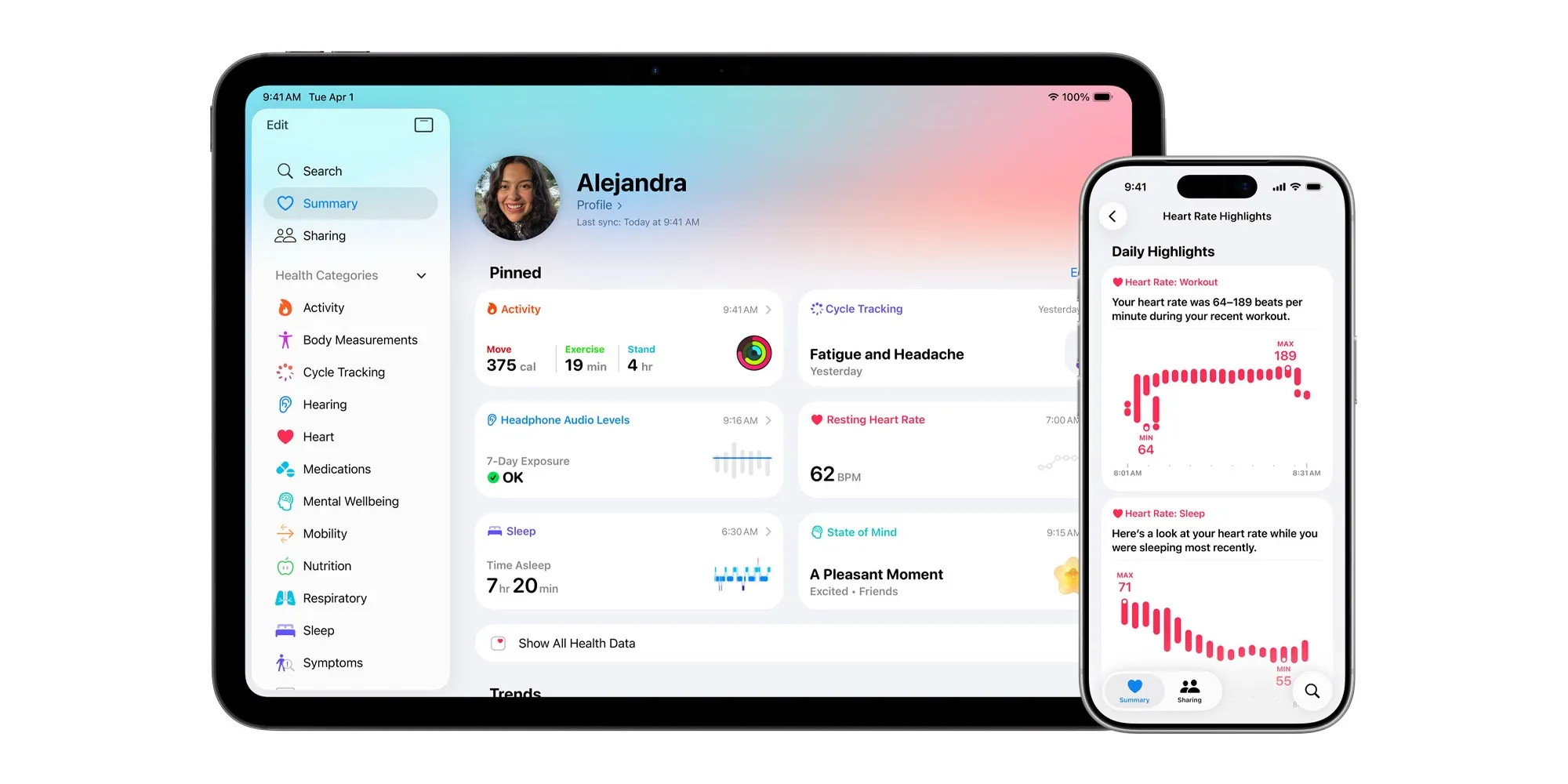
Four Apple Health features have rolled out to new countries, including two for India
Health continues being a major focus area for Apple, not only on Apple Watch but also now AirPods Pro.
Due to regulatory requirements, Apple's rollout of new health features is always gradual. But the company just announced that some of its latest features have rolled out to major new territories around the world.
Hearing Aid, the AirPods Pro feature, is now available in Italy. It requires AirPods Pro 3 or AirPods Pro 2.
Hypertension notifications have now launched in Taiwan. They require Apple Watch Series 9 or later, or Apple Watch Ultra 2 or later.
Finally, in the largest new global expansion, users across India now have access to two additional health features:
Hearing Test
Sleep apnea notifications
Hearing Test requires AirPods Pro 3 or AirPods Pro 2. Sleep apnea notifications require Apple Watch Series 9 or later, Apple Watch Ultra 2, or Apple Watch SE 3
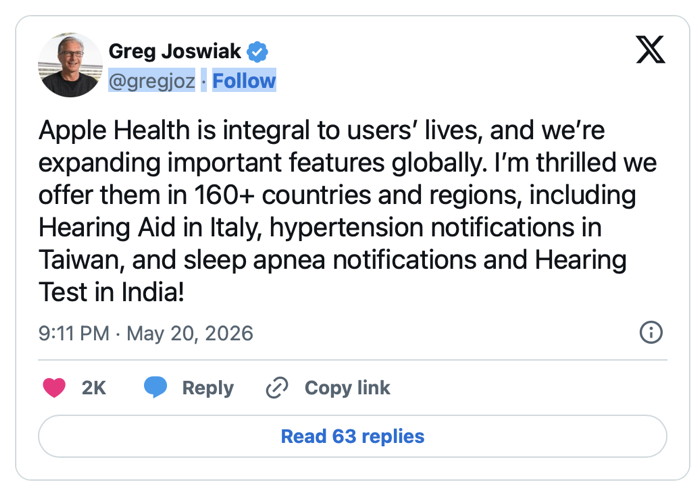
Apple's SVP of Marketing, Greg Joswiak, detailed the expansion in a post on X:
As Joswiak notes, select Apple Health features are now available in over 160 countries and regions around the world.
Coming to Apple TV: All the upcoming shows, series, movies, trailers, and more
by Macworld staff, macworld
In summary:
Macworld highlights Apple TV+'s extensive 2026 content pipeline, featuring returning series like Ted Lasso season 4, Silo season 3, and Sugar season 2 alongside new projects.
Notable upcoming releases include a Lance Armstrong biopic starring Austin Butler, Florence Pugh's sci-fi drama Dolly, and adaptations of Neuromancer and Brandon Sanderson's Cosmere universe.
Apple TV+ costs $12.99 monthly with various free trial options available, offering diverse content from biographical series to fantasy epics releasing throughout 2026.
Apple's list of currently available content for Apple TV continues to grow, and so does the list of upcoming projects in the works.
Some of these projects have been officially announced and acknowledged by Apple, while others have been reported by the Hollywood press.
We've divided this list in two: Coming Soon is a list of shows and films for which Apple has given an official release date or release window, and Further Out compiles content that is still in production or perhaps haven't even begun yet.
Owning an Apple Home: HomePods as a whole-home audio system
by Wesley Hilliard, appleinsider
Apple's HomePod and HomePod mini are incredible additions to your smart home. Here's how I've made use of Apple's smart speaker after abandoning Sonos and other speakers.
We're approaching two months in our new home, and I'm finally feeling like we've settled in nicely. If you missed my first installment on this Owning an Apple Home series, check it out to see how I approached the move and setup process.
While I'm working on stories involving pet care, smart kitchens, MagSafe mounts, and more, I'd like to examine what it is to be all-in on HomePods. That's right, I don't have any third-party speaker or other AirPlay solution in my home.
In May 2023, I sold my whole home Sonos system and went all-in on HomePod. I'd like to pretend I saw the troubles Sonos had coming ahead of time, but the reality is I wanted to simplify my Apple Home.
Apple had just brought back the large-sized HomePod in January 2023, and I decided I no longer wanted to use a third-party app to manage my music. I wanted the integration of AirPlay 2, Siri, and my Apple products without any effort or need for other tools.
I can happily say that I don't regret the decision. Here's how having a house full of HomePods has been and how I've integrated them in the new place.
watchOS 27 Will Add These New Features to Your Apple Watch
by Joe Rossignol, macrumors
Apple will unveil watchOS 27 during its WWDC 2026 keynote on Monday, June 8, and a handful of new features have been rumored already.
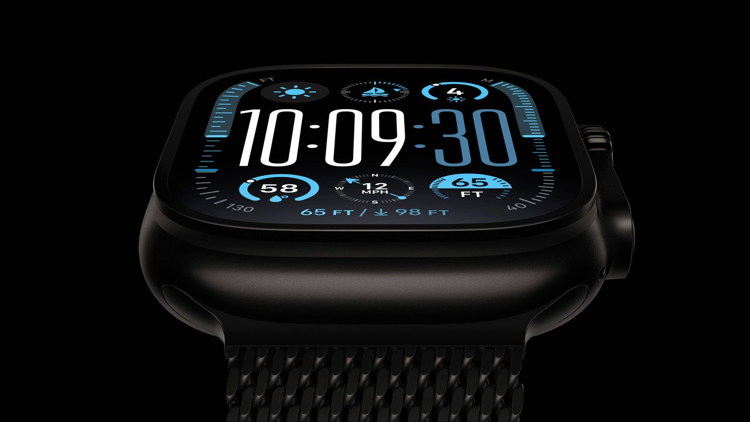
Apple Watch Ultra 2 Black Titanium
The first developer beta of watchOS 27 should be available immediately following the keynote, and a public beta typically follows in July. The update should be released to all users with a compatible Apple Watch model in September.
Below, we recap watchOS 27 rumors so far.
Improved Heart Rate Tracking
In his Power On newsletter this week, Bloomberg's Mark Gurman said watchOS 27 will include improvements to heart rate tracking, but he did not elaborate.
New Modular Watch Face
watchOS 27 will add new watch faces, including a variant of the "Modular Ultra" watch face that is currently exclusive to the Apple Watch Ultra, according to Gurman.
New Apple Intelligence Features
On watchOS 26, the following Apple Intelligence features are available on an Apple Watch when it is paired with an iPhone 15 Pro or newer:
Workout Buddy
Live Translation in Messages
Notification Summaries
When it announced the dates for WWDC 2026, Apple promised to unveil "AI advancements" across its platforms, and it can be reasonably assumed that watchOS 27 will include some additional Apple Intelligence features powered by the iPhone.
New Satellite Features
Apple Watch Ultra 3 has built-in satellite connectivity, enabling Emergency SOS, Find My, and Messages via satellite without any reliance on an iPhone.
iOS 27 will reportedly include up to five new satellite features, and the following two would likely extend to watchOS 27:
Apple Maps via satellite
Photos support for Messages via satellite
Amazon last month announced plans to acquire Globalstar, the satellite company that powers Apple's satellite features on the iPhone 14 and newer and the Apple Watch Ultra 3. In turn, Amazon announced that it has signed an agreement with Apple to provide satellite connectivity for current and future iPhone and Apple Watch features.
Stability Focus
Apple is largely focused on "stability, performance, and smaller refinements" for watchOS 27, rather than on major new features and capabilities, according to Gurman. This suggests that the update could include many bug fixes.
What do you call when a Pirate updates their iPhone?
An iPatch.
A 7-year-old kid showed his uncle with pride the 'telephone' he had just made from a string and two tin cans.
The man pulled out his iPhone and said, "That's nice, but… Look at what kids your age make in China!"
What do you call a person who saw an Apple store getting robbed?
An iWitness.
Malware Examples *
by Ron Sharp and Robert Elphick, MAGIC *
Here are some tips if you do respond to a scam email. Call your bank. Put a stop payment on your charge card if it is involved. Change your account password for whatever accounts are involved. If it's a PayPal account, log into that account and change the password. If you use a bank account online change that password. You can also set up email "rules" to block email from the sender if their email address shows. If you use Apples Mail app you'll find the "Rules" options in the Mail app Settings. You should also change the password to your email account that the scam email came to.
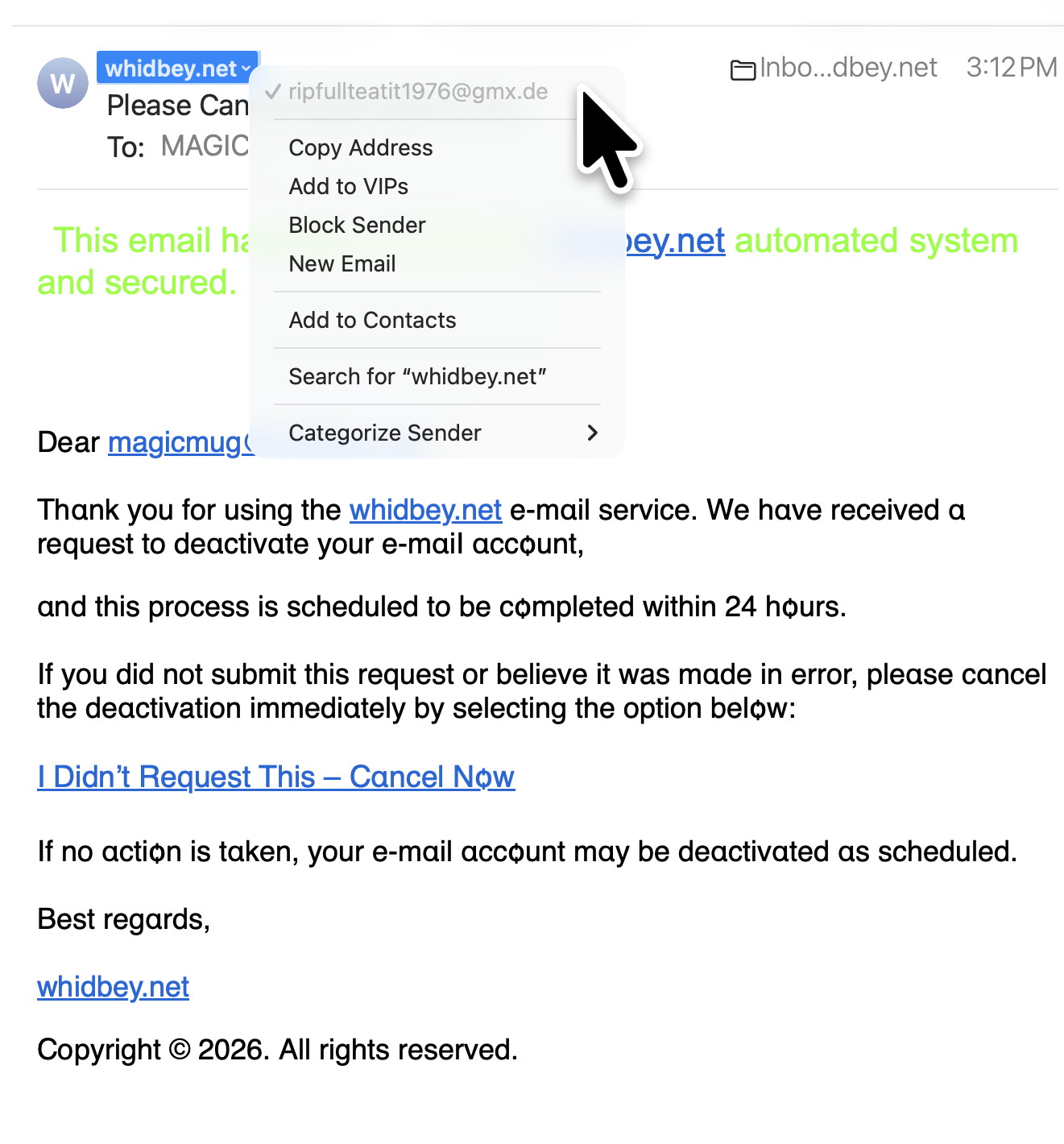
From address is not from WhidbeyTel (arrow)
DO NOT RESPOND.
From address is not from WhidbeyTel (arrow)
DO NOT RESPOND.
<
From address is not from Quickbooks DO NOT RESPOND.
SCAM! DO NOT RESPOND.
From address is not from WhidbeyTel (arrow)
DO NOT RESPOND.
SPAM
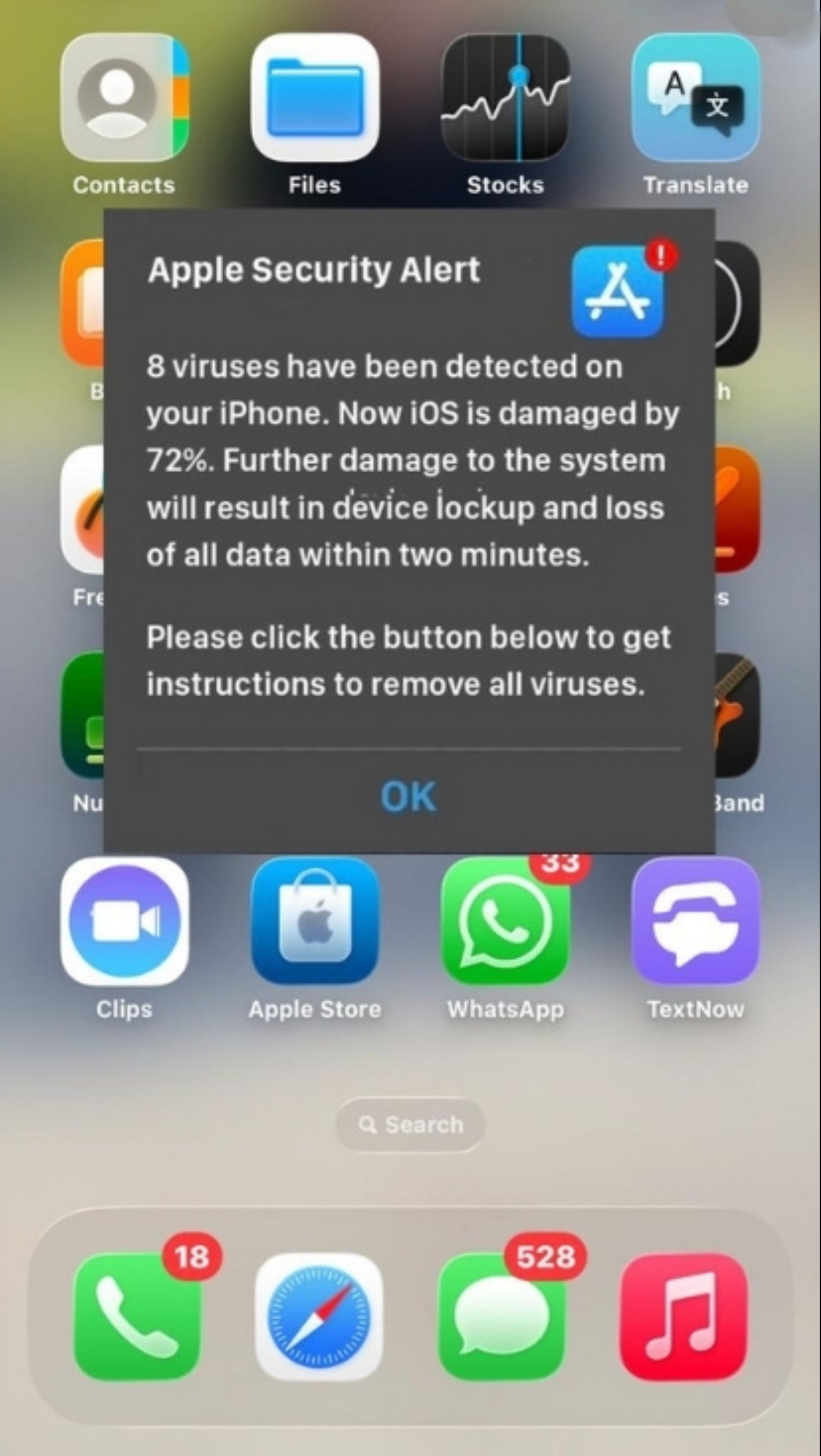
No one can detect viruses on your iPhone from the internet. DELETE IT!
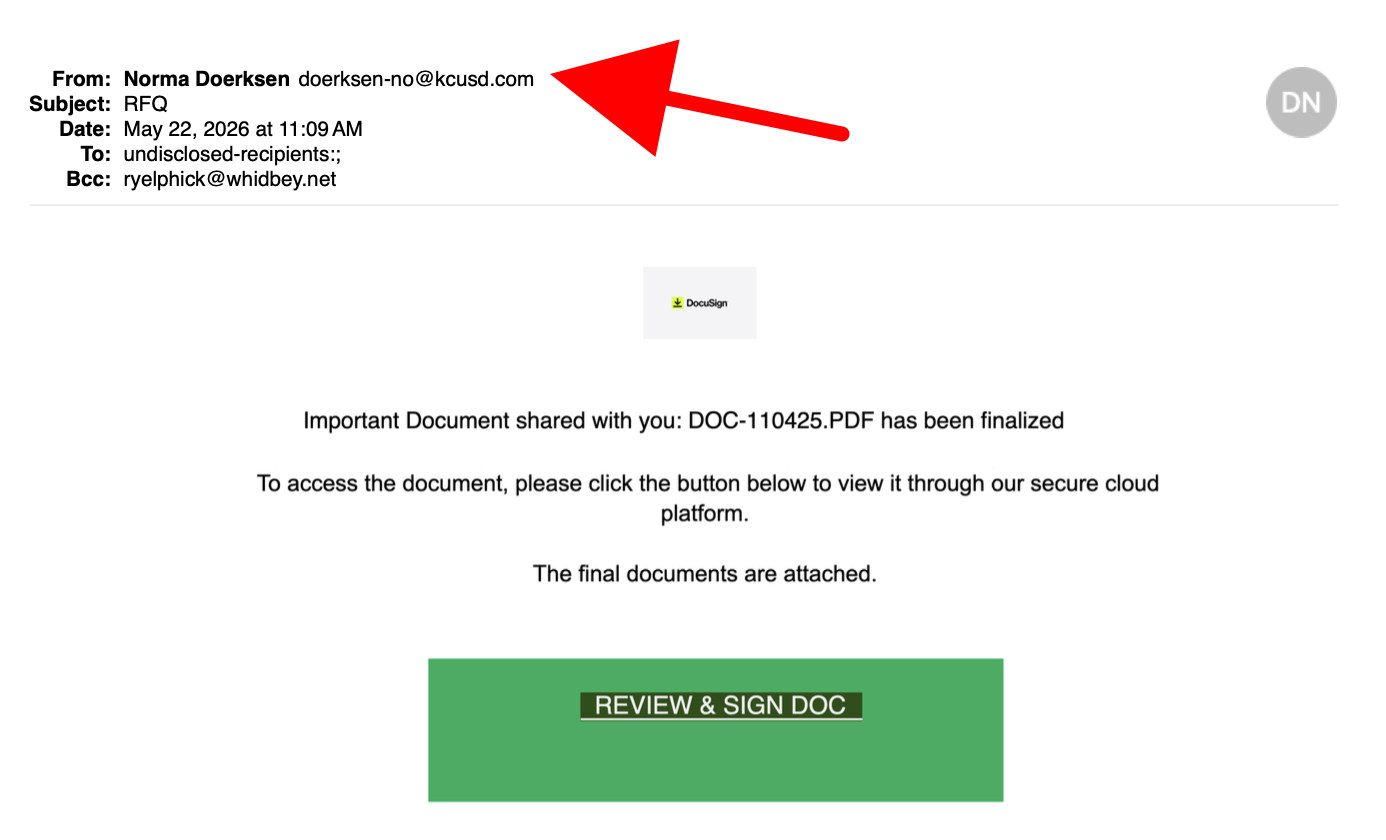
From address is not legitimate (arrow) DO NOT RESPOND.
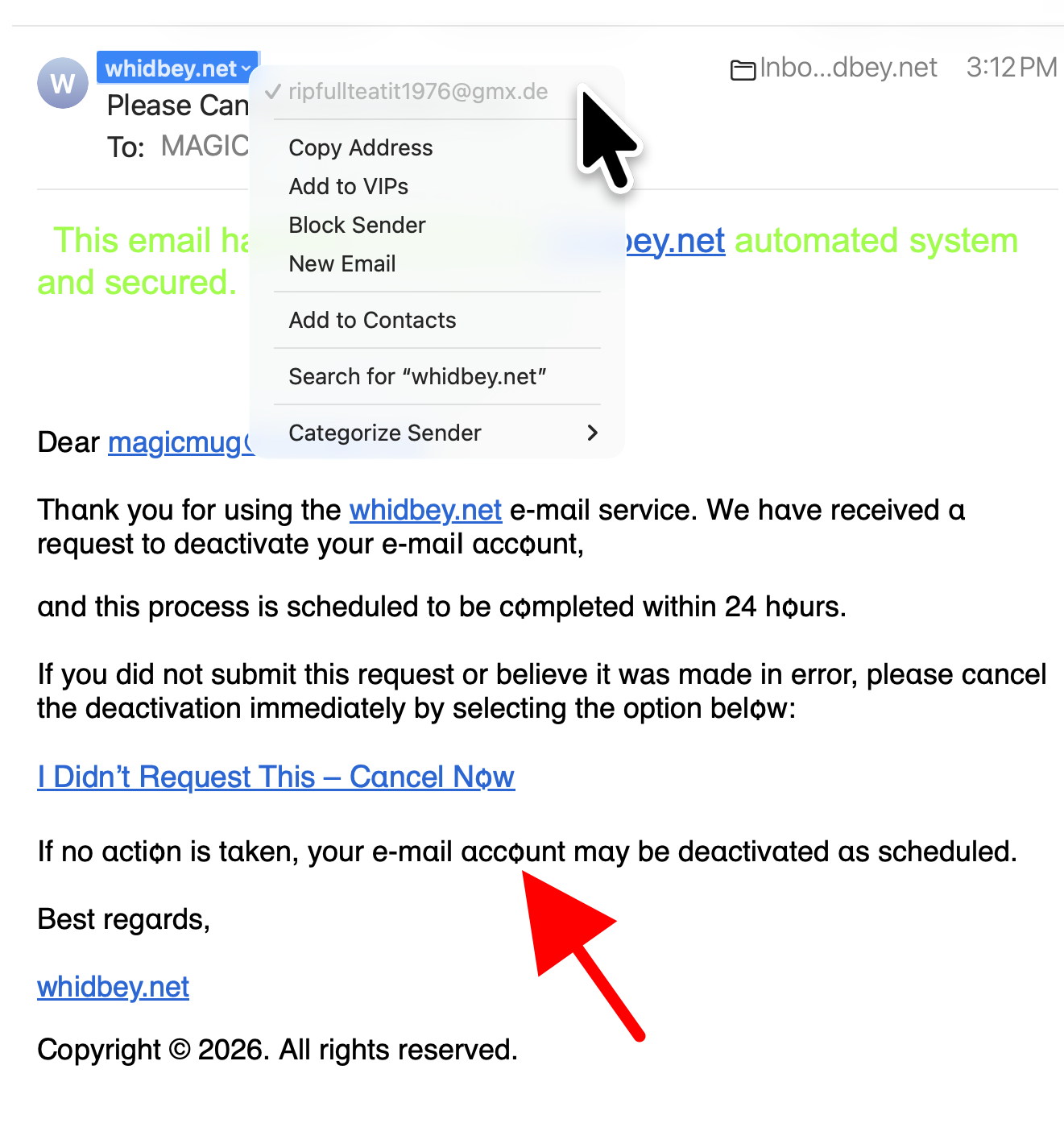
From address is not from WhidbeyTel (arrow) Also note that the letter "a" has been changed to the greek letter alpha DO NOT RESPOND.
From address is from Germany (de = deutchland) Also note that the letter "o" has been changed DO NOT RESPOND.
Internet Crime
Any one bothered by internet criminal activity should report it to the Federal Bureau of Investigation Internet Crime Complaint Center (IC3) at this web page. This includes phishing, malware, spoofing, any demand for money.
Sell or Swap
by MAGIC
Got something you would like to sell or give away? Need something second hand or out of date? Contact MAGIC at this email .
Wait, what? What are you talking about? What's the difference and how do I choose what when?
The word "Network" is a general term for a system of connected "things." In our case it is connected devices to one wi-fi system.
Wi-Fi is a wireless network so you can connect your computer and tablet wirelessly to the internet. Wireless networks use modems and routers to convert the signals from a cable to
a wireless signal. Wi-fi networks cover about 50 to 150 feet. If you get too far away from your router/modem then you will loose the signal and not be able to connect to the internet.
For a bit more wi-fi information, when you connect your device to a network, you may notice a 2.4GHz option and a 5GHz option. Most modems offer both options. The 5GHz is a little faster but the 2.4GHz will reach a little farther.
Cellular is for phone service. Your mobile phone uses a "cellular" signal to connect to your phone service. With cellular service you can connect to the internet wirelessly. Cellular signals travel about 22 miles. So if you have a good cell signal you are likely within 22 miles of a cell tower. (antenna) Some cell phones offer satellite connectivity if you are too far from a tower.
"Hotspot" is a term for using your cell phone service to connect your other devices to the internet. So if you are in a location where you get cell service on your phone but there is no internet, then you can turn on your phone Hotspot to allow your computer to use your cell service for internet connection. It can be handy, but remember that using your cell service for internet uses "data." If you have a limited data phone service plan then you may eventually reach a data limit for the month and either quit getting service or more likely getting extra charges on your plan.
Bluetooth is for connecting devices locally. It's range is around 30 to 300 feet, depending on the strength of the device. It is typically used for external speakers. If you use wireless headphones, AirPods, you will need your bluetooth turned on. Same with external speakers. Your computer and cell phone may also connect to each other via bluetooth. For instance, the "AirDrop" feature for sharing photos or documents between devices uses Bluetooth.
Your computer will automatically find and join available wi-fi networks, depending on your settings. Your cell service will only use the service you have an account with such as ATT, Verizon, T-Mobile, etc.
If your computer or your phone is not connecting properly, you know what to do, restart!
How Robots Could Save $6+ Billion Worth Of Recyclables A Year :
Meet Argus: An Omnidirectional, Sea-Urchin-Like Robot That Defies Traditional Designs:
MAGIC, the Macintosh Appreciation Group of Island County, serves people who use Macintosh computers, software and peripherals. Our goal is to share information and get answers to questions to make us more productive with our use of technology. Our monthly meetings give us a chance to discuss computer problems and share ideas with other Mac users, feature speakers on specific topics, and to keep apprised of Apple news.