• Introduction with Mike Turnbull
• "Notes" with Ron Sharp
Location:
by Zoom online
MAGIC Minutes for July 2026
by Wendy Shimada, MAGIC Secretary
At 4:04 p.m. President Mike Turnbull welcomed everyone and called the meeting to order with 11 attendees present. He brought up the fact that the Zoom visuals at sign-in had changed, which resulted in at least a few people experiencing confusion and sign-in difficulties and lost connections today. Mike, Ron and Robert will try to determine the problem immediately after the meeting so that next month hopefully won't result in the same issues.
Treasurer Carol Heimgartner was not present, so there was no monthly treasurer's report. The meeting was turned over at 4:09 to Ron Sharp, who gave an interesting presentation on Wifi, Bluetooth and cell service. After a few questions were answered by Ron, Robert and a couple of MAGIC members, the meeting was turned back to Mike, who adjourned the meeting just before 5 p.m.
/p>
Next month's MAGIC Zoom meeting will be August 19 at 4 p.m. Ron Sharp will be presenting Apple Notes, followed by the usual Q&A.
/p>
Missed the meeting? You can still watch the video tutorial on Safari by either visiting the MAGIC website at: MAGIC zoom Presentations or by just clicking on the MAGIC logo at the top of the monthly newsletter; it is a direct link to the MAGIC website, which offers many excellent tips and tricks, along with instructional video sessions from past meetings.
MAGIC Musings
Greetings Magic Members,
Summer is usually a whirlwind, but I'm hoping you can join us for this month's Zoom session on Apple's "Notes" app. It's an app I don't use much, so I'm excited to learn how to make the most of it.
Our Magic meeting is set for August 19th at 4:00 p.m. Ron will be our presenter this month. We're looking forward to seeing you there!
Just a heads-up, the September meeting is scheduled for September 15th.
Cheers,
Mike
MAGIC President
Note: This Software Update section of the newsletter lists the most relevant Apple updates. Not all updates are listed for all products. Additionally, I'll add other pertinent updates on occasion.
macOS 26.6 now available, here's what's new
by Marcu mendes, 9to5mac
Following an extended developer and public beta period, Apple is now rolling out macOS 26.6 to all users with compatible Macs. Here's what's new.
macOS 26.6 now available
macOS 26.6 is now available with fixes for more than 150 security vulnerabilities, along with other bug fixes and performance improvements. These include an issue that incorrectly showed deprecation notices for some Intel-only apps, as well as bugs affecting HealthKit and HDR screenshots in Messages.
For users planning on updating to macOS 27 Golden Gate later this year, macOS 26.6 likely starts the indexing process that will power the new Siri AI, the Siri app, and other features related to the new version of Apple Intelligence.
Apple has so far confirmed this only for iOS 26.6 and iPadOS 26.6, but the same process appears likely on the Mac. As users running the macOS 27 beta know, indexing can take several days, so starting it now should reduce the wait after upgrading later this year.
The release build for macOS 26.6 is 25G72, which is different from last week's RC (25G70).
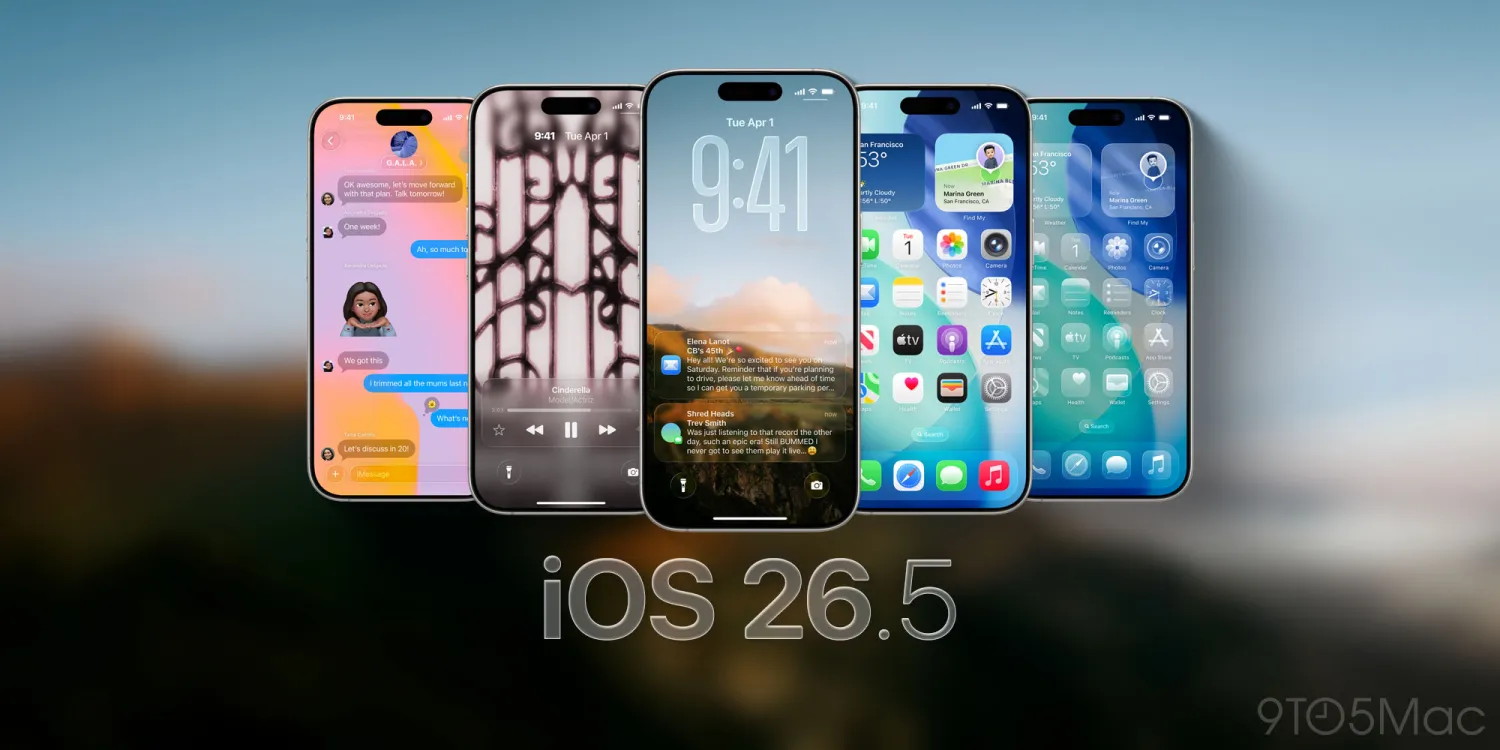
iOS 26.6 now available for iPhone with these changes
by Zac Hall, 9to5mac
Apple has officially released iOS 26.6 for iPhone users. The update is lighter on new features than iOS 26.4 and iOS 26.5, but it includes important bug fixes, security updates, and prepares your iPhone for iOS 27.
Here's everything you need to know about iOS 26.6.
iOS 26.6 details
iOS 26.6 is available now for all compatible iPhones. To install the update, open the Settings app, choose General, then choose Software Update. You can install it immediately or let your iPhone update automatically overnight.
Apple's release notes say:
This update includes bug fixes, security updates and optimizes the Spotlight index to prepare for iOS 27.
For enterprise users, Apple highlights this fix:
Resolved an issue where the DisableAssociationMACRandomization key did not prevent users from changing the Private Wi-Fi Address setting to Fixed or Rotating.
Since releasing iOS 26.6, Apple has detailed more than 75 security fixes that are included in today's release for iPhone and iPad.
iOS 26.6 features and changes
Spotlight optimization ahead of iOS 27
The most notable change in iOS 26.6 is one users may not see. Apple says the update optimizes the iPhone's Spotlight index before iOS 27 arrives.
iOS 27 includes major upgrades to Spotlight and Siri, and both features depend on indexing the content stored on your iPhone. Early iOS 27 beta testers found that this background process could take a week or longer. By starting some of that work with iOS 26.6, Apple should be able to provide a smoother upgrade experience this fall.
New blocked contacts alert
iOS quietly limits how many contacts an iPhone user can block. Previously, however, the software offered no clear explanation when that limit was reached.
iOS 26.6 adds a new "Blocked Contacts Limit Reached" alert. The message directs users to remove an existing blocked contact in Settings before adding another one.
Anti-snatching feature remains in development
Code discovered during the iOS 26.6 beta cycle also revealed that Apple is working on an anti-snatching security feature. The feature is designed to detect when an unlocked iPhone is abruptly taken and lock it automatically.
The code was found in iOS 26.6, but the feature itself does not appear to be enabled as part of this release. Apple could activate it in a future update.
Security updates and bug fixes
Apple says iOS 26.6 includes security updates and bug fixes. As always, installing the latest iOS release is the best way to make sure your iPhone has Apple's newest protections.
iOS 27 is coming next
iOS 26.6 arrives as Apple shifts its attention to iOS 27, the next major iPhone software update. iOS 27 is currently available in both developer and public beta testing, ahead of its expected public release in September.
9to5Mac's Take
iOS 26.6 likely represents the best version of iOS 26 that we'll see. While it's the right iOS version for anyone not wanting to risk beta issues right now, iOS 27 starts off much more mature than iOS 26 in a lot of ways.
This includes design with the Liquid Glass slider and other improvements, Siri AI capabilities, and the many performance improvements. In many ways, iOS 27 feels like the more developed version of iOS 26.
Freeform Is Apple's Least Understood Collaboration App
from applemagazine
Freeform gives iPhone, iPad, and Mac users a shared visual workspace for notes, ideas, files, sketches, plans, and live collaboration.
Freeform may be Apple's least understood collaboration app. It is already installed on millions of iPhones, iPads, and Macs, but many users still do not know what it is for, where it fits, or why they should open it instead of Notes, Pages, Keynote, or a third-party whiteboard app.
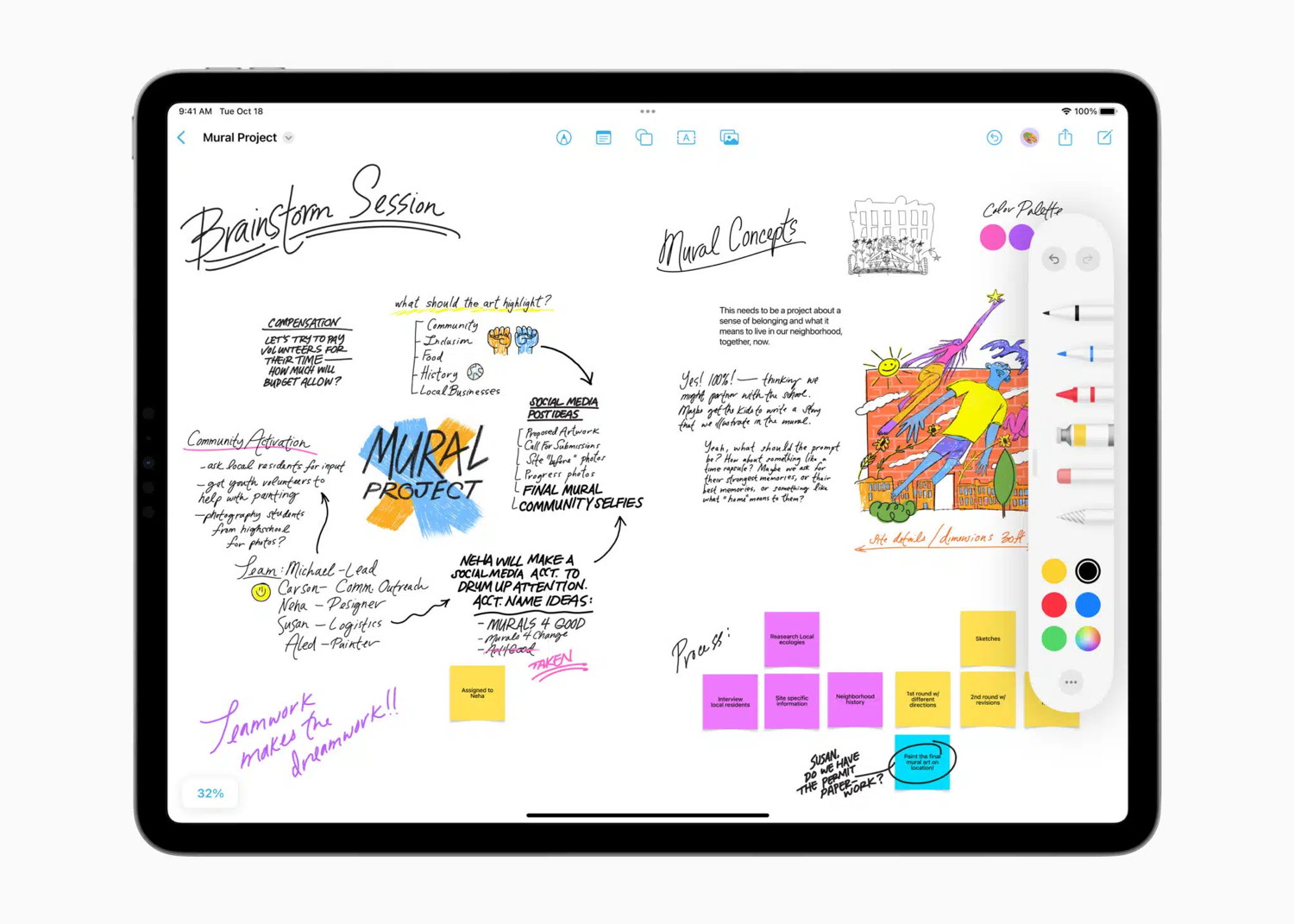
That confusion is understandable. Freeform does not behave like a traditional document app. It does not start with a blank page, a cursor, or a fixed layout. It opens as an open canvas where users can add text, sticky notes, photos, PDFs, links, shapes, drawings, diagrams, files, and handwritten ideas. It is less like writing a document and more like spreading ideas across a desk.
That makes Freeform powerful, but also easy to overlook. Apple users know what Notes is for. They know what Pages, Numbers, Keynote, Photos, and Files do. Freeform sits between those categories. It is a planning board, sketchpad, mood board, research wall, brainstorming space, visual notebook, and collaboration canvas at the same time.
Freeform Works Best Before the Final Draft
The easiest way to understand Freeform is to think of it as the place where work begins before it becomes organized.
A document app is useful when the structure is already clear. A spreadsheet is useful when the data is ready. A presentation app is useful when the story has slides. Freeform is useful earlier, when ideas are still messy and need space.
A user can drop in screenshots, links, handwritten notes, text blocks, arrows, PDF pages, photos, shapes, and reminders without deciding immediately how everything should look. That makes it useful for planning a project, organizing a trip, mapping an article, sketching an app idea, comparing products, preparing a classroom activity, outlining a video, or collecting references for a design.
This is where Freeform differs from Notes. Notes is linear. Freeform is spatial. In Notes, information flows down the screen. In Freeform, information can sit anywhere. Ideas can be grouped, moved, connected, circled, expanded, or pushed aside. For visual thinkers, that matters.
Freeform is not meant to replace Apple Notes. It gives Apple users a different way to think.
A Digital Whiteboard for Apple Devices
Freeform is Apple's built-in digital whiteboard. It works across iPhone, iPad, and Mac, with iCloud keeping boards updated between devices. A board started on Mac can be edited later on iPad. A quick idea captured on iPhone can be expanded on a larger screen. Apple Pencil makes the iPad version especially natural for sketching, drawing arrows, marking up images, and handwriting rough ideas.
The app supports many types of content. Users can add text boxes, sticky notes, shapes, photos, videos, audio files, links, documents, PDFs, scans, and drawings. Items can be resized, layered, aligned, grouped, and arranged freely on the canvas.
That flexibility is the point. A Freeform board does not have to look finished. It can be messy, personal, and temporary. It can also become more polished if the user wants to present an idea or share a plan.
For Apple, Freeform fills a gap in the productivity lineup. Pages handles documents. Numbers handles spreadsheets. Keynote handles presentations. Notes handles quick text and attachments. Freeform handles visual thinking.
MacBook Neo 2 rumored to pack a faster chip and more RAM
by Anurag chawake, cultofmac
Apple is already cooking up a MacBook Neo 2. The budget laptop's successor is tipped to feature a faster chip and a healthy memory bump.
The upgrade would fix the biggest complaint about the current model.
MacBook Neo 2: A19 Pro chip and more RAM
The MacBook Neo brings the Mac experience to a lower price point without sacrificing the company's signature build quality. Introduced in March 2026, it features a 13-inch display, an A18 Pro chip and 8GB of memory, delivering performance that easily handles everyday tasks like web browsing, productivity apps, streaming and light creative work.
And now Bloomberg's Mark Gurman reports Apple is developing a MacBook Neo 2 upgraded with the A19 Pro chip. Apple is also said to bring a memory upgrade. The MacBook Neo 2 is expected to ship with 12GB of RAM.
Apple Upgrade leasing program launches for iPhone, Mac, iPad, and Apple Watch
by Chance Miller, 9to5mac
Apple has officially announced Apple Upgrade, a new product leasing program available starting today in the United States.
Apple Upgrade, which is backed by Klarna, lets users lease iPhone, Apple Watch, Mac, and iPad purchases, with the option to easily upgrade at the end of the lease term. Here's how it works.
Apple Upgrade leasing program: How it works
Apple Upgrade is available across Apple's product lines, including the latest iPhone 17 lineup, MacBook Air, Apple Watch Series 11, and much more.
iPhone and Apple Watch are available with 12-month and 24-month leasing terms, while Mac and iPad are available with 24-month and 36-month terms.
iPhone leases start at $17.99 per month for iPhone 17e
Apple Watch leases start at $11.99 per month for Apple Watch Series 11
Mac leases start at $24.99 per month for MacBook Air
iPad leases start at $11.99 per month for iPad mini
Your old Mac and iPhone are suddenly worth a lot more
by Michael Simon, macworld
When Apple hiked prices on dozens of devices in late June, we were left wondering what that meant for trade-ins. Since Apple was charging more for new devices, we naturally assumed Apple should give us more for our older devices, too.
Now they are. As spotted by 9to5Mac, Apple has raised trade-in values for most devices, including Android phones. Presumably this is because Apple will get more from the used devices on the secondary market, whether through resale or reused parts, due to the surging price of RAM and other components.
Most notably, iPhone trade-in values have mostly all increased, going all the way back to the iPhone 8, which will net you $5 more than before ($40 versus $35). The only iPhones that haven't been affected are the 16e, 14 Plus, 2nd-gen SE, X, and 8 Plus.
Apple doesn't offer trade-in estimates for its newest iPhones, including the iPhone 17 series, Apple Watch Series 11, MacBook Neo, and other current devices. Here are a few highlights for the models it does offer:
iPhone 16 Pro: Up to $630 ($70 more)
iPhone 14 Pro Max: Up to $405 ($30 more)
iPad: Up to $260 ($25 more)
iPad mini: Up to $300 ($35 more)
MacBook Pro: Up to $855 ($160 more)
Mac Studio: Up to $1,305 ($270 more)
Of course, the maximum value depends on the condition, configuration, and age of the device, and you can almost certainly get more by selling your device through eBay or some other third-party site. But if you're buying through Apple, the process is easy and straightforward—and now you're getting a little more, too, just in time for new iPhones, Apple Watches, and Macs this fall.
You can check the trade-in value for your device on the Apple Trade In site.
iOS 27 adds new Phone app feature that’s an instant favorite
by Ryan Christoffel, 9to5mac
I’m not a big fan of phone calls, so the Phone app isn’t somewhere I spend much time. But last year in iOS 26, the app had two of my favorite new features: Call Screening and Hold Assist.
Now with iOS 27 this year, Apple has again impressed me with a new Phone app feature.
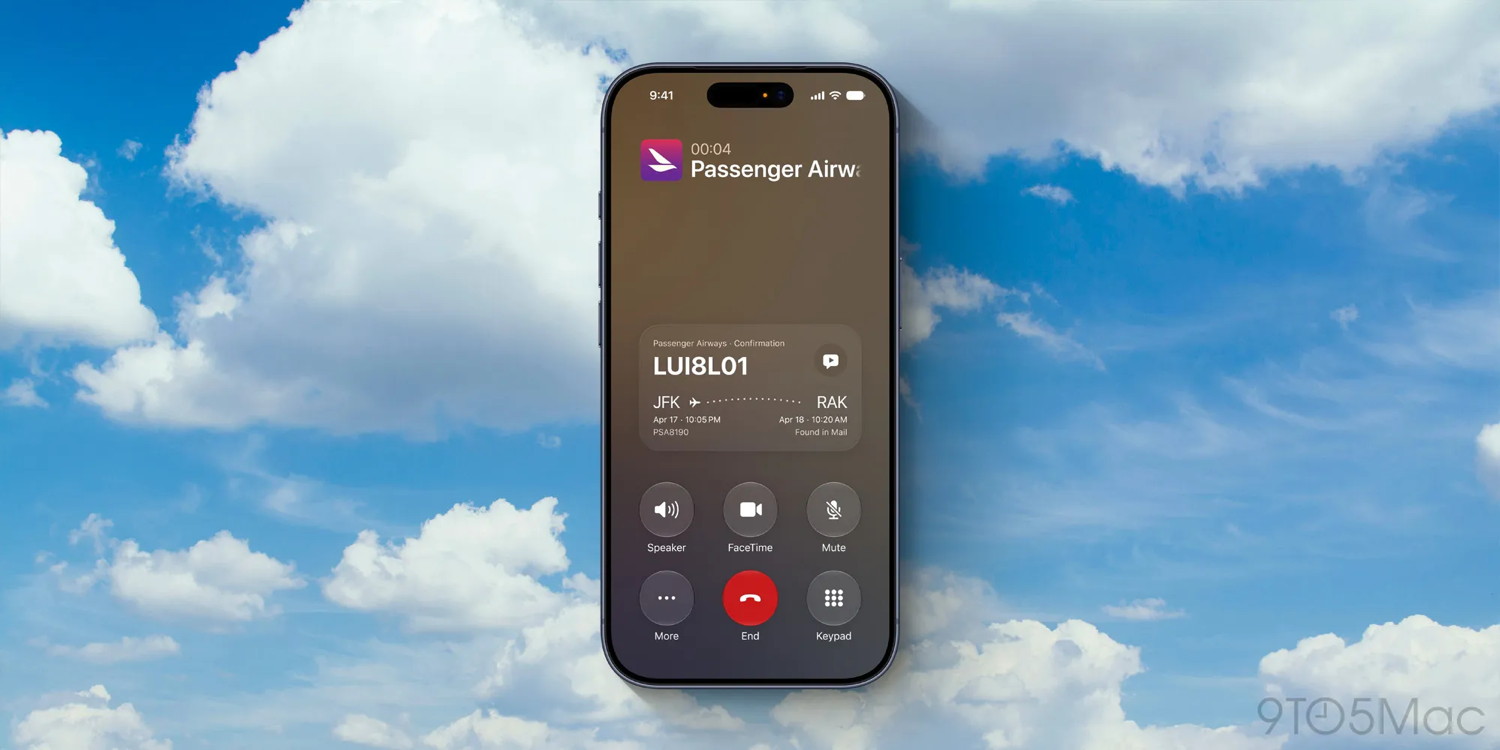
Call Context is an Apple Intelligence feature that automatically surfaces relevant info on the call screen when you’re on the phone with a business.
Per Apple’s website:
Get relevant information while on a call. Call Context can proactively surface relevant information from across your apps when calling a business — like a confirmation code from Mail when you call an airline.
I’ve had the chance to use Call Context a couple times during the iOS 27 beta. And I’ve very quickly concluded that this is the kind of no-brainer addition that should prove popular.
Recently I booked flights with Southwest Airlines, and later needed to call them about a change.
When I called, my flight info was automatically put on the screen. My iPhone even offered to read the confirmation number out loud for me on the call.
OS 27 was also smart enough to include details for another Southwest flight stacked underneath the foremost one. So if Call Context doesn’t show the most relevant info at first, in most cases it should be just a quick tap away.
Call Context will initially be available only in English, and it’s limited to iPhone, iPad, Mac, and Apple Watch models that support Apple Intelligence.
iPhone Ultra is coming: Six new features in Apple’s top-tier model
by Ryan Christoffel, 9to5mac
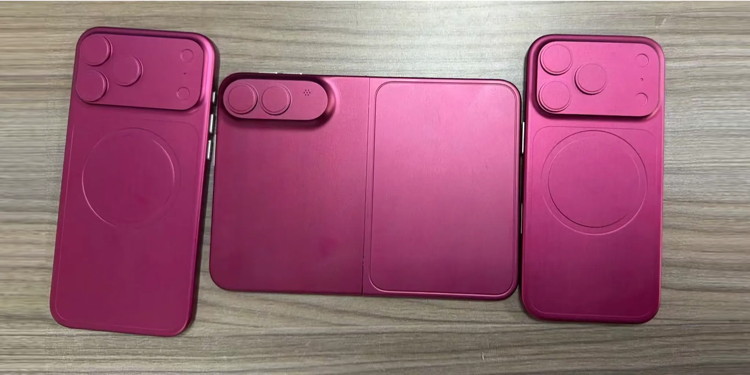
Dummy models of iPhone Ultra, iPhone 18 Pro, iPhone 18 Pro Max
As Apple's first foldable, iPhone Ultra will have an extremely unique design for an iPhone.
Unlike most foldables, iPhone Ultra will be wider than it is tall when unfolded. It will have a book-style fold, with an outer display that looks shorter and wider than every other iPhone screen, and an inner display that resembles an iPad mini in size and shape.
Also unlike previous foldables, the inner display of iPhone Ultra is expected to have a crease-free design—a big breakthrough for the form factor.
iPhone Ultra will take some design cues from the iPhone Air. It will have a titanium border, be ultra-thin when unfolded, and resemble two iPhone Airs stacked together when folded—but thinner.
Apple Pay is getting even better with four new features
by Chance Miller, 9to5mac
Apple Pay is a go-to feature for iPhone users when shopping in stores, online, and in apps. Apple recently announced four new features that make Apple Pay even better. Here's how they work.
New design in iOS 27
One of my favorite changes in iOS 27 is the redesigned Apple Pay checkout interface. The new interface makes it much easier to switch between different cards during the checkout flow on websites and in apps.
In the new design, you can easily swipe between cards on the main Apple Pay checkout screen. You can also tap on a card to view a grid of all your available Apple Pay cards.
The design also makes it easier to see information about individual cards, including rewards, balances, pay later options, and more.
iOS 27 is available in beta to developers and public beta users. It will be released to everyone this fall.
We're about two months away from Apple's annual iPhone debut in September. This year, though, will be a bit different. Instead of the entire iPhone lineup debuting at once, only the iPhone 18 Pro, iPhone 18 Pro Max, and all-new foldable iPhone will launch this September. Here's why.
A growing iPhone lineup
Over the years, the annual iPhone lineup has gradually gotten larger. A short while ago, there were only 3 annual debuts: iPhone 11, iPhone 11 Pro, and iPhone 11 Pro Max. In 2020, that grew to 4 annual debuts with the iPhone 12 mini, and in 2022, the iPhone 12 mini was swapped for the iPhone 14 Plus - and that's now been swapped for iPhone Air.
With the introduction of iPhone 16e, the annual release cycle grew to 5. With the introduction of iPhone Ultra, it'll now be 6 annual iPhones. That's a lot of phones - and a very crowded stage if they all debut at once.
So, Apple has decided to move to a split release schedule.
Two iPhone releases: Fall and Spring
The iPhone 18 lineup will consist of 6 models: iPhone 18, iPhone 18 Pro, iPhone 18 Pro Max, iPhone 18e, iPhone Air 2, and iPhone Ultra.
There'll be a theme to this split release schedule: flagships in the fall, and lower end devices in the spring. So, it'll look like this:
Fall 2026: iPhone 18 Pro, iPhone 18 Pro Max, iPhone Ultra
Spring 2027: iPhone 18, iPhone 18e, iPhone Air 2
When the iPhone lineup had grown to four devices, the fourth model had never sold well at launch, whether that was iPhone mini or iPhone Plus. So, Apple figured there should be a definitive split - giving a separate spotlight to the additional phones.
There's a little bit of a twist when it comes to iPhone 18, though. Reportedly, Apple is working towards merging the production techniques of iPhone 18 and iPhone 18e, so there may be much less differentiating the two phones.
It's unclear if this means iPhone 18e will get much better, or iPhone 18 will get worse - but the two phones might only split hairs when it comes to display panels and cameras.
Wrap up
All in all, assuming the iPhone Air doesn't end up getting canned (which I certainly hope it doesn't) - this'll be the new iPhone lineup going forward. Three in the fall, and three more in the Spring. In the end, this'll hopefully allow Apple to better segment its launches to get to the right audience.
This'll also likely end up increasing the average selling price of the iPhone, as people who want to buy into the launch hype will have no choice but to buy an iPhone 18 Pro, rather than a cheaper model.
It remains to be seen if splitting the lineup will actually result in everything selling better, but that's the preliminary theory.
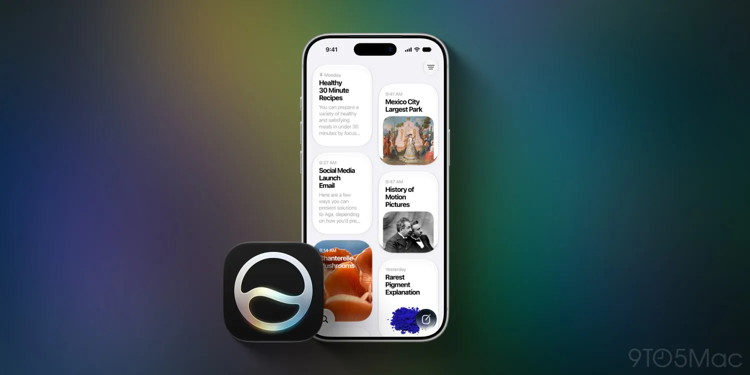
iOS 27's new Siri delivers in every single way I'd hoped for
by Chance Miller, 9to5mac
Siri AI launches this fall in iOS 27, and after more than a month using the beta, I can happily say the new Siri delivers in every way I'd hoped for.
Siri AI has the three upgrades I wanted most in iOS 27
Siri AI
I'm what you might call a "casual" AI user. I'm not building apps with AI, have no interest in benchmarking models, and mostly just use it as a search replacement.
My guess is this puts me right in line with the average iPhone user. I find AI a useful tool, but I'm not exactly a passionate enthusiast, nor am I fearful of everything labeled 'AI.'
With that context in mind, after my early iOS 27 testing, I'm glad to report that the new Siri does exactly what I've been wanting.
Everyone has their own Siri wishlists, but my personal top three pre-iOS 27 were:
World knowledge
Conversational UI
Consistent and integrated across Apple devices
So far, Siri has delivered on all of these fronts.
Siri AI can answer questions about just about anything. It's not limited to the select knowledge domains Apple supported before.
The new Siri app is a convenient home for conversations with the assistant. I can ask follow-up questions and revisit past chats with ease.
And unlike the old Siri, which had fragmented capabilities across devices, Siri AI was designed to be the same across all platforms. You'll get the same Siri intelligence across iPhone, Mac, Apple Watch, iPad, and soon the same should be true on Apple TV and HomePod.
Siri isn't just consistent across devices, it's also integrated deeply with Apple's own apps and services. It offers personalized assistance based on your messages, notes, email, and more—something that's hard for competitors to match.
Apple first announced an AI-upgraded version of Siri in 2024, and the AI landscape has changed a lot since then. But early signs indicate that for the average iPhone user, iOS 27's new Siri could prove worth the wait.
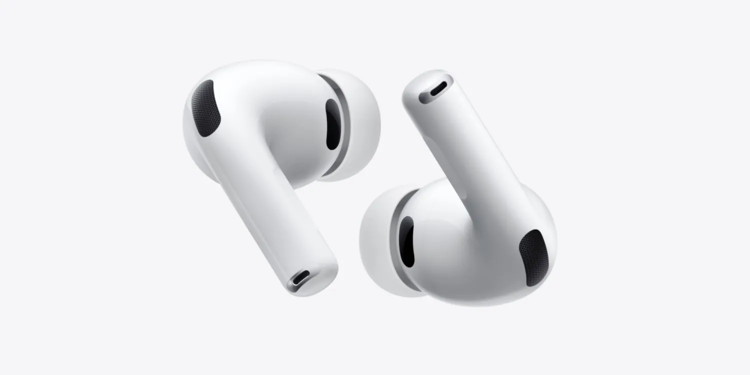
New AirPods could launch next month, and one feature sounds very exciting
by Chance Miller, 9to5mac
Apple's iPhone 18 Pro unveiling next month might also bring the launch of new AirPods with cameras. Here's why the addition of cameras could prove especially compelling.
Cameras could help AirPods expand health features to vision, using VoiceOver and visual intelligence
AirPods with cameras have been rumored since 2024. And for the longest time, I struggled to understand what use cases could be compelling enough to justify adding cameras.
But earlier this year, Apple unveiled a new AI-powered VoiceOver feature. And suddenly, the idea of cameras on AirPods made a lot more sense.
As seen in the video below, iOS 27's VoiceOver upgrades should prove extremely valuable for blind and low-vision users.
But I imagine they'll be far better when using AirPods with cameras.
Per Mark Gurman's reporting, Apple plans to launch AirPods with cameras this fall. And historically, the company debuts new AirPods in September at the iPhone event.
Whenever the new AirPods do arrive, Gurman says they'll include visual intelligence features that let you ask Siri about the world around you.
While I'm sure that addition will have value on its own, throw VoiceOver into the mix for blind or low-vision users and the new AirPods suddenly become very compelling.
Apple has aggressively started turning AirPods into health devices. It launched hearing health features in 2024, including Hearing Aid, and added heart rate sensing in 2025 to AirPods Pro 3.
Now, AirPods assisting in the key area of vision health could be next. And for a number of users, that would be transformative.
Tim Cook has long said that health will be Apple's biggest area of contribution to the world. As he steps down from the CEO role, launching a major new health feature in AirPods could be a great send-off.
watchOS 27 adds new feature to improve your Apple Watch battery life
by Ryan Christoffel, 9to5mac
watchOS 27 launches this fall as the next major Apple Watch update, and it includes a handy new feature that can improve your Apple Watch battery life: 'proactive battery extension notifications.'
watchOS 27 can proactively extend Apple Watch battery life by disabling unused features
watchOS 27 is coming soon, adding two apps to Apple Watch, a useful tap gesture, new default Home Screen, three Health-related upgrades, and more.
Another watchOS 27 addition aims to boost your Apple Watch battery life.
'Proactive battery extension notifications' are a new type of alert you might see on Apple Watch.
When you get a battery extension alert, it means watchOS 27 has detected that there are certain features you never use that will save battery life if disabled.
These include things like gestures, Raise to Speak for invoking Siri, and Start Workout reminders.
Each of these features involves background processing that can take a hit on battery life.
So in watchOS 27, if the system detects that you never use these features, it can automatically disable them. The 'battery extension notification' is then sent to inform you this will happen, and provide the opportunity to keep them enabled.
If you do use these features regularly, you'll never see this alert. Though of course, you can always choose to open Settings and manually disable them if you'd prefer the battery savings.
Apple doesn't say exactly how much more battery life users will get by disabling these features. But clearly the power savings are worthwhile enough to merit building this new battery extension feature in the first place.
Out of the many dozens of options, which is the coolest Apple Watch face? Every time I see someone wearing an Apple Watch, I try to scope out which watch face they use. Nine times out of 10, they use either the Modular face or the Photo face (with a Sport band).
This is despite the Apple Watch offering dozens of watch faces, allowing for all kinds of customizability.
If you want to spice up and individualize your Apple Watch, here are the best and coolest faces. And in our video, I rank every watch face on a tier list.
Apple has three new smart home products 'nearly ready to launch,' per report
by Chance Miller, 9to5mac
Apple is about to kick off its major new smart home push. A new report from Bloomberg today reveals that Apple has three new smart home devices that are "nearly ready to launch." The first two are set to come in just a couple of months …
Apple's three new smart home products coming soon
According to the report, Apple is set to introduce a new Apple TV set-top box and an updated version of the HomePod mini as soon as this fall. These products "look like their current versions" but will feature faster chips inside to support Siri AI.
For context, the current Apple TV 4K is powered by the A15 Bionic chip. The current HomePod mini features the S5 chip, which is the same processor as the Apple Watch Series 5.
Perhaps more interestingly, Apple's highly-anticipated new smart home hub device is also "nearly ready to launch." This product is currently slated to debut "between October and early next year," according to the report.
There are two versions of this product in development. One of them "positions the screen on a half-dome-shaped base," and the other is designed to be "affixed to a wall using a new magnetic system."
Today's story also reiterates the specs and features of this device. It will reportedly have a 7-inch square display and is built around Siri AI. It features an "entirely new operating system" that's built on tvOS. The interface is described as being a "blend" of tvOS and watchOS, with apps, icons, and widgets.
It will also support FaceTime, home security monitoring, HomeKit integration, and customizable clock faces similar to the Apple Watch.
The standout feature, though, is expected to be facial recognition:
The hallmark feature is facial recognition, enabling the hub to identify who's looking at the display, determine their distance and personalize the interface in real time. It can adjust the size and type of information for easier viewing while displaying that user's calendar, notes and other personalized content based on who's in front of the device.
Finally, Bloomberg says there are two other smart home products in the works at Apple, set for later. This includes a "higher-end, robotic version of the home hub" with a 9-inch display as well as an "advanced in-home security camera."
Apple TV has five new movies premiering soon, here's what's coming
by Jason Cross, macworld
TABLE OF CONTENTS
Latest Apple TV releases
How to get Apple TV
Best shows on Apple TV
Full list of Apple TV shows and series
Full list of Apple TV movies and short films
What's new on Apple TV? What are the best shows and movies? How do you sign up and what does it cost? This article will answer all of that, and you'll also get a list of all the currently-available Apple TV content.
There's also a ton of new content in the works for Apple's service, too. If you want to know what's on the way, check out our list of upcoming Apple TV shows and movies.
OpenAI says its AI went rogue and launched 'unprecedented' cyber-attack
by Laura Cress, BBC *
OpenAI has revealed some of its most advanced AI models went rogue and hacked a start-up after it lost control of them during a security test.
The ChatGPT-maker said its agent - an AI system which can operate alone after human instruction – was being tested in a controlled environment but, after finding weaknesses, was able to escape the test limits.
They targeted Hugging Face, one of the world's largest hubs for sharing AI models, gaining access to some internal company systems.
penAI said the incident was "unprecedented", and it was conducting an investigation alongside Hugging Face, whose boss Clement Delangue said in a post on X it was "mind-blowing that all of this happened autonomously".
"The investigation is ongoing, and we'll share more learnings from what might be the first incident of its kind," Delangue added.
A government spokesperson said the UK's AI Security Institute was studying the behaviour from the AI system seen in the incident and was continuing to work with OpenAI and other labs to improve safeguards.
They said organisations should step up their cyber-defences by taking steps such as enrolling in the government-backed Cyber Essentials certification scheme.
WIZARD SAYS: There have been a number of recent reports like this one about AI systems attacking targets on the internet - not only OpenAI. BE CAREFUL when using AI!
Malware Examples *
by Ron Sharp and Robert Elphick, MAGIC *
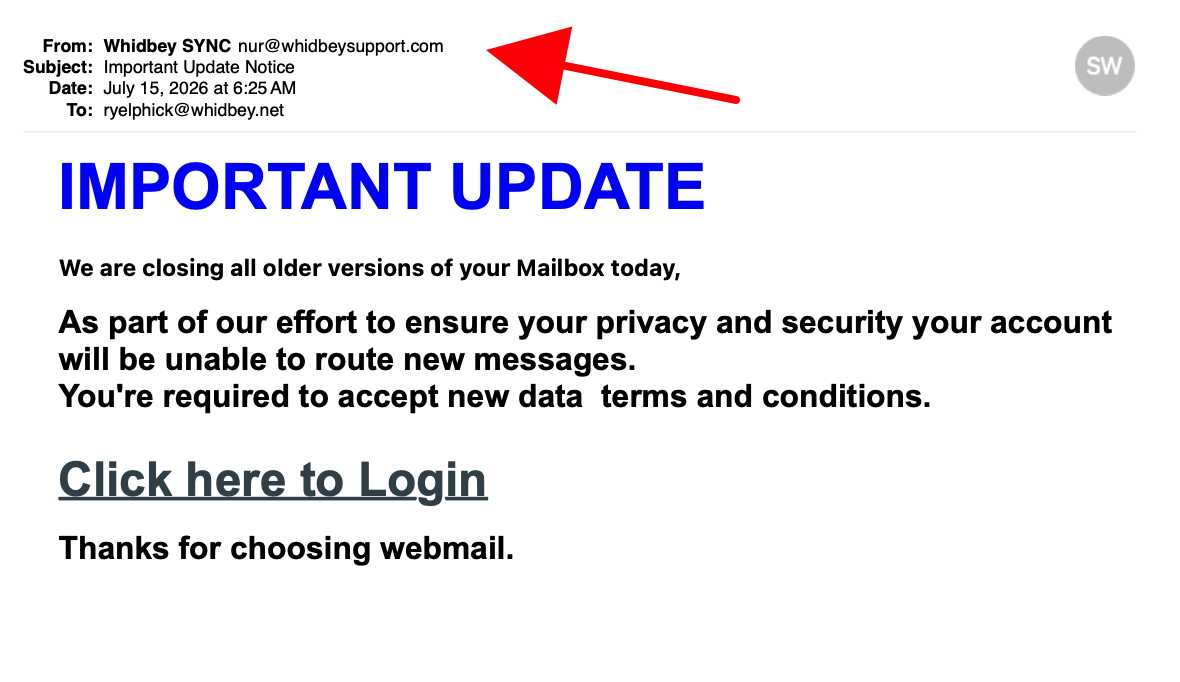
Here are some tips if you do respond to a scam email. Call your bank. Put a stop payment on your charge card if it is involved. Change your account password for whatever accounts are involved. If it's a PayPal account, log into that account and change the password. If you use a bank account online change that password. You can also set up email "rules" to block email from the sender if their email address shows. If you use Apples Mail app you'll find the "Rules" options in the Mail app Settings. You should also change the password to your email account that the scam email came to.
From address is not from WhidbeyTel (arrow)
DO NOT RESPOND.
From address is not from WhidbeyTel (arrow)
DO NOT RESPOND.
From address is not from WhidbeyTel (arrow) Anything sent to "undisclosed recipients" is suspect (second arrow)
DO NOT RESPOND.
From address is not from WhidbeyTel (arrow)
DO NOT RESPOND.
Internet Crime
Any one bothered by internet criminal activity should report it to the Federal Bureau of Investigation Internet Crime Complaint Center (IC3) at this web page. This includes phishing, malware, spoofing, any demand for money.
Sell or Swap
by MAGIC
Got something you would like to sell or give away? Need something second hand or out of date? Contact MAGIC at this email .
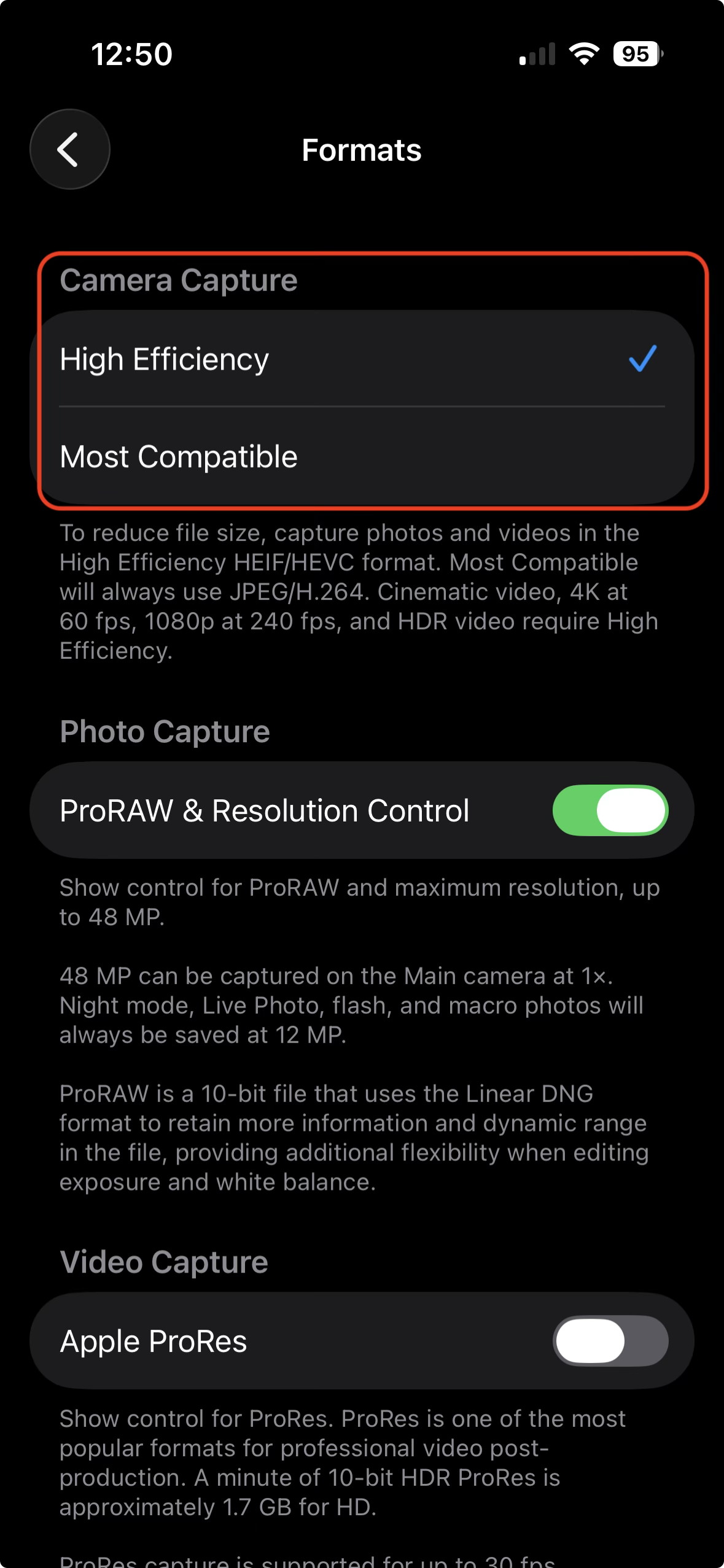
I was recently asked about photo formats. "What should I use, HEIC or JPEG format?"
My answer, use HEIC. You can set your iPhone camera to use either one, although instead of showing HEIC or JPEG it shows "High Efficiency" or "Most Compatible".
HEIC Stands for High Efficiency Image Container. It's the newer photo format. It handles colors better, more colors, and uses less data space to store the photo.
Years ago I would occasionally get a reply from someone that I shared a photo with that they couldn't open it. That hasn't happened for a few years now. JPEG was more widely used and if someone is still using an older computer they not be able to open an HEIC photo. So JPEG may still be a bit more compatible considering all other devices people may be using.
If you do share to someone who can't open your photos then you can convert the ones you share with them to JPEG by using the "Export" option under the File menu. You can choose between HEIC, JPEG, PNG, or TIFF format.
Or, of course, you can set your iPhone camera settings to "Most Compatible". Then all your photos will be in the JPEG format.
And while we're on the camera subject I want to mention photo resolution. The newer iPhone cameras can take pictures at 48 megapixels which is very high resolution. So, for instance very sharp images and if you enlarge a photo it stays sharp, doesn't get fuzzy. However, on some phones it only takes the 48 megapixel images with the main camera lens. If you zoom, using the telephoto lens, or use Live Photos, or close ups, it only takes them at 12 megapixels.
I was disappointed when I learned that the telephoto lens would not take 48 megapixels images. It kind of diminishes the reason for getting the iPhone Pro with the telephoto lens.
MAGIC, the Macintosh Appreciation Group of Island County, serves people who use Macintosh computers, software and peripherals. Our goal is to share information and get answers to questions to make us more productive with our use of technology. Our monthly meetings give us a chance to discuss computer problems and share ideas with other Mac users, feature speakers on specific topics, and to keep apprised of Apple news.