How to block ads (and other distracting things) on iPhone (also works on Mac Desktop and laptop computers)
Walk, Run, Crawl, RL Fun | Boston Dynamics | Atlas
* Indicates author is a member of MAGIC
Meeting information
Date
20 May 2026
Time
4:00 - 5:00 p.m.
Presentation:
• Introduction with Mike Turnbull
• "SPAM and other evils" with Robert Elphick
Location:
by Zoom online
MAGIC Minutes for April 2026
by Wendy Shimada, MAGIC Secretary
At 4:02 p.m. President Mike Turnbull welcomed everyone and called the meeting to order with 14 attendees present within a few moments. Mike noted that the April newsletter will be out a little late as there were some technical difficulties with the website, which Robert is working on. This month's presentation is "Safari on iPhones, iPads and Macs" with Ron Sharp. This will be followed by Q&A.
Treasurer Carol Heimgartner gave the monthly report, explaining that after receiving two donations, the current monthly bank balance is $4389.79, with our only bill being the monthly Whidbey Telecom website hosting fee.
Mike mentioned that there would be a brief board meeting directly following April's MAGIC monthly meeting, primarily to discuss the Educational Topics for the remainder of the year. Before turning the meeting over to Ron Sharp, he encouraged members to submit ideas on what sessions they would be interested in. Ron then gave a very interesting presentation on how to use all the features of Safari on each of your devices.
After the presentation, Ron answered a few members' questions. The meeting was adjourned at 4:59 p.m. Mike reminded everyone that next month's Zoom meeting will be on May 20 at 4 p.m., with a presentation called "All About Spam".
Missed the meeting? You can still watch the video tutorial by either visiting the MAGIC website here or by just clicking on the MAGIC logo at the top of the monthly newsletter which is a direct link to the MAGIC website. The website offers many excellent tips and tricks, along with instructional video sessions from past meetings.
MAGIC Musings
Hello Magic Members,
The weather this week has been quite pleasant and I hope it continues. I've been using my iPhone to navigate around town and used the Maps App to take the new Link light rail connection to both Bellevue and Redmond from Whidbey. Sometimes technology works well.
Our Magic Meeting will be held on May 20th at 4:00 p.m. via Zoom. Robert will be giving a presentation on "Spam and other evils." We hope to see you at the meeting.
The next meeting is scheduled for June 17th.
Mike Turnbull
MAGIC President
Note: This Software Update section of the newsletter lists the most relevant Apple updates. Not all updates are listed for all products. Additionally, I'll add other pertinent updates on occasion.
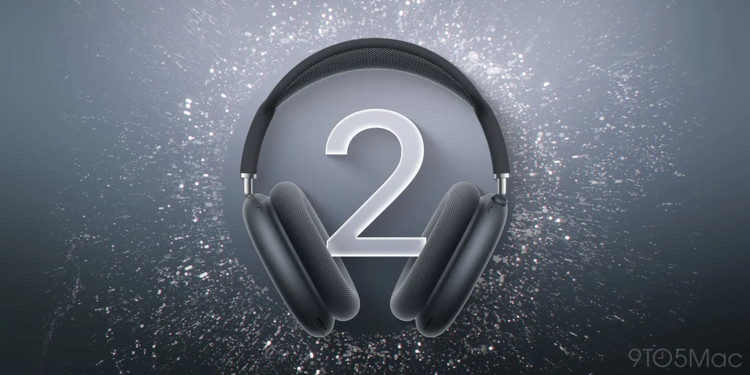
Apple just released new AirPods Max 2 firmware
by Ryan Christoffel, 9to5mac
Last week Apple shipped new firmware for AirPods Pro 3, and now today AirPods Max 2 have gotten a fresh firmware update too.
New AirPods Max 2 firmware update now available
AirPods Max 2 owners, Apple has new firmware available to install today.
The previous firmware version was build 8E251, and today's new release is 8E258.
No details have been shared about what's included in this latest firmware.
Apple publishes AirPods firmware release notes on this page, but it's yet to be updated with the latest release details.
Most firmware builds simply include "Bug fixes and other improvements."
That's what last week's AirPods Pro 3 firmware said, and it was the same one-liner given for the last AirPods Max 2 firmware release.
How to install AirPods Max firmware
Here are Apple's instructions for triggering an AirPods Max firmware update:
Make sure that your iPhone, iPad, or Mac is updated to the latest version of iOS, iPadOS, or macOS, and that Bluetooth is on.
Make sure that your AirPods Max are connected via Bluetooth to your iPhone, iPad, or Mac.
Connect your iPhone, iPad, or Mac to Wi-Fi.
Plug the charging cable into the bottom-right earphone, then plug the other end of the cable into a USB charger or port.
Keep your AirPods Max in Bluetooth range of your iPhone, iPad, or Mac, and wait at least 30 minutes for the firmware to update.
Reconnect your AirPods Max to your iPhone, iPad, or Mac.
Check the firmware version again.
Have you installed the latest AirPods Max 2 firmware? Let us know of any differences you notice via the comments.
Best AirPods Max deals and accessories
AirPods Max 2 (limited-time $509 price, down from $549)
Apple says watchOS 26.5 fixes two key Apple Watch bugs
by Chance Miller, 9to5mac
Alongside iOS 26.5, Apple also released the watchOS 26.5 RC yesterday. The update includes a new Pride Luminance watch face with a ton of customization options, as Zac covered earlier today. There are also two key bug fixes that Apple Watch users will appreciate.
Apple says that watchOS 26.5 fixes a bug affecting iMessage, as well as a problem impacting the Workout app. The company explains:
Fixes an issue where Messages on Apple Watch may use SMS instead of iMessage when paired with a dual SIM iPhone
Fixes an issue where Workout app audio alerts could fail to play if the phone was not nearby Apple Watch
Now that the watchOS 26.5 RC is available, we expect the update to be released to everyone as soon as next week. Attention will then shift to watchOS 27, which will be announced at WWDC on June 8.
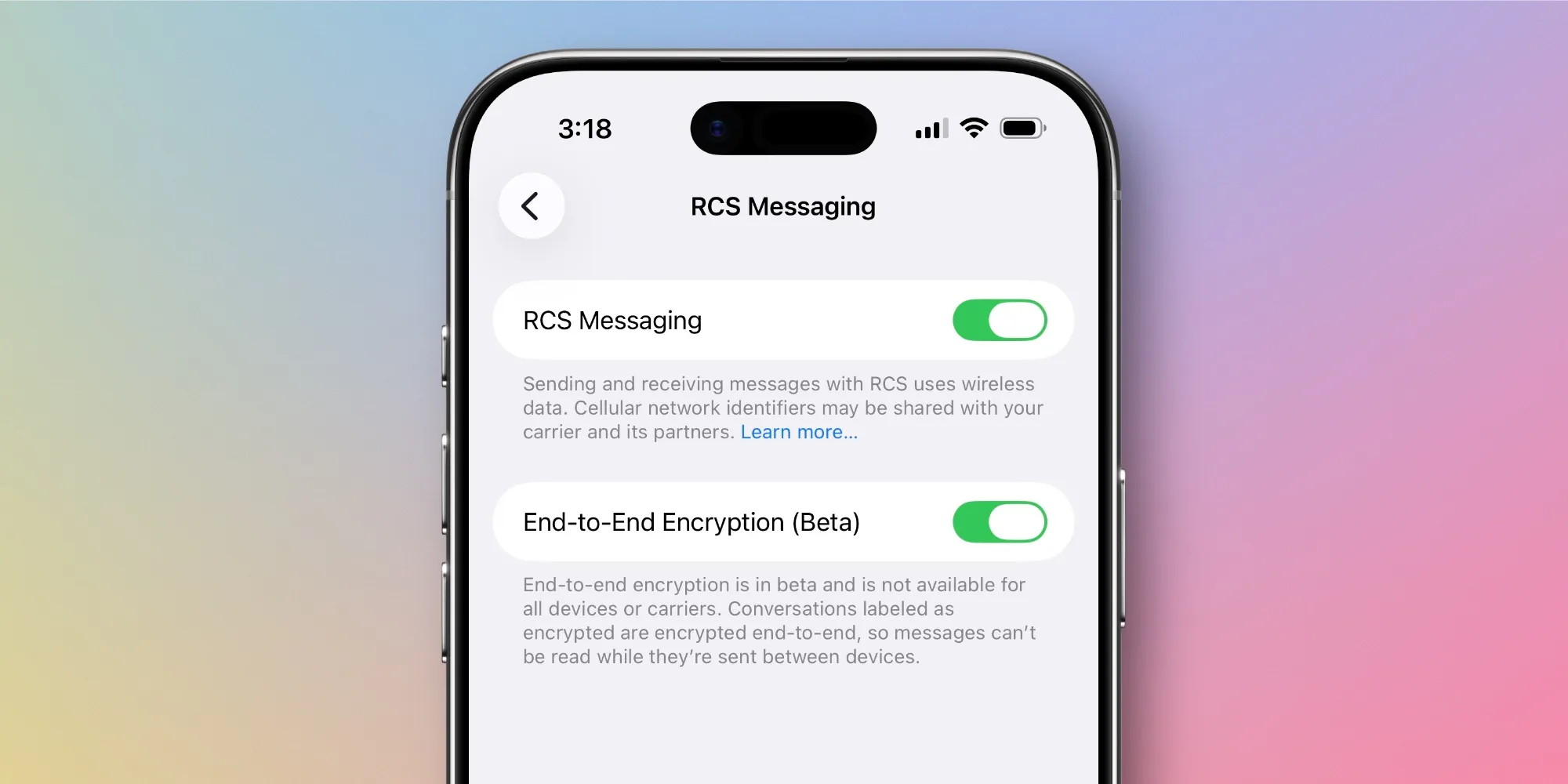
Apple confirms iOS 26.5 Messages app adds RCS end-to-end encryption
by Ryan Christoffel, 9to5mac
iOS 26.5's RC is available now, along with official release notes, and with them Apple has confirmed that the update will bring a key RCS upgrade to the Messages app.
Messages app to support RCS end-to-end encryption in iOS 26.5
RCS messaging is the best way for iPhones to message with Androids. It brings several iMessage-style features to your green bubble conversations.
And in iOS 26.5, Apple has confirmed that RCS messaging will now be more secure and private than ever.
That's because, per the company's iOS 26.5 release notes, the update adds the following:
End-to-end encrypted RCS messaging (beta) in Messages is available with supported carriers and will roll out over time.
Ahead of iOS 26.5's public launch (likely next week), Apple plans to list carriers that support RCS end-to-end encryption on this webpage. The info is not yet available, though.
Apple has offered end-to-end encrypted RCS messaging in the iOS 26.5 beta until now. But it was also featured in iOS 26.4's beta before later being removed pre-launch.
We suspected Apple planned to ship the feature in iOS 26.5, since it never cautioned otherwise—such a warning was given during iOS 26.4's beta. It's good to see the company officially confirm that though.
End-to-end encryption for RCS is still labeled a beta, but it will be available in the final shipping version of iOS 26.5.
It's only Tuesday morning but there's already blockbuster news this week that will change the course of Apple events.
And that is that the third macOS Tahoe beta is available to developers.
Ha-ha! No, that's not it. It's that in the middle of writing this column that was going to be about the MacBook Neo, Apple announced that Tim Cook would be turning over the reins to John Ternus as of September 1st of this year, and now the Macalope has to somehow make what he's already written make sense in the context of this executive change. This is extremely rude timing on the part of Apple. Very inconsiderate. The Macalope sleeps a full third of the day. Is it so hard to issue big announcements while he's asleep?
Anyway, let's see if we can take the ingredients on hand and make a meal.
As the Macalope noted last week, sales of the MacBook Neo are exceeding expectations. This creates a bit of a problem for Apple as it uses binned iPhone A18 Pro processors for the Neo so it can't easily spin up production to get more.
Writing for 9to5Mac, Michael Burkhardt has an option for Apple: expand the type of chips it puts into the MacBook Neo to include the base level instead of just the Pro.
Who says you can't bin 'em all?
The Macalope believes he is legally obligated to say "Hey-yo!" after a joke like that so…
Hey-yo!
Let it never be said he was not in full compliance with the law.
In addition to hardware changes, Apple could just spin up more production and sacrifice a little margin, it could raise the price a little, or it could do nothing and keep the MacBook Neo as a hard-to-get item.
But the bigger point is, a product selling better than you thought it would is not in any way a bad thing.
Future Apple CEO John Ternus promises fiscal discipline, 'incredible' product pipeline
by Lewis Wallace, cultofmac
Photo from Apple
Incoming Apple CEO John Ternus promises he will be just as much of a profit-focused bean counter as his predecessor, current CEO Tim Cook.
"As you know, one of the hallmarks of Tim's tenure has been a deep thoughtfulness, deliberateness and discipline when it comes to the financial decision-making of the company," Ternus said Thursday during Apple's earnings call with Wall Street analysts. "I want you to know that it's something Kevan and I intend to continue when I transition into the role in September," Ternus added, referring to Apple CFO Kevan Parekh.
John Ternus promises fiscal discipline, 'incredible' product pipeline
John Ternus' commitment to fiscal discipline came as Apple announced yet another record-breaking quarter. Sales of the iPhone 17 lineup — which Cook called "the most popular lineup in our history" during the earnings call — powered the company to $111.2 billion in revenues in Q2 2026. Continued growth in Apple's services sector, a hallmark of Cook's time as CEO, also plumped up Apple's bottom line.
With Cook stepping down in September after an incredible 15 years at the helm, Wall Street is understandably concerned that Apple will continue to function as a well-oiled money machine. At the same time, many Apple observers hold out hope that Ternus — a can-do hardware guy with a long history at the company — might spur an innovation revolution.
As he did during a town-hall meeting with Apple employees earlier this month, where he promised Apple will "change the world once again," Ternus expressed extreme optimism about the company's product pipeline.
"This is an especially exciting moment for Apple," Ternus said Thursday. "As Tim mentioned, we have an incredible roadmap ahead, and while you're not going to get me to talk about the details of that roadmap, suffice it to say this is the most exciting time in my 25-year career at Apple to be building products and services."
Cook expressed confidence in Ternus' ability to continue Apple's winning streak, saying "there is no one on this planet I trust more to lead Apple into the future than John Ternus."
He called Ternus "a brilliant engineer, a deep thinker, a person of remarkable character, and a born leader."
"I know he will push us to go further than we think is possible in order to deliver the greatest products and services for our users," Cook said. "I have been so proud to call him a colleague and a friend, and I will be even more proud to call him Apple's CEO."
Cook also reassured the analysts on the call that he and Ternus will work closely to ensure the best corporate transition ever.
Tim Cook: 'One of the greatest business leaders of all time'
In return, Ternus paid tribute to Cook, who oversaw Apple's ascent to a nearly $4 trillion market cap largely by focusing on subscription services like iCloud+, Apple TV and Apple Music during his time at the top.
"In my view, Tim is one of the greatest business leaders of all time," Ternus said. "Stepping into the role of CEO is an incredible honor, and it means a great deal to me to have Tim's trust and confidence."
Ternus wrapped up his brief comments during the earnings call with a typically upbeat prediction for the future.
"There are so many opportunities before us, and I couldn't be more optimistic about what's to come for now," he said. "Let me simply say I am deeply grateful to Tim, to the executive team and everyone at Apple, and I look forward to all of the important work ahead."
Tim Cook will step down from the CEO role to become executive chairman of Apple's board of directors on September 1. Ternus will take over as Apple CEO at that time.
Apple announced today an expansion of its environmental initiatives in India, with three projects focused on clean energy, plastic pollution, and green entrepreneurship. Here are the details.
Apple's international environmental push continues
As 9to5Mac readers know, India has seen greater focus from Apple in recent years, with the company investing more in manufacturing, retail, and services in the country.
Today, Apple announced a fresh investment in renewable energy infrastructure in India, through a partnership with CleanMax, "one of the country's leading renewable energy developers," according to the company.
As a result, the company will invest roughly $10.6 million to help build out renewable energy capacity in the region:
Apple's initial investment of INR 100 crore will support the development of more than 150 megawatts of new renewable energy capacity — enough to power an average 150,000 Indian households each year — with opportunity to further expand in the coming years.
Apple notes that while this is a new initiative, the company has worked with CleanMax in the past on rooftop solar projects used to power its offices and retail stores in India with 100% renewable energy.
Additionally, Apple announced a new effort with WWF-India to expand recycling and waste-management initiatives to keep plastic waste from entering local ecosystems.
Apple says the program builds "on WWF-India's collaboration with waste-management pioneer Saahas Zero Waste in Goa," where facilities "collect, sort, and recover recyclable materials with full traceability."
In the press release, Apple says that this new initiative will expand this model to new regions, including Coimbatore, alongside local authorities, communities, and waste workers.
Finally, Apple also announced an expansion of its partnership with Acumen, beyond its support for Acumen's Energy for Livelihoods Accelerator, which focused on social enterprises working on clean energy innovation.
With the new partnership, Apple will enable mentorship, strategic guidance, technical assistance, and network access through "catalytic grants to six green enterprises developing solutions across waste management, circular economy and consumption, and regenerative agriculture and livelihoods."
Today's news adds to Apple's international push for environmental initiatives.
Last year, the company announced new renewable energy projects across Europe, along with a donation program to support environmental education in China, which, like today, also tied into the company's broader Apple 2030 initiative.
When you take photos with your location enabled, your iPhone will pin them to a map, which you can use to see everywhere you've been. Here's how to view your iPhone photos by location.
Why You'll Love This Tip
Easily find photos if you remember where you took them.
See all the places you've traveled to and taken photos.
Revisit memories of every location where you've taken photos.
How to View iPhone Photo Map
System Requirements: This tip was performed on an iPhone 15 Pro running iOS 26.4. Find out how to update to the latest version of iOS.
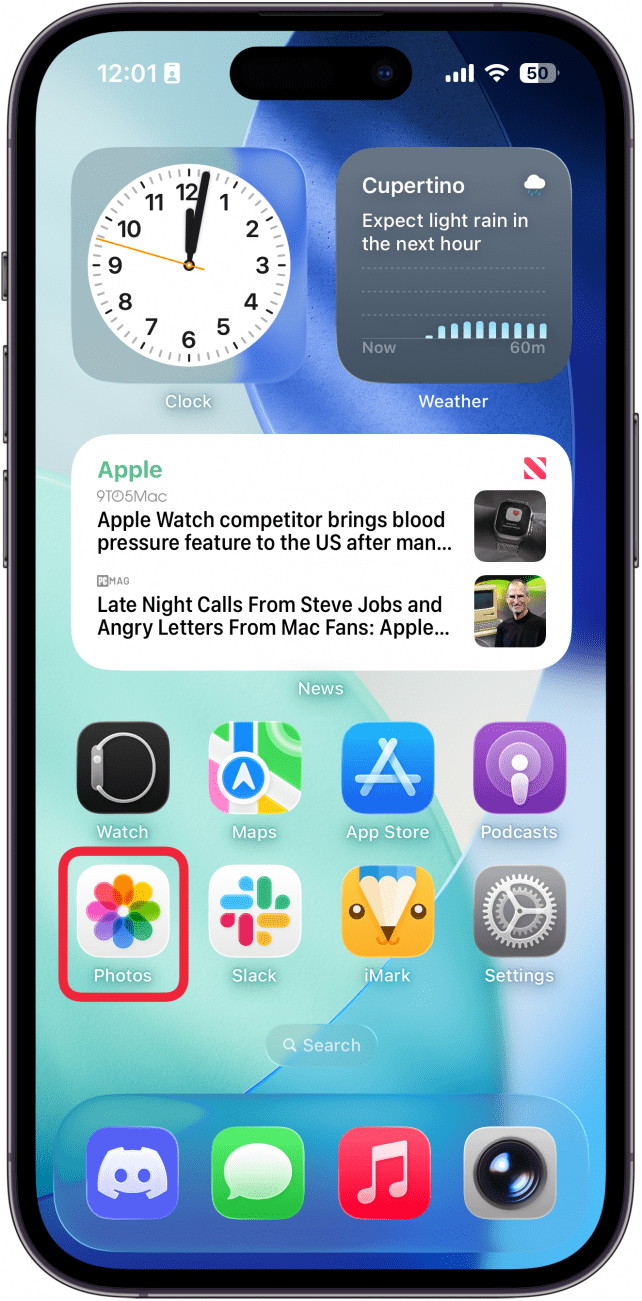
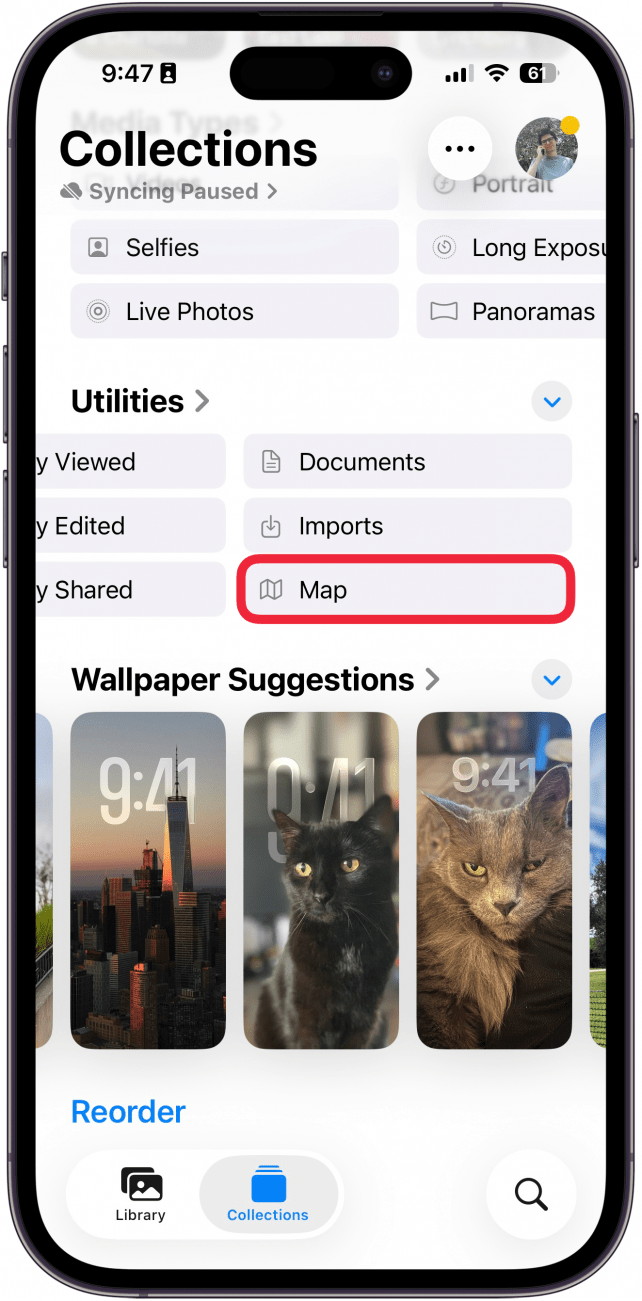
If you have Location Services enabled for your iPhone camera and photos, every picture you take will have a location saved to its metadata. The Photos app will pin these photos to a map, so that you can see all the places you've traveled to and taken photos. For more iPhone tips and tricks, check out our free Tip of the Day newsletter. Now, here's how to see your iPhone photos on a map:
Open the Photos app.
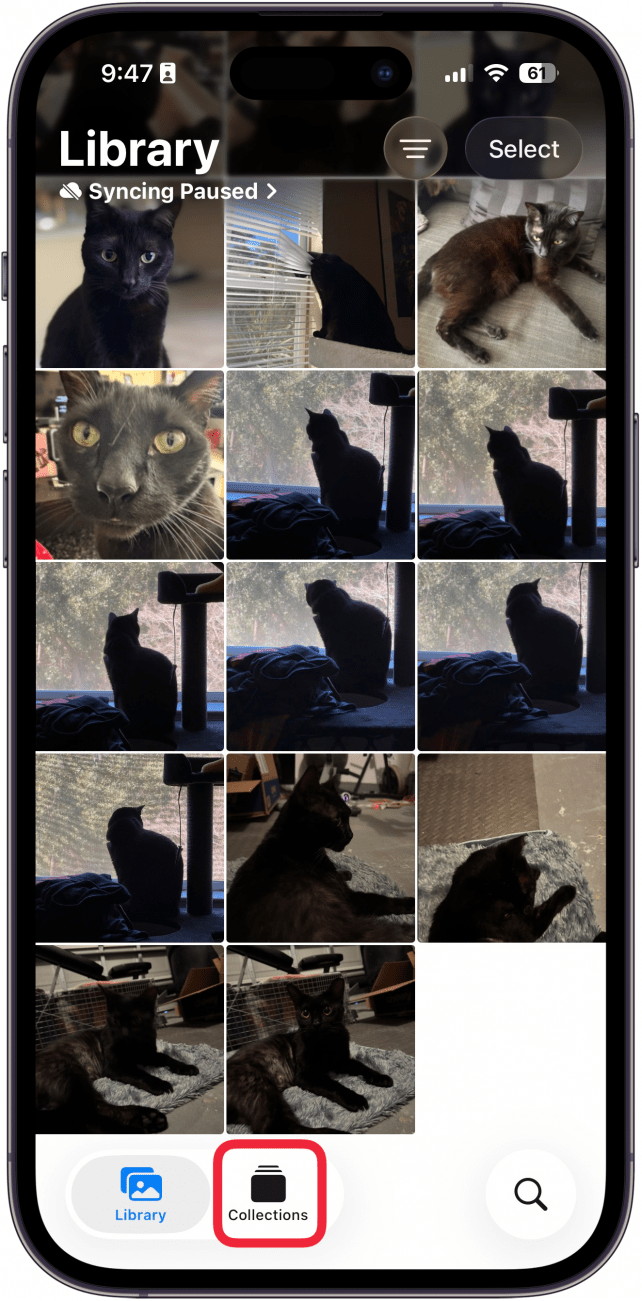
Tap Collections (if you don't see the Collections button, scroll to the bottom of the Photos app first)
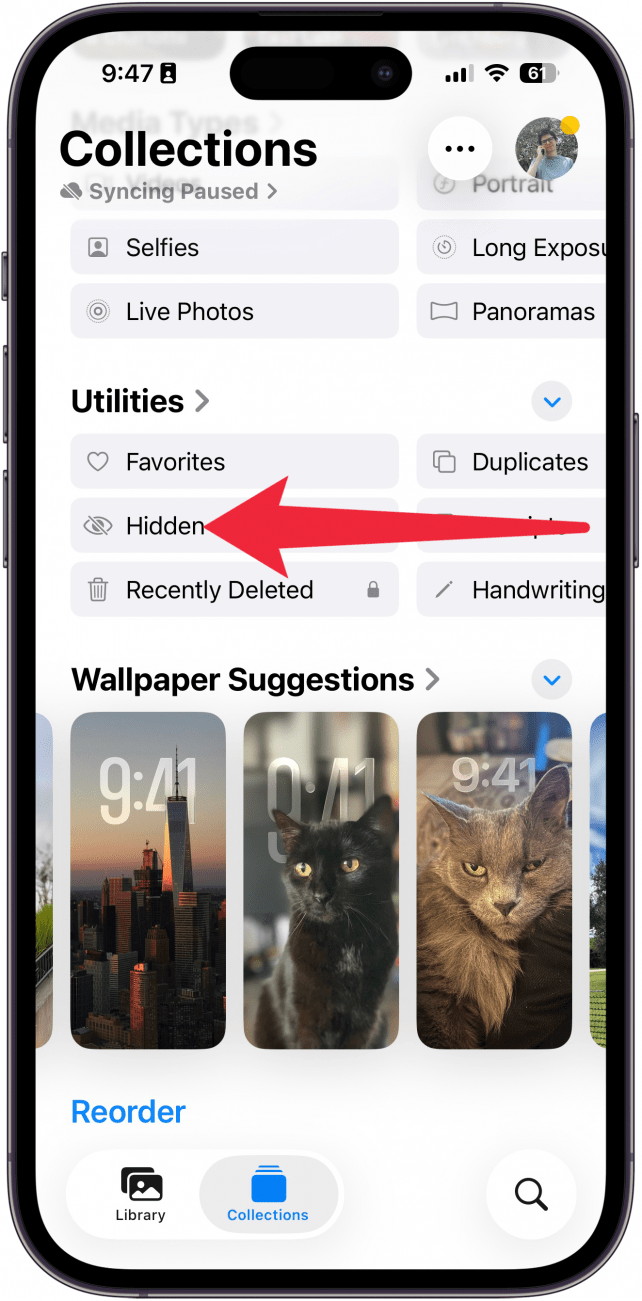
Scroll down and, under Utilities, swipe to the left.
Keep swiping left, and tap Map. (You may also see this option under Pinned Collections, but in case you've unpinned it, you can always find it here.)
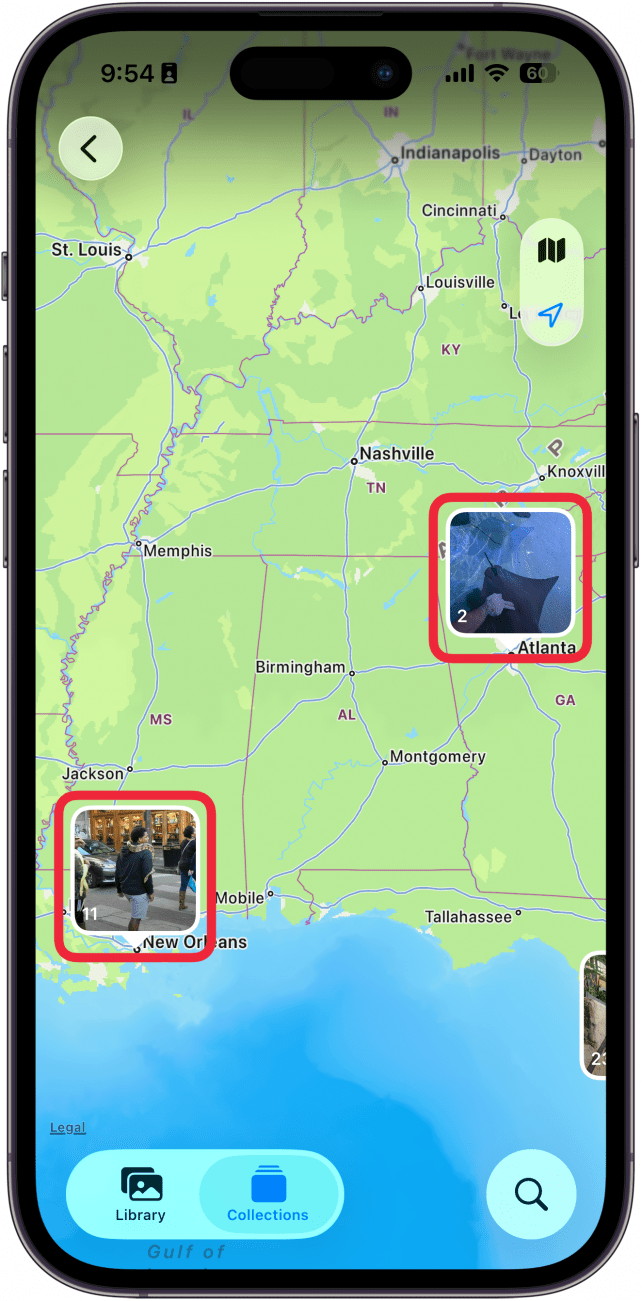
You'll see a map. Zoom in and out to see more, and tap a location to see all the photos you've taken there.
That's how to find the photo map on your iPhone. This is a fun way to keep track of all the places you've traveled to.
How to block ads (and other distracting things) on iPhone for free
by D Griffin Jones, cultofmac
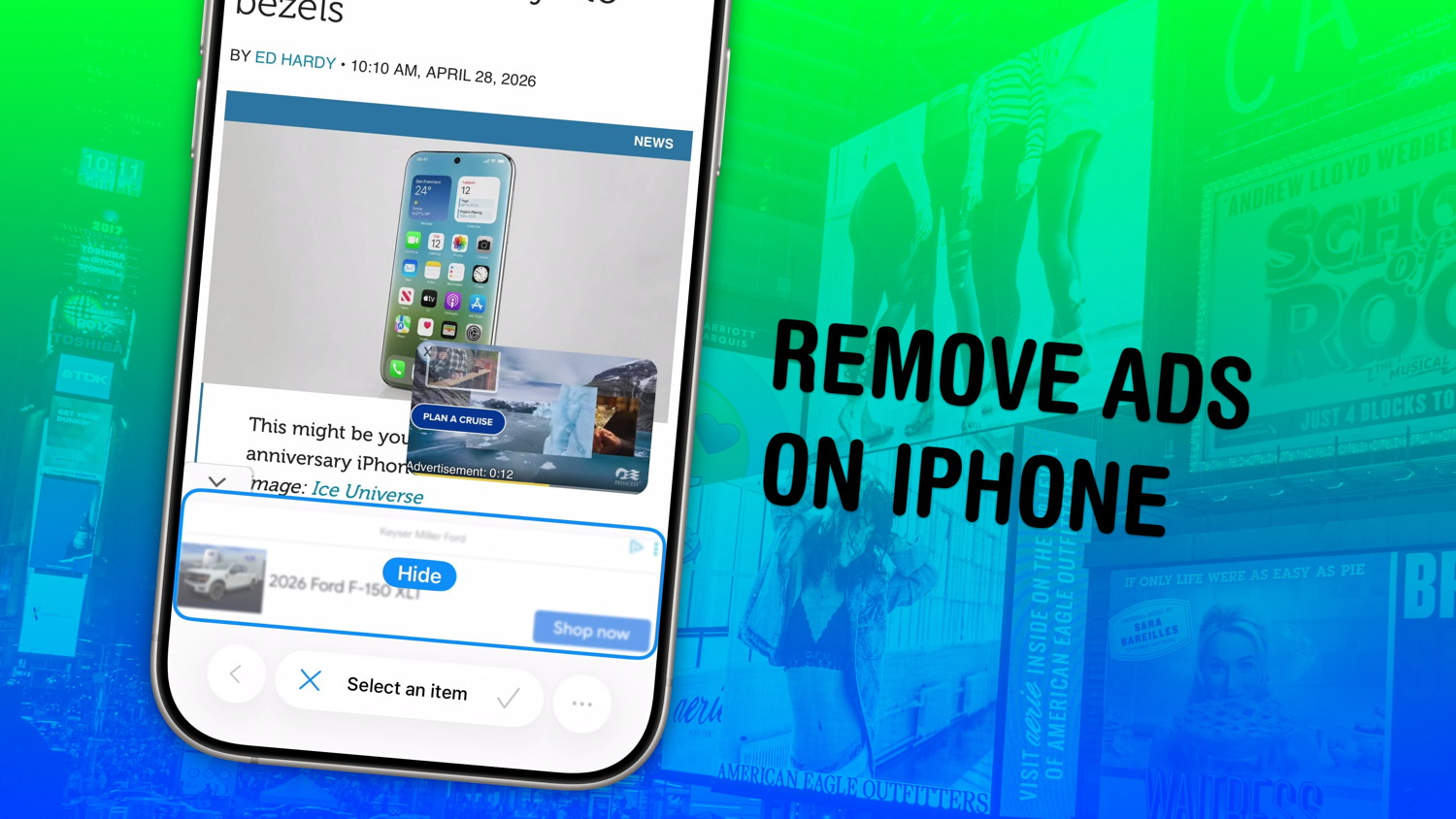
Safari's Hide Distracting Items feature lets you remove ads from your iPhone, along with other elements on the page that irritate you. It doesn't require an ad blocker or a paid extension — Apple built it right into the browser.
Hide Distracting Items is not an ad blocker per se. But if pop-ups and other items that cover the page with no obvious close button pester you (like a cookie banner) Hide Distracting Items can come to the rescue. Here's how to use it — keep reading or watch our video.
Apple Notes is a killer app, and iOS 27's rumored upgrade excites me for more
by Ed Hardy, cultofmac
Apple Notes has long been one of my most-used apps, and iOS 27 is rumored to add a powerful new capability that I know will quickly become a go-to feature for me.
iOS 27's new Siri expected to have special Notes integration
I'm a heavy Apple Notes user, with nearly 2,700 notes in iCloud currently. So any time Apple adds new features to the Notes app, I'm especially intrigued.
iOS 26 offered some modest updates to Notes, like the clever Adaptive Toolbar and Markdown import and export. My favorite change is probably just the Liquid Glass UI.
But iOS 27 is rumored to offer a much bigger upgrade thanks to the new Siri and special integration with the Notes app.
All signs point to iOS 27 bringing the Siri we've all been waiting for. It will introduce not only the promised iOS 18 features that got delayed, but also a complete modernization for the AI era.
Siri will be a full-featured chatbot like ChatGPT, with a dedicated app and expertise in world knowledge. Its LLM foundation, based on a Google Gemini variant, will enable Siri to offer the convenience and intelligence seen with competitors like ChatGPT, Claude, and Gemini.
But Siri will also reportedly come with a special advantage for Apple Notes users, and I'm very excited for it.
Adding Siri intelligence to Apple Notes with one command
One of my most-anticipated iOS 27 features was first reported on earlier this year. Per The Information:
Siri will also be able to handle other types of tasks, such as creating a Notes document with a cooking recipe or information about the top causes of drug addiction, for instance.
I use Apple Notes as a catch-all for information that I want to reference later. And Siri's ability to add information directly into Notes is something I know I'll use often.
Today, I get AI answers all the time from ChatGPT and Gemini that I want to save in Notes for later.
The process is clunky, as I need to manually select and copy the relevant information, then switch to the Notes app, find where I want to save it, and paste. Formatting is often a problem too, especially bullet points.
With iOS 27, it sounds like Siri will be able to streamline this whole process. What's currently a multi-step hassle should become as easy as saying, "Add this to a new note." Or, "Add this to my XYZ note."
Siri's 'Add to Note' capability, combined with the assistant's new LLM intelligence, should make iOS 27 a big upgrade for Notes users.
With this collection, Apple Watch users can customize the watch face and matching iPhone and iPad wallpaper with even more color options to create a unique expression of themselves and their communities.
Today, Apple introduced a new Apple Watch Pride Edition Sport Loop, watch face, and iPhone and iPad wallpaper to celebrate LGBTQ+ communities around the world during Pride Month and beyond. Apple is proud to financially support organizations that serve LGBTQ+ communities.
The new Pride Edition Sport Loop, available to order today, is woven from a rainbow of 11 colors of nylon yarns. The intricate weaving blends one color into the next, creating depth and movement across the band. The resulting design is joyful and vibrant, showcasing a full spectrum of colors that reflect the unique identities that shape LGBTQ+ communities worldwide.
The new Pride Luminance watch face complements the band design with colors that refract dynamically to celebrate the vibrancy, spirit, and individuality of the LGBTQ+ community. The face is designed in two geometric patterns: radial, featuring rays of color that align with the hour marks, and vertical, reflecting the colorful linear stripes of the weaving pattern. With this collection, users can customize the watch face with even more color options to create a unique expression of themselves and their communities.
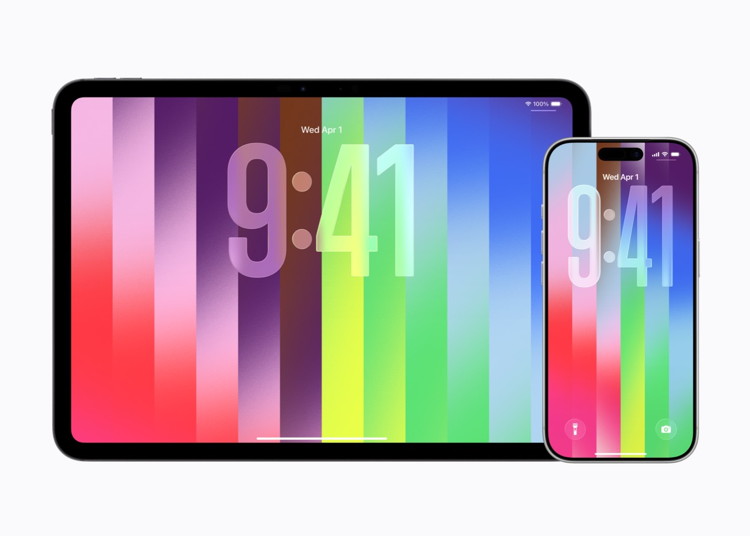
Matching wallpaper from the new Apple Watch Pride Collection is displayed on an 11-inch iPad Pro and iPhone 17 Pro.
With this collection, Apple Watch users can customize the watch face and matching iPhone and iPad wallpaper with even more color options to create a unique expression of themselves and their communities.
The matching iPhone and iPad wallpaper features a complementary joyful and dynamic design with similarly customizable colors.
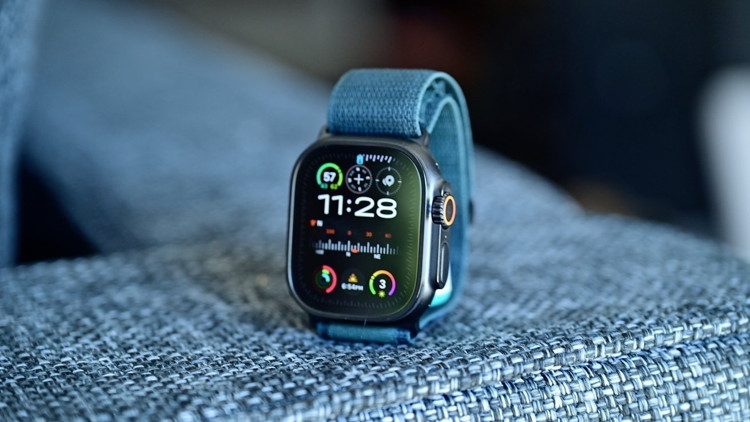
Apple Watch Ultra's Modular face is being simplified for watchOS 27
by Malcolm Owen, appleinsider
The Apple Watch updates in watchOS 27 includes new watch faces, with Apple testing a new simpler version of the Modular Ultra for the standard model.
In the run-up to WWDC in June, the rumor mill will surface leaks and speculation about Apple's software changes. One of the more frequent updates to expect is for the Apple Watch, in the form of new faces.
According to Mark Gurman in Sunday's "Power On" newsletter for Bloomberg, Apple's update to watchOS 27 will include some watch face changes as usual. Apple is said to be testing multiple new faces for inclusion, but Gurman only discusses one stand-out version.
He writes that Apple is doing a simplified version of the Modular Ultra, the watch face designed for the Apple Watch Ultra. It's a version that Apple is seemingly trying to rework so it can be used on the smaller face of other Apple Watch models.
The refinements maintain the large clock from the face design, but eliminates the large complication section in the center. It also removes the row of three small complications that appear above the time, and the information that surrounds the bezel.
The change turns into a large clock for the top two thirds of the display. The lower row of three small complications remains under the time, filling out the rest of the design.
The result is a face that is less information-dense but suitable for the standard Series models.
The modular face is not the only one on the way. As part of watchOS 26.5, Apple is bringing out a new Pride Luminance face as part of its annual Pride collection.
'Ted Lasso' season 4 kicks off its return to Apple TV in August
by Amber Neely, appleinsider
Apple darling "Ted Lasso" is headed back to the small screen, with Apple TV officially setting a premiere date and sharing a new season 4 teaser.
In season 4, Ted makes his way back to Richmond to coach a second-division women's football team. The task will challenge both Ted and his team, encouraging them to take chances they never thought they would.
In preparation, Apple TV has shared a minute-long teaser, in addition to finally giving us a premiere date: August 5.
Apple TV greenlights new project with 'Your Friends & Neighbors' star
by Marcus Mendes, 9to5mac
Apple Studios announced today a new action thriller series starring James Marsden (Your Friends & Neighbors, X-Men: Days of Future Past), based on an original idea by 'Iron Man' and 'Uncharted' writers Art Marcum and Matt Holloway. Here are the details.
In a press release issued earlier today, Apple TV announced Disavowed, a new thriller series starring James Marsden (Paradise).
From the press release:
Marsden will play legendary CIA Case Officer Brad Griffin, who is abruptly fired in the middle of a global hunt for an elusive assassin responsible for killing his colleague. Disgraced and outcast from the world of intelligence, all bets are off when Brad decides to go after the $15 million federal bounty on the assassin's head.
Apple says 'Disavowed' will be produced by Blue Marble Pictures, the company behind the award-winning series 'Pachinko,' which ran from 2022 to 2024.
'Disavowed' will also mark the second collaboration between Apple and Marsden, as the actor is currently playing Owen Ashe in the second season of 'Your Friends & Neighbors'.
Apple TV has its best summer lineup ever, here's what's coming
by Ryan Christoffel, 9to5mac
Apple TV has its best summer lineup ever this year, with compelling new and returning series coming to the streamer. More premieres are expected to be announced soon too, including the long-delayed The Savant. But as things stand today, here's everything coming to Apple TV this summer.
Apple TV reveals John Travolta's directorial debut in new trailer
by Ryan Christoffel, 9to5mac
Propeller One-Way Night Coach is Apple TV's next movie, premiering later this month from first-time director John Travolta. Here's the new trailer.
Propeller One-Way Night Coach is based on John Travolta's 1997 book
Apple TV's next original film is just a few weeks away, and its first trailer was just released.
Propeller One-Way Night Coach premieres Friday, May 29 on Apple TV following an appearance at the 2026 Cannes Film Festival.
The movie is written, directed, narrated, and produced by John Travolta based on his book of the same name.
Travolta also makes an acting appearance in the new trailer, but he's not expected to have much of a presence in front of the camera.
Here's Apple's official description for the film, followed by its trailer:
Set in the golden age of aviation, a young airplane enthusiast, Jeff (played by newcomer Clark Shotwell), and his mother (Kelly Eviston-Quinnett) set off on a one-way cross-country odyssey to Hollywood, which transforms a simple flight into the trip of a lifetime. Between airline meals, charming flight attendants (played by Ella Bleu Travolta and Olga Hoffmann), unexpected stopovers, larger-than-life passengers and a thrilling glimpse at first class, the journey unfolds in moments both magical and unexpected, charting the course for the boy's future.
Propeller One-Way Night Coach is a "film for all ages" per Apple, and the trailer makes that pretty clear with a noted absence of any plot conflict.
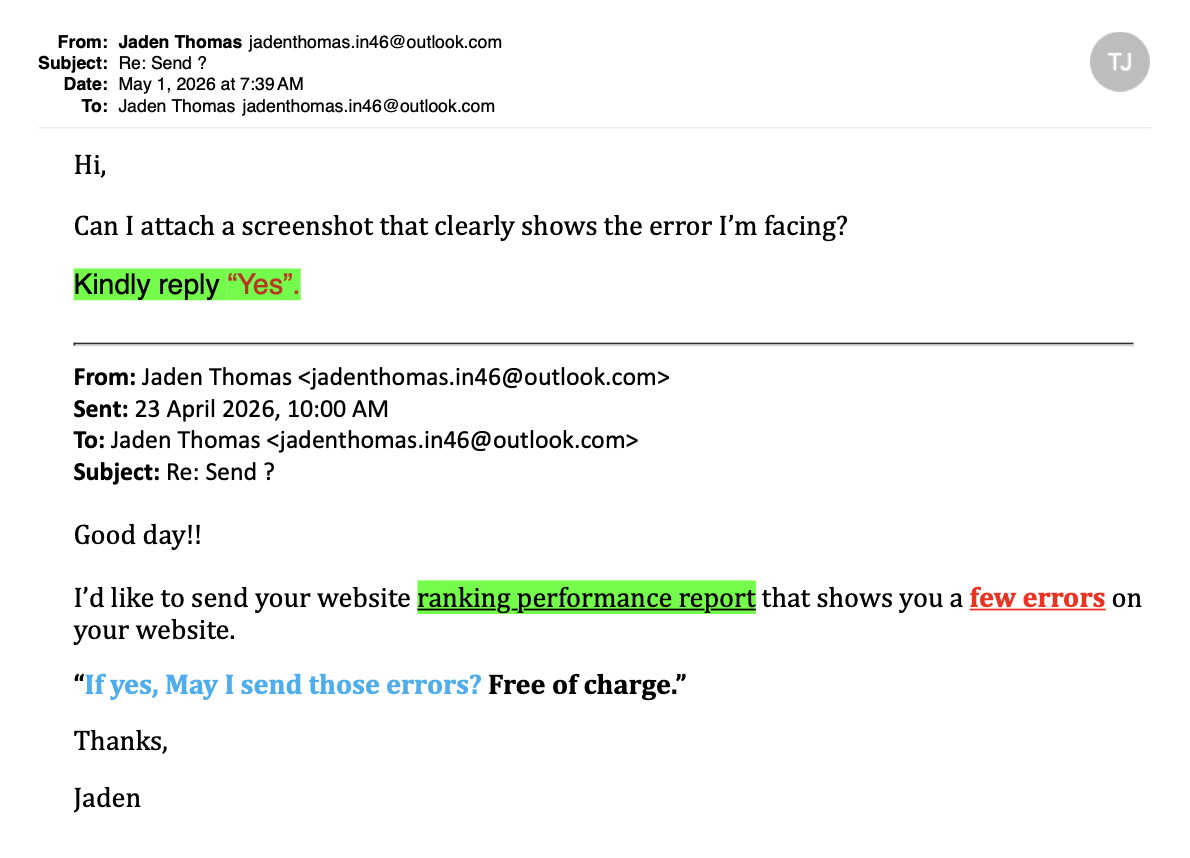
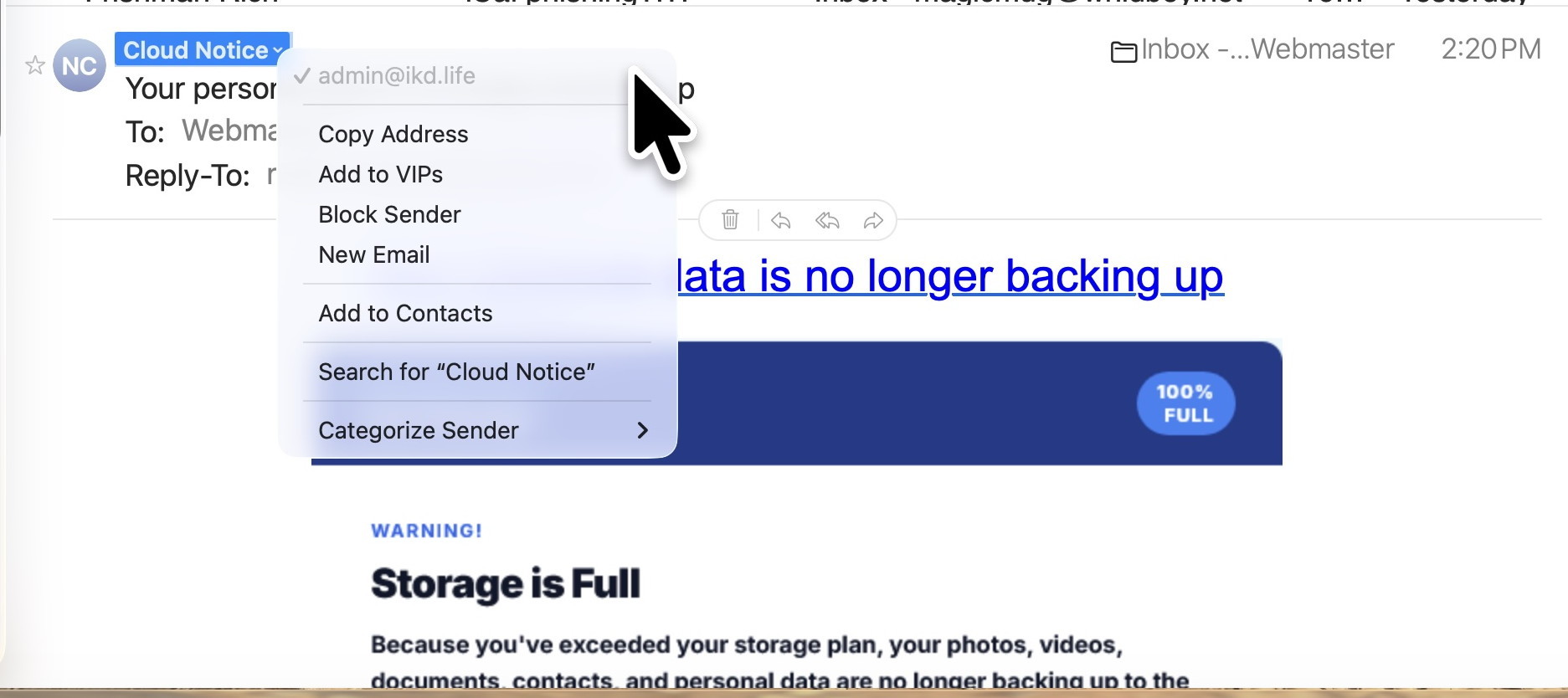
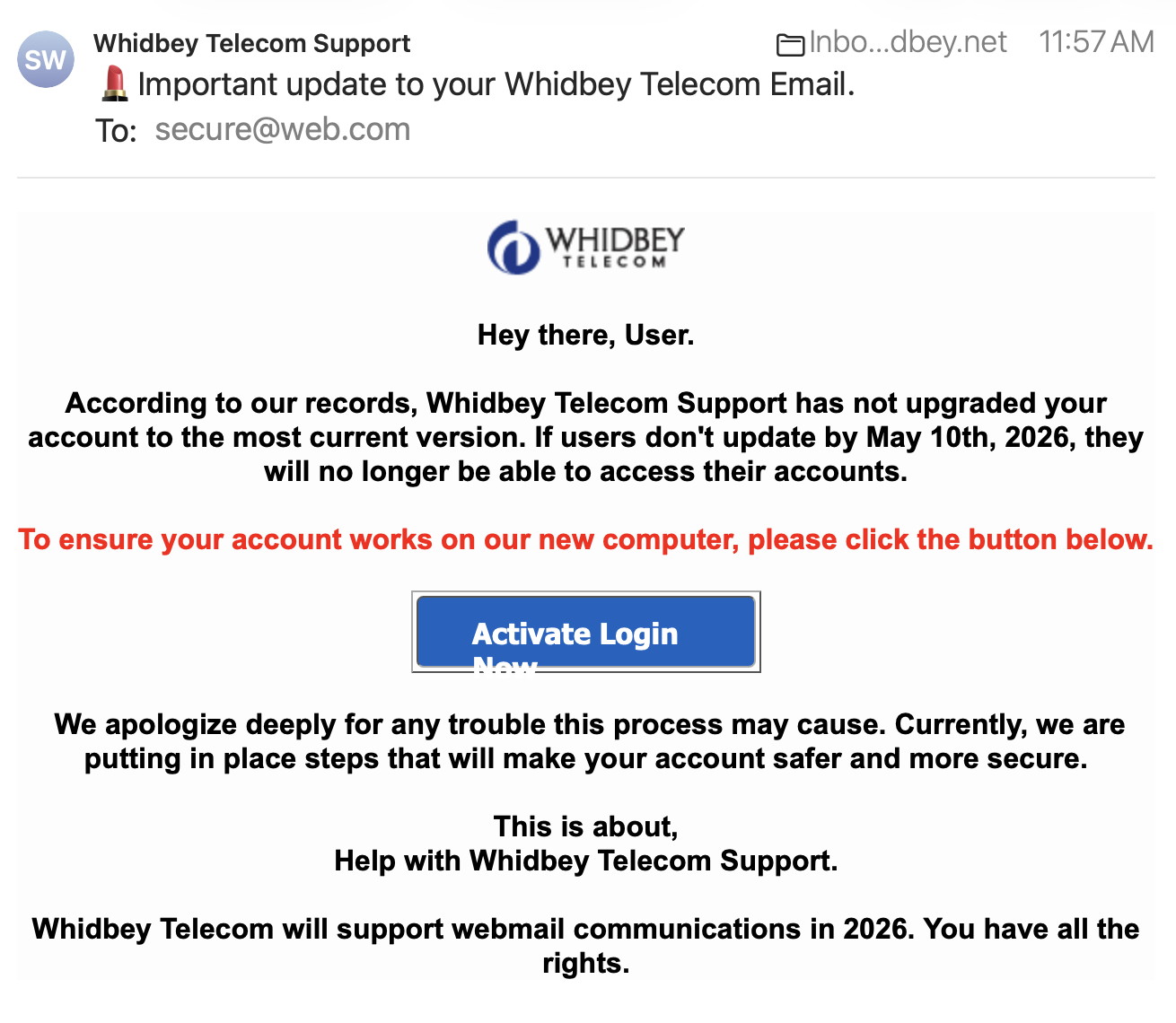
Here are some tips if you do respond to a scam email. Call your bank. Put a stop payment on your charge card if it is involved. Change your account password for whatever accounts are involved. If it's a PayPal account, log into that account and change the password. If you use a bank account online change that password. You can also set up email "rules" to block email from the sender if their email address shows. If you use Apples Mail app you'll find the "Rules" options in the Mail app Settings. You should also change the password to your email account that the scam email came to.
From address is not from WhidbeyTel (red arrow) The spelling is not good either! DO NOT RESPOND.
SPAM
<
From address is not from a storage facility DO NOT RESPOND.
From address is not from WhidbeyTel I like the lipstick emoji in the title!! DO NOT RESPOND.
Internet Crime
Any one bothered by internet criminal activity should report it to the Federal Bureau of Investigation Internet Crime Complaint Center (IC3) at this web page. This includes phishing, malware, spoofing, any demand for money.
Sell or Swap
by MAGIC
Got something you would like to sell or give away? Need something second hand or out of date? Contact MAGIC at this email .
FREE STUFF
Also A LOT of blank floppy discs (3.5x3.5), ZIP discs and CDs.
And a ZIP drive and a floppy drive.
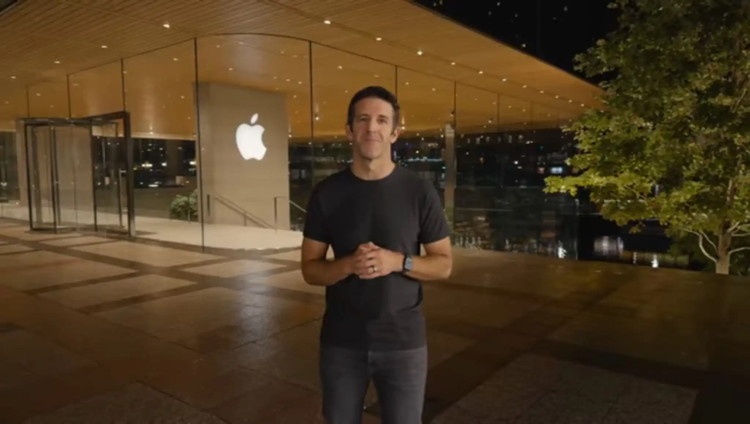
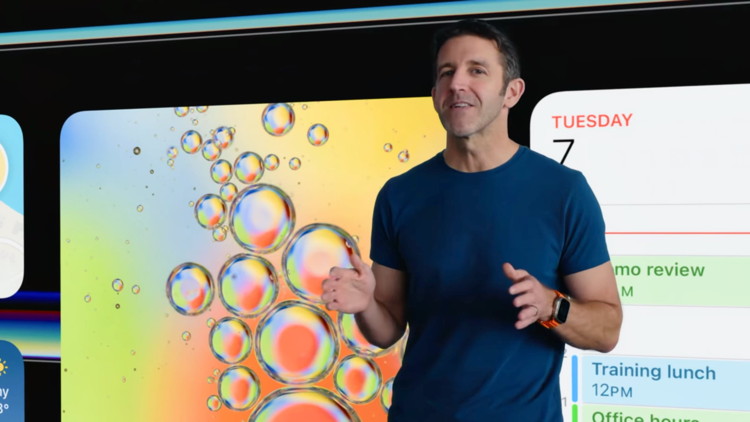
MAGIC Members, you may have already read the big news at Apple. A new CEO has been chosen who will take control of the $4 trillion dollar company this fall. The incoming CEO, John Ternus, has been with Apple since 2001 and is currently the Senior Vice President of Hardware Engineering. Seems like a long title, like they could drop the "Senior." At 50 years old he's not really all that senior. And drop the engineering label, making it just "Vice President of Hardware." Much better, …they should hire me as a PR guy. 🤣
As for a title, it'll be changed to CEO. The stock has been been a little bouncy since the news but Ternus has been has been seen at previous Apple events presenting new products. So the name and face is not unfamiliar with anyone who keeps up on Apple news. And I like what I've know about him, so that's something.
In an address to the other employees, Ternus was appropriately enthusiastic about the future of Apple, and indicated much more and interesting advances in AI for the company. I'm not enthusiastic about AI but Apple is a big company and I'm sure their operating guidelines of quality products and attention to security will prevail. So cheers to Apple for continued quality tech and innovation for the next 15 years, and beyond.
How to block ads (and other distracting things) on iPhone (also works on Mac Desktop and laptop computers):
Walk, Run, Crawl, RL Fun | Boston Dynamics | Atlas:
MAGIC, the Macintosh Appreciation Group of Island County, serves people who use Macintosh computers, software and peripherals. Our goal is to share information and get answers to questions to make us more productive with our use of technology. Our monthly meetings give us a chance to discuss computer problems and share ideas with other Mac users, feature speakers on specific topics, and to keep apprised of Apple news.